4
|
Set Up the Chart Display
U
se the following instructions to customize the chart display by adjusting the LakeMaster settings. See the Humminbird LakeMaster
Accessory Manual for additional information about these features.
1. Apple iOS: Tap the Settings menu icon.
Google Android: Tap the FishSmart main menu.
2. Select a menu option. Press and drag the slider, or tap the plus (
+
) or minus (-) signs, to adjust the setting.
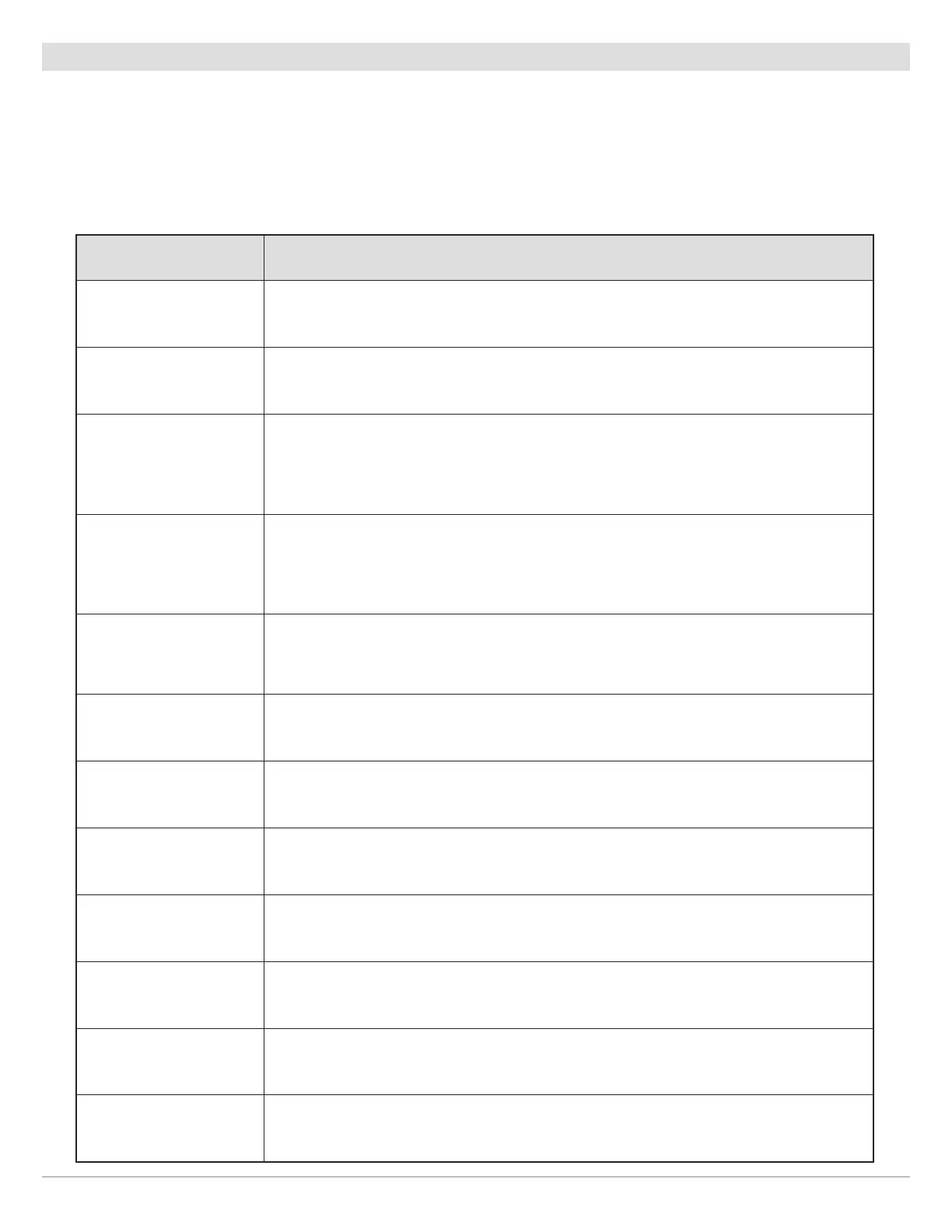
Menu Setting Description
Depth & Contours Select which chart features to display (depth shading, contour lines, or both).
Depth Highlight Level
Adjust the Depth Highlight Level to highlight a depth setting. The depth you set will be
highlighted in green. Use Depth Highlight Level with Depth Highlight Range.
Depth Highlight Range
When a Depth Highlight Level is active, use Depth Highlight Range to highlight a range on
each side of the highlighted depth. For example, if you know a certain fish is holding at
18 to 20 feet, you can set the Depth Highlight Level at 19 feet, and the Depth Highlight
Range at +/– 1 foot. The view will show a green band from 18 to 20 feet.
Water Level Offset
Adjust the setting to change the water level displayed on the chart. For example, if you
know the lake is down 5 feet, set the Water Level Offset setting to -5. The displayed
numbers on the Contour Lines will adjust from the Water Level Offset setting, and the
water level offset will be highlighted in brown to extend the land visually on the display.
Shallow Water Highlight
Adjust the Shallow Water Highlight slider. When the depth is equal to or less than the
amount set, it will be highlighted in red. For example, if your boat has a draft of 3 feet, set
the Shallow Water menu to 3 feet, and the display will draw a red band from 0 to 3 feet.
Base Map Select the type of base map to display (satellite, hybrid, terrain, etc.).
Depth Unit Select the unit of measure for all depth-related readouts.
Coordinate Format Select the format of the latitude and longitude position display.
Compass Card Display or hide the digital compass.
Lake Map Markers
Display or hide Lake Map Markers, which indicate areas where Humminbird lake charts are
available. (See the illustration Setting the Chart Orientation).
Scale Bar Display or hide the map scale.
Auto-Lock
Enable or disable auto-lock. When auto-lock is enabled, it will prevent your mobile device
from automatically locking and turning off the display after a set elapsed time.
21
Using FishSmart










 To Next Page