28
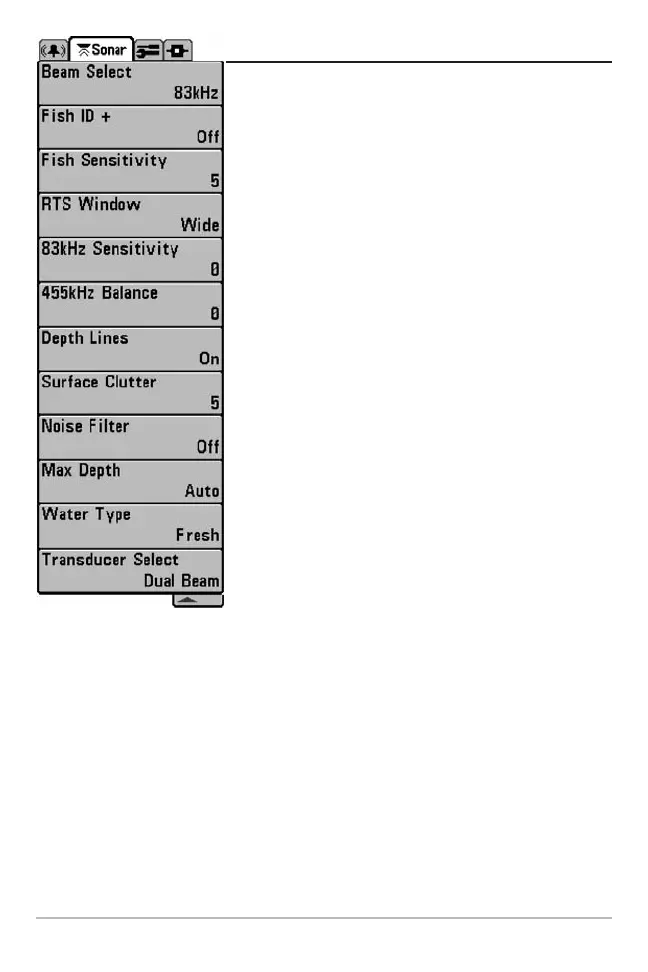
Sonar Menu Tab
Press the MENU key twice to access the Main Menu
System and then press the RIGHT Cursor key to select
the Sonar tab.
NOTE: Beam Select and 83 kHz Sensitivity will only appear
if you have a DualBeam PLUS™ or QuadraBeam® Matrix
Fishing System.
NOTE: Depth Lines, Surface Clutter, Noise Filter, Max Depth,
and Water Type only appear in Advanced User Mode.
NOTE: 455 kHz Balance and Transducer Select will only
appear if you have a QuadraBeam® Matrix Fishing System.
Sonar Menu




 To Next Page