9
42700-01•01/15/08•HunterFanCompany
6 • Setting the Remote Transmitter and Receiver
CAUTION:eremotecontroldevicecomplieswithpart15oftheFCCrules.
ChangesormodicationsnotexpresslyapprovedbyHunterFanCompanycouldvoid
your authority to operate this equipment.
Operationissubjecttothefollowingtwoconditions:
1.isdevicemaynotcauseharmfulinterference.
2.isdevicemustacceptanyinterferencereceived,includinginterferencethatmay
cause undesired operation.
WARNING:UseonlytheHunterFanspeedcontrolsuppliedwiththisfan.
IMPORTANT!Beforeyouchangethejumpersettings,makesurethe
batteryisnotconnectedtothetransmitter.
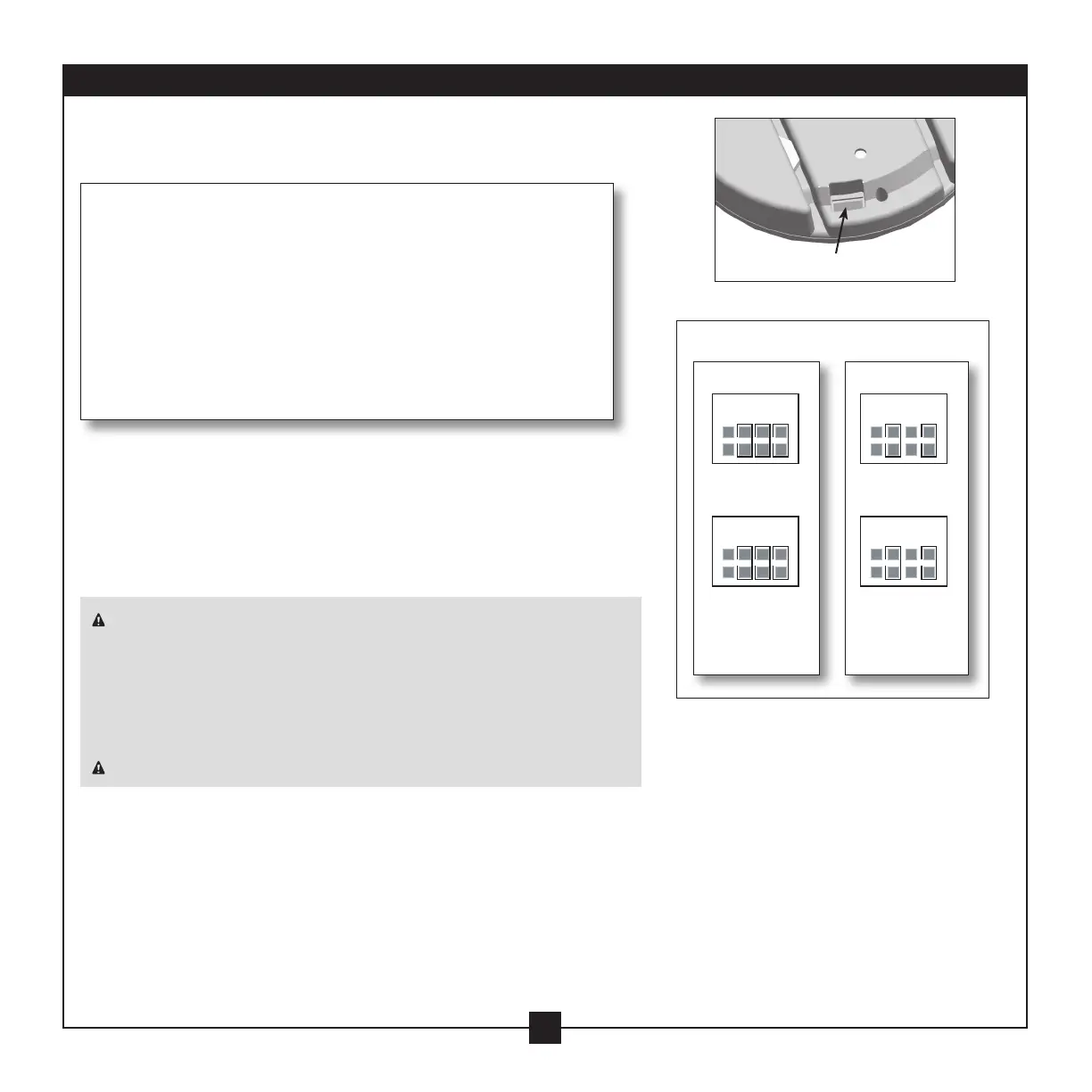
6-1. Changethepositionofthejumpersintheremotetransmitter
andthereceiver.Makesurethatthejumpersmatchintheremote
receiverandtransmitter.Iftheydon’tmatch,thetransmitterwill
not function.
6-2. Installtheincluded12-voltbatteryintothetransmitter.
Setting Transmitter and Receiver Codes
Whentwoormorefansarelocatedneareachother,youmaydesire
tohavethereceiver/transmitterforeachfansettoadierentcode,
sothattheoperationofonefandoesnotaecttheoperationofthe
other fans.
ejumpersforthereceiverarelocatedontheatsurfaceof
thereceiver.ejumpersforthetransmitterareinthebattery
compartment.ejumpersareverysmall;youcanmovethemmost
easily using a small pair of pliers or tweezers.
4321
4321
4321
4321
4 = off
3 = on
2 = on
1 = on
4 = off
3 = on
2 = off
1 = on
ReceiverJumpers
4321
4321
4321
4321
4 = off
3 = on
2 = on
1 = on
4 = off
3 = on
2 = off
1 = on
Example Jumpers Settings
Receiver1 Receiver2
Transmitter 2Transmitter 1
4321
4321
4321
4321
4 = off
3 = on
2 = on
1 = on
4 = off
3 = on
2 = off
1 = on



 To Next Page