27
41524-01 9-5-2001
®
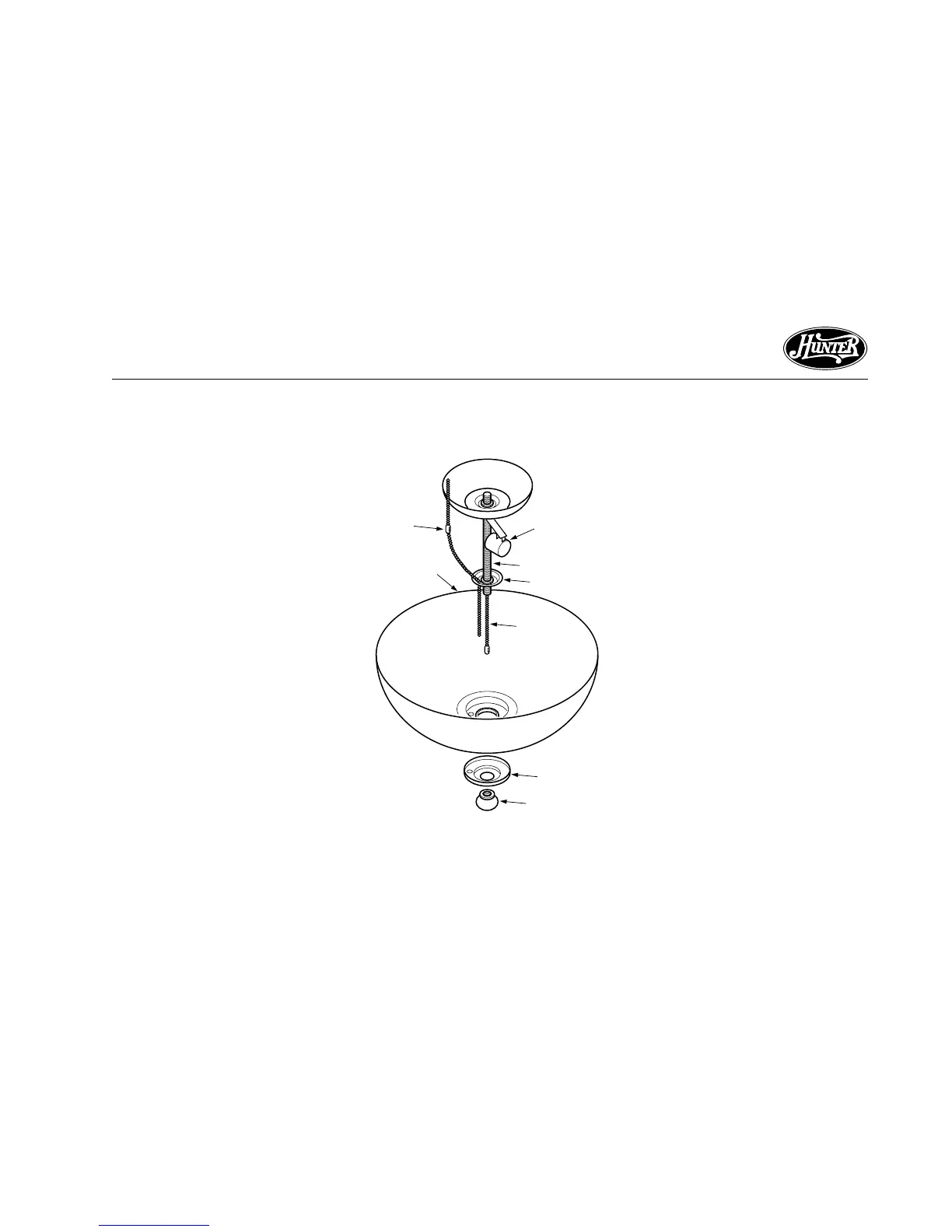
Figure 10g - Aurora Fixtures
Pipe
Globe
Metal Disk
Bulb
Socket
Light
Switch
Pull Chain
Cover Plate
Finial
Fan
Switch
Pull Chain
INSTALLING ACCESSORY LIGHT
KITS
To install the light kit, follow the in-
structions included with the kit for
wiring, mounting, and assembly. Af-
ter completing the light kit installa-
tion, follow sub-steps 1 and 2 on
page 22 to reattach the lower switch
housing.
AURORA AND TIFFANY LIGHT
FIXTURES
Note: Sub-step 1 applies to all light
fixtures. Sub-steps 2-7 apply to Tif-
fany and Aurora light fixtures. Refer
to Figures 10g.
1. Install bulbs.
2. Thread the fan switch pull chain
through the hole in the metal
disk.
3. Place globe on pipe until flush
against metal disk.
4. Thread the light switch pull chain
through the large center opening
of the globe.
5. Thread the fan switch pull chain
through the small center opening
in the globe.
6. Place the cover plate up against
the underside of the globe. Pass
light and fan switch pull chains
through the appropriate holes.
7. Thread the light switch pull chain
through the finial and screw the
cap onto the pipe end until tight.



 To Next Page