Need help?
Do you have a question about the HunterDouglas PowerView Pebble and is the answer not in the manual?
Ergonomically designed hand-held remote available in ten on-trend colors.
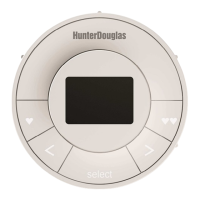
Sleek wall-mounted remote ensuring you know its location.
Diagram illustrating the front of the remote module and its buttons.
Diagram showing the back of the remote module with access points.
View of the remote module with the back cover removed, detailing battery compartments.
Step-by-step guide on how to insert the remote module into the Pebble hand-held remote.
Instructions for securely mounting the Surface remote unit onto a wall surface.
Guide on how to correctly insert the remote module into the Surface remote.
Steps to pair PowerView Repeaters to extend the system's signal range effectively.
Instructions for adding new remotes to an existing PowerView Hub setup.
Detailed steps to create a duplicate remote with identical settings and group assignments.
Guide to disable or enable the remote's backlights for battery conservation.
Steps to assign window coverings to specific groups for centralized control.
Instructions to unassign a window covering from its selected group.
How to set and save a preferred window covering position as a favorite.
Erases network and group information from window coverings for re-setup.
Comparison of paired vs. duplicate remotes and their respective functionalities.
Core functions like waking, selecting groups, opening, closing, and stopping movement.
Using arrow buttons to control vanes, louvers, or middle rails for precise adjustments.
Step-by-step guide to replace the batteries in the Pebble remote module.
Steps to replace the batteries in the Surface remote module.
Solutions for common problems like unresponsive buttons or remotes not illuminating.
Addresses problems with window coverings not responding to remote commands.
 General
| Brand | HunterDouglas |
|---|---|
| Model | PowerView Pebble |
| Category | Remote Control |
| Language | English |

 To Next Page