Operator’s Manual 19
Hurricane Power Operating
Using the Blower and the Deector Controls
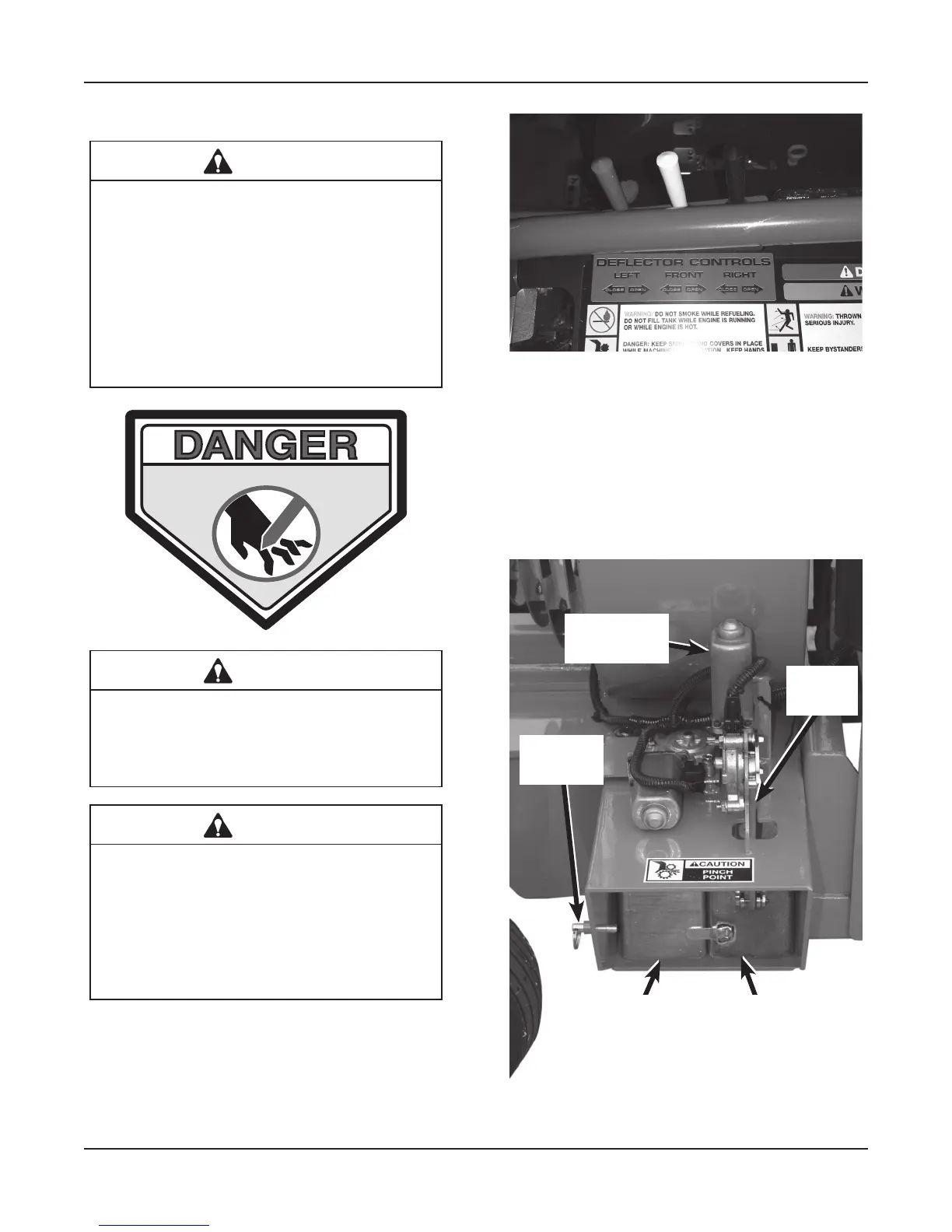
CAUTION
Avoid injury and property damage! DO NOT
position discharge where it will blow de-
bris towards people, vehicles, buildings or
other objects in vicinity. Flying debris may
damage, harm, or cause injury to people or
objects in air ow range. Keep a safe dis-
tance between two or more operators and
machines when working together in the
same areas.
KEEP HANDS AND FEET AWAY
CAUTION
Keep hands and feet away from air intake
and air discharge. Pinch points and crush-
ing forces will cause severe injury.
DANGER
Danger rotating fan - don’t attempt to re-
move materials from intake or discharge
when blower is running. Engage parking
brake, stop engine, remove key and wait
until all machinery has come to a complete
stop.
The functions of the Deflector control switches are:
•
Starting and Stopping the air stream.
•
Adjusting the air pattern.
Deector Control Switches
Dual Deector System (Left Deector)
The rear deflector is motor controlled. The front de-
flector is closed by the rear deflector. For normal blow-
ing, run the front deflector at the halfway pin and ad-
just the rear deflector in the desired location.
This photo shows the deflectors in the CLOSED position.
Rear Powered
Deflector
Front
Deflector
Halfway
Pin
Deflector
Motor
Gear
Rack
Deector Closed


 To Next Page