EasyManua.ls Logo

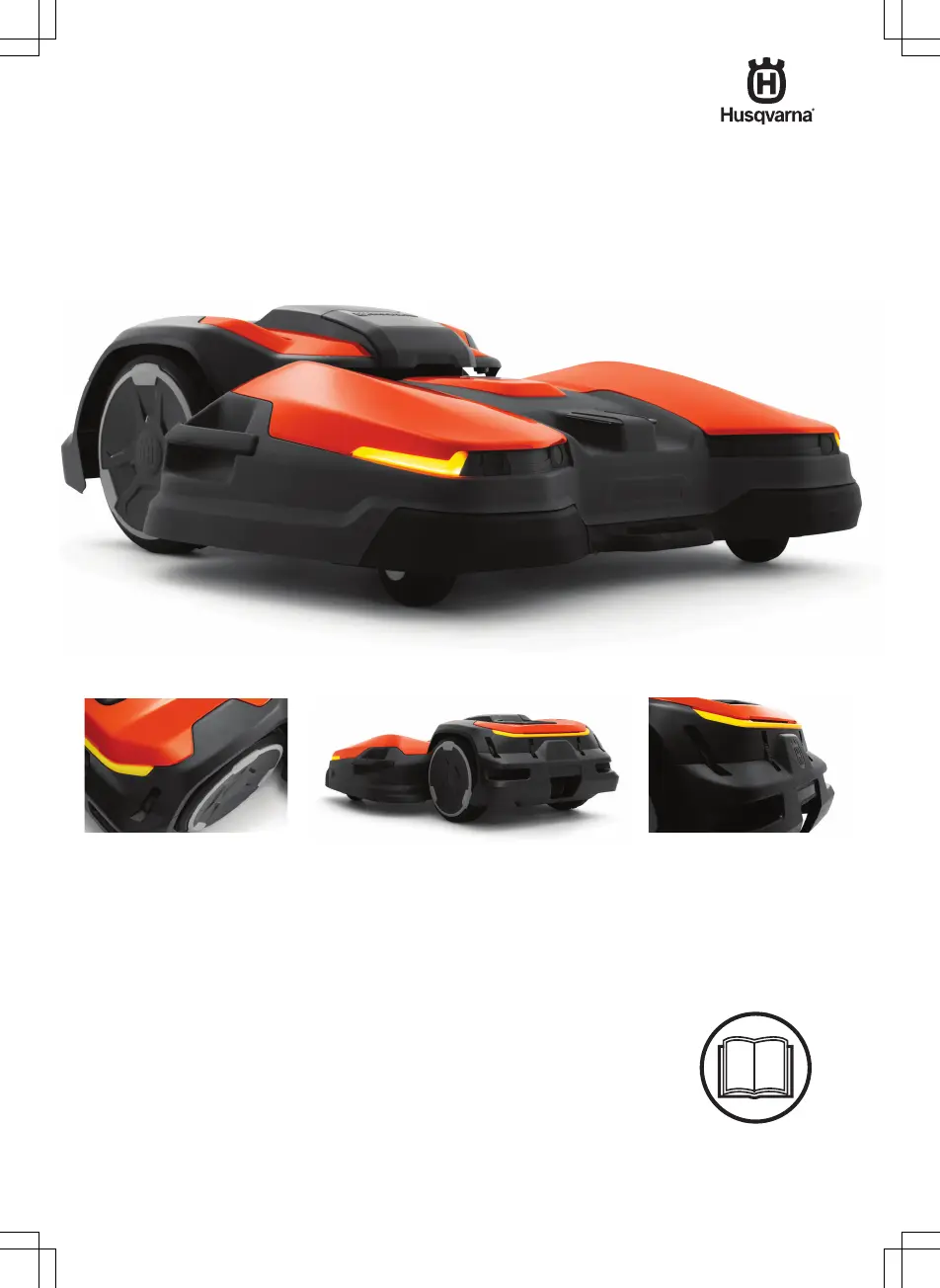
Husqvarna CEORA - User Manual

Husqvarna CEORA
56 pages
Print Icon
To Next Page IconTo Next Page
Loading...
EN, English
Operator's manual
HUSQVARNA CEORA
Read the operator's manual carefully and make sure that you
understand the instructions before you use the product.

Table of Contents

Other manuals for Husqvarna CEORA

Questions and Answers

Summary

Safety

Safety Definitions

Defines warnings, cautions, and notes used in the manual.

General Safety Instructions

Provides essential safety instructions for operating the product safely.

Safety Instructions for Installation, Operation, and Maintenance

Safety Instructions for Installation

Safety precautions for installing the product.

Safety Instructions for Operation

Critical safety guidelines for operating the product.

Safety Instructions for Maintenance

Safety measures required before performing maintenance.

Battery Safety

Safety warnings and precautions for the product's battery.

Product Handling and Movement

To Lift and Move the Product

Instructions on how to safely lift and move the product.

To Lift the Product Manually

Detailed steps for safely lifting the product manually.

Introduction to the Product System

Support

Information on how to obtain product support.

Product Description

Overview of the robotic lawn mower and its primary functions.

System Description

Explains the components of the CEORA™ system.

System Functionality and Overview

Find the Charging Station

Describes how the product locates its charging station.

Connectivity

Information on the product's connectivity features.

System Overview

Diagram illustrating the system components and their relationships.

Product Component Identification

Drive Unit Overview

Identifies key components of the drive unit.

Cutting Deck Overview

Identifies key components of the cutting deck.

Charging Station Overview

Charging Station Overview

Identifies key components of the charging station.

User Interface Elements

Control Panel Overview

Details the functions of each button on the product's control panel.

LED Indicator on the Product

Explains the status indicated by the LED lights on the product.

Symbols and Manual Conventions

Symbols on the Product

Explains the meaning of various symbols found on the product.

Symbols on the Battery

Explains the meaning of symbols related to the product's battery.

Symbols in the App

Explains the meaning of symbols used within the product's mobile application.

General Manual Instructions

General Manual Instructions

Provides guidance on manual formatting and conventions.

Installation

Introduction - Installation

Introduction to the installation process and safety precautions.

Primary Components for Installation

Lists essential components for product installation.

To Prepare for Installation

Steps to prepare the work area and plan the installation.

To Examine Where to Put the Reference Station

Guidance on selecting a location for the reference station.

To Examine Where to Put the Charging Station

Instructions for choosing the best location for the charging station.

Installation - Map Objects and Site Planning

To Examine Where to Install the Objects on the Map

Guidance on placing map objects for optimal satellite coverage.

To Examine Where to Install Objects for Satellite Coverage

How to position objects for unimpeded sky view and good satellite reception.

Installation - Specific Scenarios

To Examine Where to Install Objects in Narrow Passages

Guidelines for positioning objects in narrow passages for proper operation.

Product Installation Procedures

To Install the Map Objects in a Slope

How to install map objects in sloped areas.

Installation of the Product

Steps for the overall product installation process.

To Install the Product

General steps to follow for installing the product.

Installation Tools

Lists the required tools for product installation.

To Attach the Cutting Deck

Step-by-step guide to attach the cutting deck.

Component Installation and Setup

To Remove the Cutting Deck

Instructions for safely removing the cutting deck.

Installation of the Charging Station

Detailed instructions for installing the charging station.

To Install the Charging Station

Specific steps for physically installing the charging station.

Installation Verification and Services

Visual Check of Charging Station

How to visually verify the charging station installation.

Installation of the Reference Station

Instructions for installing the reference station.

Husqvarna Fleet Services

Overview of the Husqvarna Fleet Services platform.

App-Based Installation and Settings

Automower Connect

Information about the Automower® Connect mobile application.

To Do the Basic Settings

Steps for performing initial product setup and configuration.

Installation of the Map Objects

How to install map objects like work areas and stay-out zones.

Map Object Installation Details

To Install Objects on the Map

Detailed steps for installing objects on the product's map using the app.

Defining Work Areas and Zones

To Make a Work Area

Steps to define and create work areas for the product.

To Make a Stay-Out Zone

Steps to define and create stay-out zones to restrict product movement.

Path and Point Definition

To Make a Transport Path

Steps to define transport paths for the product.

To Make a Maintenance Point

Steps to define maintenance points for servicing.

To Reinstall the Charging Station on the Map

How to reinstall the charging station on the map.

To Reinstall the Reference Station on the Map

How to reinstall the reference station on the map.

Settings for Operation and Configuration

Schedule

How to set and manage the product's operating schedule.

Cutting Height

Information on adjusting the cutting height.

Pattern

Settings for cutting patterns and border mowing.

Operation

Settings related to object avoidance and ECO mode.

Advanced Settings and Features

Object Avoidance

How the object avoidance feature works and its settings.

ECO Mode

Explanation and settings for the ECO mode feature.

Accessories

Lists available accessories for the product.

Headlights

Settings for the product's headlights.

Avoid Collisions with the Mower House

Settings to avoid collisions with the mower house.

General (Bluetooth only)

General Bluetooth settings including time and date.

Security (Bluetooth only)

Security settings including PIN code and GeoFence.

Change PIN Code

Instructions for changing the product's PIN code.

Theft Protection

Settings and features for theft protection.

Advanced Security and System Management

Carried Away Alarm

Explanation of the "Carried Away" alarm function.

GeoFence

Details on the GeoFence GPS-based theft protection feature.

Automower Connect (Bluetooth only)

Managing the Automower® Connect module via Bluetooth.

Messages

How to view and interpret fault and information messages.

Download Firmware Over the Air

Information on downloading and installing firmware updates wirelessly.

Operation Modes and Controls

To Set the Product to ON

Steps to power on the product.

To Start the Product

Instructions on how to start the product.

To Select Operation Mode

How to select different operating modes.

Scheduled Operation

Explains and how to activate scheduled operation.

appDrive

Using the appDrive feature for manual product control.

Work Area Selection

How to temporarily select a work area for operation.

Operation Mode Park

Explanation of the Park operation mode.

Product Operation and Management

To Select Operation Mode Park in the App

How to select Park mode using the app.

To Select Operation Mode Park on the Control Panel

How to select Park mode via the control panel.

Operation Mode Park at Maintenance Point

How to park the product at a maintenance point.

To Stop the Product

Instructions on how to stop the product safely.

To Set the Product to OFF

Steps to power off the product.

To Charge the Battery

Instructions for charging the product's battery.

To Release Wheel Brakes and Move the Product

How to release wheel brakes to move the product manually.

Maintenance Schedule and Procedures

Introduction - Maintenance

Introduction to maintenance and safety precautions.

Maintenance Schedule

Schedule outlining regular maintenance tasks for the product.

Cutting Deck Maintenance

To Put the Cutting Deck in Service Position

Steps to place the cutting deck in a service position.

To Put the Cutting Deck in Cut Position

Steps to place the cutting deck in the cutting position.

Product and Component Cleaning

Clean the Product

Instructions on how to clean the product.

To Clean the Drive Unit

Specific steps for cleaning the drive unit.

To Clean the Cutting Deck and Blade Discs

How to clean the cutting deck and blade discs.

To Clean the Charging Station

Instructions for cleaning the charging station.

Replacement of the Blades and Blade Discs

Guide for replacing the product's blades and blade discs.

Blade and Brush Maintenance

To Replace the Blade Discs

Steps for replacing the blade discs.

To Replace the Blades on the Blade Disc

Steps for replacing individual blades on the blade disc.

Wheel Brush and Battery Care

Adjustment of the Wheel Brushes

How to adjust the wheel brushes when they are worn.

Battery

Information regarding battery care and replacement.

Troubleshooting

Introduction - Troubleshooting

Introduction to troubleshooting and where to find more information.

Fault Messages

Lists common fault messages and their causes and actions.

Troubleshooting Information and Indicators

Information and Warning Messages

Lists information and warning messages and their resolutions.

LED Indicator Lamps on the Charging Station

Interpreting LED indicator lights on the charging station.

Troubleshooting Symptoms and Solutions

Symptoms

Table of symptoms, causes, and actions for product malfunctions.

Transportation, Storage, and Disposal

Safety Instructions for Transportation

Safety guidelines for transporting the product.

To Safely Attach the Product for Transport

Instructions on how to safely attach the product for transportation.

To Put the Product into Storage

Steps for safely storing the product.

Transportation of Batteries

Regulations for transporting batteries.

Disposal

Guidelines for proper product disposal.

To Remove the Battery

Steps for removing the battery from the product.

Technical Data

Technical Data

Detailed technical specifications for product models.

Registered Trademarks and Specifications

Registered Trademarks

List of registered trademarks.

Applicable to US;CA Market

Suppliers Declaration of Conformity

Supplier's declaration of product conformity.

Compliance Requirements

Compliance requirements and FCC/IC information.

Summary

Safety

Safety Definitions

Defines warnings, cautions, and notes used in the manual.

General Safety Instructions

Provides essential safety instructions for operating the product safely.

Safety Instructions for Installation, Operation, and Maintenance

Safety Instructions for Installation

Safety precautions for installing the product.

Safety Instructions for Operation

Critical safety guidelines for operating the product.

Safety Instructions for Maintenance

Safety measures required before performing maintenance.

Battery Safety

Safety warnings and precautions for the product's battery.

Product Handling and Movement

To Lift and Move the Product

Instructions on how to safely lift and move the product.

To Lift the Product Manually

Detailed steps for safely lifting the product manually.

Introduction to the Product System

Support

Information on how to obtain product support.

Product Description

Overview of the robotic lawn mower and its primary functions.

System Description

Explains the components of the CEORA™ system.

System Functionality and Overview

Find the Charging Station

Describes how the product locates its charging station.

Connectivity

Information on the product's connectivity features.

System Overview

Diagram illustrating the system components and their relationships.

Product Component Identification

Drive Unit Overview

Identifies key components of the drive unit.

Cutting Deck Overview

Identifies key components of the cutting deck.

Charging Station Overview

Charging Station Overview

Identifies key components of the charging station.

User Interface Elements

Control Panel Overview

Details the functions of each button on the product's control panel.

LED Indicator on the Product

Explains the status indicated by the LED lights on the product.

Symbols and Manual Conventions

Symbols on the Product

Explains the meaning of various symbols found on the product.

Symbols on the Battery

Explains the meaning of symbols related to the product's battery.

Symbols in the App

Explains the meaning of symbols used within the product's mobile application.

General Manual Instructions

General Manual Instructions

Provides guidance on manual formatting and conventions.

Installation

Introduction - Installation

Introduction to the installation process and safety precautions.

Primary Components for Installation

Lists essential components for product installation.

To Prepare for Installation

Steps to prepare the work area and plan the installation.

To Examine Where to Put the Reference Station

Guidance on selecting a location for the reference station.

To Examine Where to Put the Charging Station

Instructions for choosing the best location for the charging station.

Installation - Map Objects and Site Planning

To Examine Where to Install the Objects on the Map

Guidance on placing map objects for optimal satellite coverage.

To Examine Where to Install Objects for Satellite Coverage

How to position objects for unimpeded sky view and good satellite reception.

Installation - Specific Scenarios

To Examine Where to Install Objects in Narrow Passages

Guidelines for positioning objects in narrow passages for proper operation.

Product Installation Procedures

To Install the Map Objects in a Slope

How to install map objects in sloped areas.

Installation of the Product

Steps for the overall product installation process.

To Install the Product

General steps to follow for installing the product.

Installation Tools

Lists the required tools for product installation.

To Attach the Cutting Deck

Step-by-step guide to attach the cutting deck.

Component Installation and Setup

To Remove the Cutting Deck

Instructions for safely removing the cutting deck.

Installation of the Charging Station

Detailed instructions for installing the charging station.

To Install the Charging Station

Specific steps for physically installing the charging station.

Installation Verification and Services

Visual Check of Charging Station

How to visually verify the charging station installation.

Installation of the Reference Station

Instructions for installing the reference station.

Husqvarna Fleet Services

Overview of the Husqvarna Fleet Services platform.

App-Based Installation and Settings

Automower Connect

Information about the Automower® Connect mobile application.

To Do the Basic Settings

Steps for performing initial product setup and configuration.

Installation of the Map Objects

How to install map objects like work areas and stay-out zones.

Map Object Installation Details

To Install Objects on the Map

Detailed steps for installing objects on the product's map using the app.

Defining Work Areas and Zones

To Make a Work Area

Steps to define and create work areas for the product.

To Make a Stay-Out Zone

Steps to define and create stay-out zones to restrict product movement.

Path and Point Definition

To Make a Transport Path

Steps to define transport paths for the product.

To Make a Maintenance Point

Steps to define maintenance points for servicing.

To Reinstall the Charging Station on the Map

How to reinstall the charging station on the map.

To Reinstall the Reference Station on the Map

How to reinstall the reference station on the map.

Settings for Operation and Configuration

Schedule

How to set and manage the product's operating schedule.

Cutting Height

Information on adjusting the cutting height.

Pattern

Settings for cutting patterns and border mowing.

Operation

Settings related to object avoidance and ECO mode.

Advanced Settings and Features

Object Avoidance

How the object avoidance feature works and its settings.

ECO Mode

Explanation and settings for the ECO mode feature.

Accessories

Lists available accessories for the product.

Headlights

Settings for the product's headlights.

Avoid Collisions with the Mower House

Settings to avoid collisions with the mower house.

General (Bluetooth only)

General Bluetooth settings including time and date.

Security (Bluetooth only)

Security settings including PIN code and GeoFence.

Change PIN Code

Instructions for changing the product's PIN code.

Theft Protection

Settings and features for theft protection.

Advanced Security and System Management

Carried Away Alarm

Explanation of the "Carried Away" alarm function.

GeoFence

Details on the GeoFence GPS-based theft protection feature.

Automower Connect (Bluetooth only)

Managing the Automower® Connect module via Bluetooth.

Messages

How to view and interpret fault and information messages.

Download Firmware Over the Air

Information on downloading and installing firmware updates wirelessly.

Operation Modes and Controls

To Set the Product to ON

Steps to power on the product.

To Start the Product

Instructions on how to start the product.

To Select Operation Mode

How to select different operating modes.

Scheduled Operation

Explains and how to activate scheduled operation.

appDrive

Using the appDrive feature for manual product control.

Work Area Selection

How to temporarily select a work area for operation.

Operation Mode Park

Explanation of the Park operation mode.

Product Operation and Management

To Select Operation Mode Park in the App

How to select Park mode using the app.

To Select Operation Mode Park on the Control Panel

How to select Park mode via the control panel.

Operation Mode Park at Maintenance Point

How to park the product at a maintenance point.

To Stop the Product

Instructions on how to stop the product safely.

To Set the Product to OFF

Steps to power off the product.

To Charge the Battery

Instructions for charging the product's battery.

To Release Wheel Brakes and Move the Product

How to release wheel brakes to move the product manually.

Maintenance Schedule and Procedures

Introduction - Maintenance

Introduction to maintenance and safety precautions.

Maintenance Schedule

Schedule outlining regular maintenance tasks for the product.

Cutting Deck Maintenance

To Put the Cutting Deck in Service Position

Steps to place the cutting deck in a service position.

To Put the Cutting Deck in Cut Position

Steps to place the cutting deck in the cutting position.

Product and Component Cleaning

Clean the Product

Instructions on how to clean the product.

To Clean the Drive Unit

Specific steps for cleaning the drive unit.

To Clean the Cutting Deck and Blade Discs

How to clean the cutting deck and blade discs.

To Clean the Charging Station

Instructions for cleaning the charging station.

Replacement of the Blades and Blade Discs

Guide for replacing the product's blades and blade discs.

Blade and Brush Maintenance

To Replace the Blade Discs

Steps for replacing the blade discs.

To Replace the Blades on the Blade Disc

Steps for replacing individual blades on the blade disc.

Wheel Brush and Battery Care

Adjustment of the Wheel Brushes

How to adjust the wheel brushes when they are worn.

Battery

Information regarding battery care and replacement.

Troubleshooting

Introduction - Troubleshooting

Introduction to troubleshooting and where to find more information.

Fault Messages

Lists common fault messages and their causes and actions.

Troubleshooting Information and Indicators

Information and Warning Messages

Lists information and warning messages and their resolutions.

LED Indicator Lamps on the Charging Station

Interpreting LED indicator lights on the charging station.

Troubleshooting Symptoms and Solutions

Symptoms

Table of symptoms, causes, and actions for product malfunctions.

Transportation, Storage, and Disposal

Safety Instructions for Transportation

Safety guidelines for transporting the product.

To Safely Attach the Product for Transport

Instructions on how to safely attach the product for transportation.

To Put the Product into Storage

Steps for safely storing the product.

Transportation of Batteries

Regulations for transporting batteries.

Disposal

Guidelines for proper product disposal.

To Remove the Battery

Steps for removing the battery from the product.

Technical Data

Technical Data

Detailed technical specifications for product models.

Registered Trademarks and Specifications

Registered Trademarks

List of registered trademarks.

Applicable to US;CA Market

Suppliers Declaration of Conformity

Supplier's declaration of product conformity.

Compliance Requirements

Compliance requirements and FCC/IC information.

Husqvarna CEORA Specifications

General IconGeneral
TypeRobotic lawn mower
Cutting Width22 cm
Charging systemAutomatic
Power sourceBattery
Battery TypeLithium-ion
ConnectivityBluetooth

Related product manuals