To decrease the temperature of the
motor
• Operate the product with no load for 2 minutes to
decrease the temperature of the motor.
To change gear
CAUTION Change gear only when the motor
decreases in speed or stops. Do not use
force to change gear.
• Make sure that you always use the applicable speed
for the drill bit diameter. Refer to the rating plate on
the product or
Technical data on page 18
.
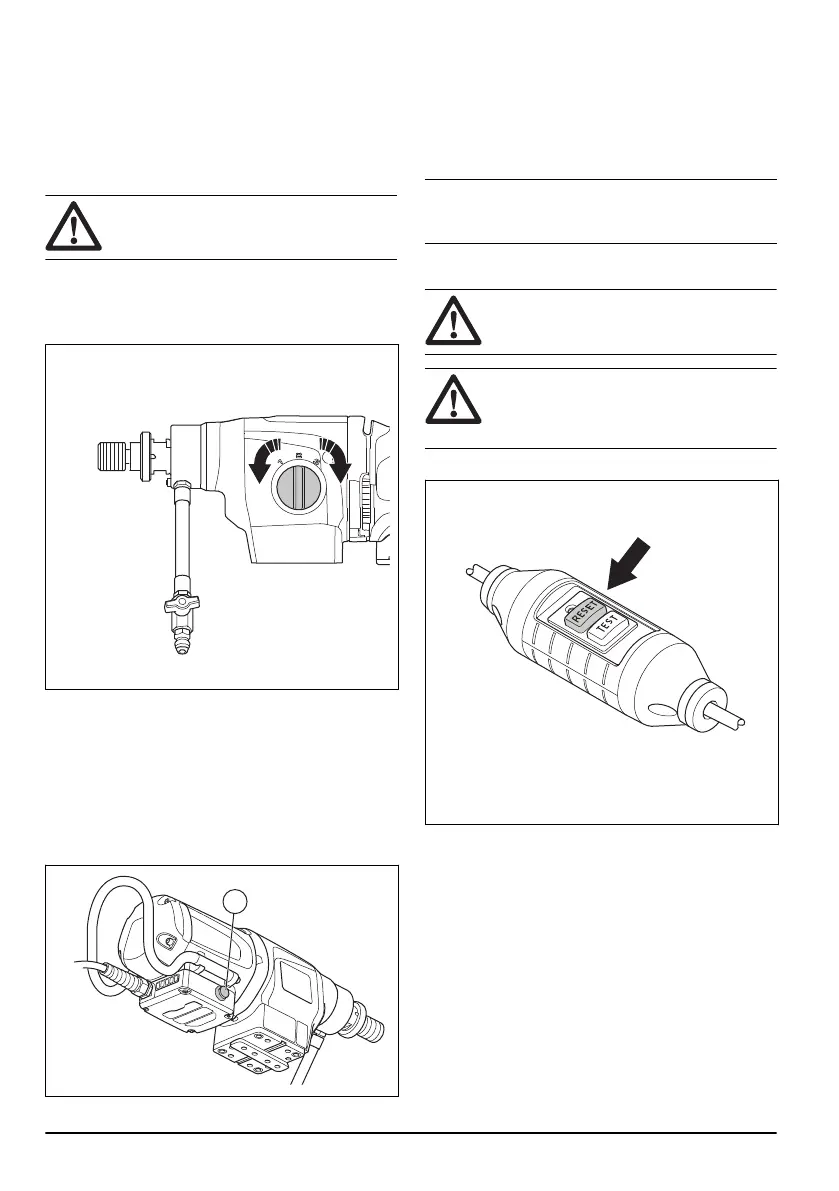
• Turn the gear selector to change gear.
To use Smartstart
™
The Smartstart
™
function decreases the speed of the
motor. This helps to make a starter hole.
1. Start the motor. Make sure that the drill does not
touch the material.
2. Push the Smartstart
™
button (A) one time. The
speed is decreased and the first green LED will flash
while the Smartstart
™
function is on.
3. Drill a starter hole in the material.
4. Push the Smartstart
™
button (A) again. The speed is
increased back to usual speed.
The speed is automatically increased back to usual
speed 1 minute after start of the Smartstart
™
function if
the Smartstart
™
button (A) is not pushed again.
Note Only use the Smartstart
™
function to start a hole.
The power will be very much decreased if it is used
during usual operation.
To start the product
WARNING Make sure that the drill bit can
rotate freely. It starts to rotate when the
motor starts.
WARNING If this is the first time the product
is started for the day, make sure you make a
check of the PRCD. Refer to
To examine the
PRCD on page 8
.
1. Push the "RESET" button on the PRCD.
12 1188 - 006 - 03.02.2020



 To Next Page