EasyManua.ls Logo

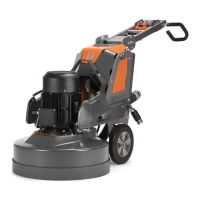
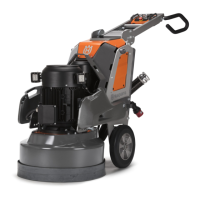
Husqvarna PG 830 RC - User Manual

Husqvarna PG 830 RC
160 pages
Print Icon
To Next Page IconTo Next Page
Loading...
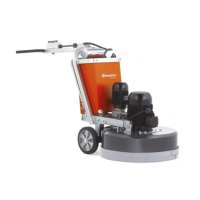
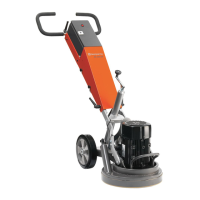
PG 690, PG 690 RC, PG 830, PG 830 RC
EN Operator's manual 2-52
ES-MX Manual del usuario 53-105
FR-CA Manuel d’utilisation 106-158

Questions and Answers

Summary

Introduction to the Floor Grinder

Product Component Identification

Control Panel and Remote Overview

Control Panel Component Identification

Details the functions and indicators of the control panel buttons and displays.

Remote Control Component Identification

Identifies the buttons, display, and other components of the remote control.

Connectivity and General Safety

Safety Definitions and General Instructions

Explains manual warnings and provides overarching safety guidelines for operation.

Operation Safety and Personal Protection

General Operation Safety Precautions

Lists critical safety precautions for operating the product.

Required Personal Protective Equipment (PPE)

Details the personal protective equipment necessary for safe product operation.

Work Area and Electrical Safety

Work Area Safety Precautions

Advises on maintaining a safe work environment and keeping bystanders clear.

Electrical Safety Guidelines

Provides essential safety instructions related to electrical connections and usage.

Power, Grounding, Extension, and Battery Safety

Grounding and Plug Safety

Emphasizes the importance of proper grounding and the power plug.

Battery Safety Precautions

Lists crucial safety measures for handling and using batteries.

Safety Devices and Emergency Stops

Safety Device Checks

Stresses the importance of checking safety devices for proper function.

Emergency Stop Button Checks

Details procedures for checking emergency stop buttons on control panel and remote.

Product Operation Procedures

Pre-Operation Checks

Lists essential safety and functional checks to perform before operating the product.

Diamond Tool Replacement

Diamond Tool Replacement Procedure

Provides a step-by-step guide for safely replacing diamond tools.

Power Connection and USB Charger

Connecting the Product to a Power Source

Guides on how to connect the product to an extension cable and mains outlet.

Motor Speed and Direction Control

Adjusting Motor Speed and Rotation Direction

Provides instructions on how to change the speed and direction of motor rotation.

Control Panel Operation and Starting

Operating the Product with the Control Panel

Explains how to operate the product using the control panel.

Starting the Product via Control Panel

Details the steps to start the product using the control panel.

Stopping and Remote Control Operation

Stopping the Product via Control Panel

Provides instructions on how to stop the product using the control panel.

Settings and Service Menu Options

Calibration Functionality

Explains the calibration process for product controls if movement is incorrect.

Control Calibration Procedures

Calibrating Speed Control

Provides steps to calibrate the speed control for the product.

Calibrating Grinding Disc and Head

Details the calibration procedure for the grinding disc and head controls.

Joystick Calibration and Function Menus

Calibrating Joystick Controls

Explains how to calibrate the horizontal and vertical movement of the joystick.

Remote Control Operation

Remote Control Operation Safety

Emphasizes safety precautions when operating the product remotely.

Remote Control Pairing Procedure

Details the steps required to pair the remote control with the product.

Starting and Operating with Remote Control

Starting Product via Remote Control

Provides instructions for starting the product using the remote control.

Stopping Product and Resetting

Stopping Product via Remote Control

Details the procedure for stopping the product using the remote control.

Maintenance Introduction and Schedule

Weight Adjustment Procedure

Guides on how to adjust the product weights to a selected position.

Pre-Maintenance Safety Checks

Lists essential safety checks and preparations before performing maintenance.

Maintenance Schedule Overview

Outlines a schedule for routine maintenance tasks performed by the operator.

Specific Maintenance Tasks

Routine Maintenance Task Frequencies

Details specific maintenance tasks and their recommended frequencies.

Remote Control Battery and Grinding Head

Grinding Head Installation;Removal Safety

Provides a warning about chassis balance during grinding head removal.

Grinding Head Installation Steps

Troubleshooting Product Start Issues

Product Not Starting Issues

Lists common causes and solutions for the product failing to start.

Error and Warning Messages

Interpreting Remote Control Errors

Explains how to interpret error codes and warning messages from the remote control.

Error Code Reference

Lists specific error codes, their messages, and potential causes.

Error Code Reference (Continued)

Error Code Reference (Continued)

Continues the list of error codes, messages, and their causes for the remote control.

Transportation, Storage, and Disposal

Lifting and Transporting the Product

Technical Specifications (PG 690 Series)

Technical Specifications (PG 830 Series)

Summary

Introduction to the Floor Grinder

Product Component Identification

Control Panel and Remote Overview

Control Panel Component Identification

Details the functions and indicators of the control panel buttons and displays.

Remote Control Component Identification

Identifies the buttons, display, and other components of the remote control.

Connectivity and General Safety

Safety Definitions and General Instructions

Explains manual warnings and provides overarching safety guidelines for operation.

Operation Safety and Personal Protection

General Operation Safety Precautions

Lists critical safety precautions for operating the product.

Required Personal Protective Equipment (PPE)

Details the personal protective equipment necessary for safe product operation.

Work Area and Electrical Safety

Work Area Safety Precautions

Advises on maintaining a safe work environment and keeping bystanders clear.

Electrical Safety Guidelines

Provides essential safety instructions related to electrical connections and usage.

Power, Grounding, Extension, and Battery Safety

Grounding and Plug Safety

Emphasizes the importance of proper grounding and the power plug.

Battery Safety Precautions

Lists crucial safety measures for handling and using batteries.

Safety Devices and Emergency Stops

Safety Device Checks

Stresses the importance of checking safety devices for proper function.

Emergency Stop Button Checks

Details procedures for checking emergency stop buttons on control panel and remote.

Product Operation Procedures

Pre-Operation Checks

Lists essential safety and functional checks to perform before operating the product.

Diamond Tool Replacement

Diamond Tool Replacement Procedure

Provides a step-by-step guide for safely replacing diamond tools.

Power Connection and USB Charger

Connecting the Product to a Power Source

Guides on how to connect the product to an extension cable and mains outlet.

Motor Speed and Direction Control

Adjusting Motor Speed and Rotation Direction

Provides instructions on how to change the speed and direction of motor rotation.

Control Panel Operation and Starting

Operating the Product with the Control Panel

Explains how to operate the product using the control panel.

Starting the Product via Control Panel

Details the steps to start the product using the control panel.

Stopping and Remote Control Operation

Stopping the Product via Control Panel

Provides instructions on how to stop the product using the control panel.

Settings and Service Menu Options

Calibration Functionality

Explains the calibration process for product controls if movement is incorrect.

Control Calibration Procedures

Calibrating Speed Control

Provides steps to calibrate the speed control for the product.

Calibrating Grinding Disc and Head

Details the calibration procedure for the grinding disc and head controls.

Joystick Calibration and Function Menus

Calibrating Joystick Controls

Explains how to calibrate the horizontal and vertical movement of the joystick.

Remote Control Operation

Remote Control Operation Safety

Emphasizes safety precautions when operating the product remotely.

Remote Control Pairing Procedure

Details the steps required to pair the remote control with the product.

Starting and Operating with Remote Control

Starting Product via Remote Control

Provides instructions for starting the product using the remote control.

Stopping Product and Resetting

Stopping Product via Remote Control

Details the procedure for stopping the product using the remote control.

Maintenance Introduction and Schedule

Weight Adjustment Procedure

Guides on how to adjust the product weights to a selected position.

Pre-Maintenance Safety Checks

Lists essential safety checks and preparations before performing maintenance.

Maintenance Schedule Overview

Outlines a schedule for routine maintenance tasks performed by the operator.

Specific Maintenance Tasks

Routine Maintenance Task Frequencies

Details specific maintenance tasks and their recommended frequencies.

Remote Control Battery and Grinding Head

Grinding Head Installation;Removal Safety

Provides a warning about chassis balance during grinding head removal.

Grinding Head Installation Steps

Troubleshooting Product Start Issues

Product Not Starting Issues

Lists common causes and solutions for the product failing to start.

Error and Warning Messages

Interpreting Remote Control Errors

Explains how to interpret error codes and warning messages from the remote control.

Error Code Reference

Lists specific error codes, their messages, and potential causes.

Error Code Reference (Continued)

Error Code Reference (Continued)

Continues the list of error codes, messages, and their causes for the remote control.

Transportation, Storage, and Disposal

Lifting and Transporting the Product

Technical Specifications (PG 690 Series)

Technical Specifications (PG 830 Series)

Husqvarna PG 830 RC Specifications

General IconGeneral
Working width830 mm
Voltage400 V
Frequency50 Hz
Grinding discs3
Power sourceElectric
Dust extractionYes
Water supplyYes

Related product manuals