20
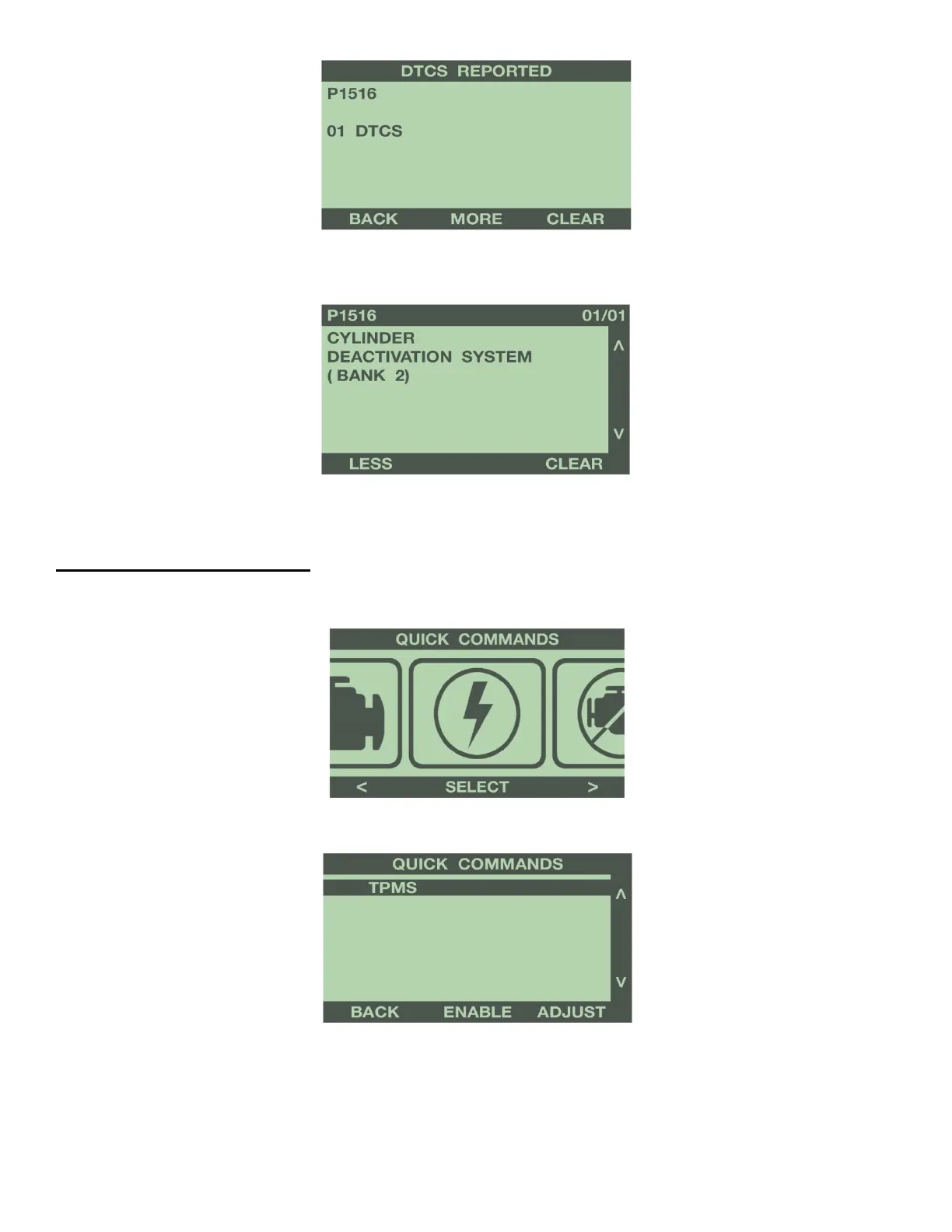
Use the buttons to the right of the screen to scroll up or down and review each DTC. The programmer will
display a description of the DTC.
Once you have reviewed each DTC, you can clear them by selecting ‘Clear’.
1-5: QUICK COMMANDS
From the Main Menu, press the left or right arrow buttons to scroll for the Quick Commands menu. Press
‘Select’ to enter Quick Commands menu from the Main Menu.
The programmer will display the following menu.
TPMS ADJUST (Most Vehicles)
This feature allows instant adjustment of the minimum pressure for tire pressure monitor sensor (TPMS) alarm.
Select ‘Adjust’ to display the Adjust TPMS menu. Use the buttons to the right of the screen to scroll up or
down, and highlight the wheels to adjust. Press the ‘Select’ button to adjust the TPMS alarm minimum pressure.


 To Next Page