7
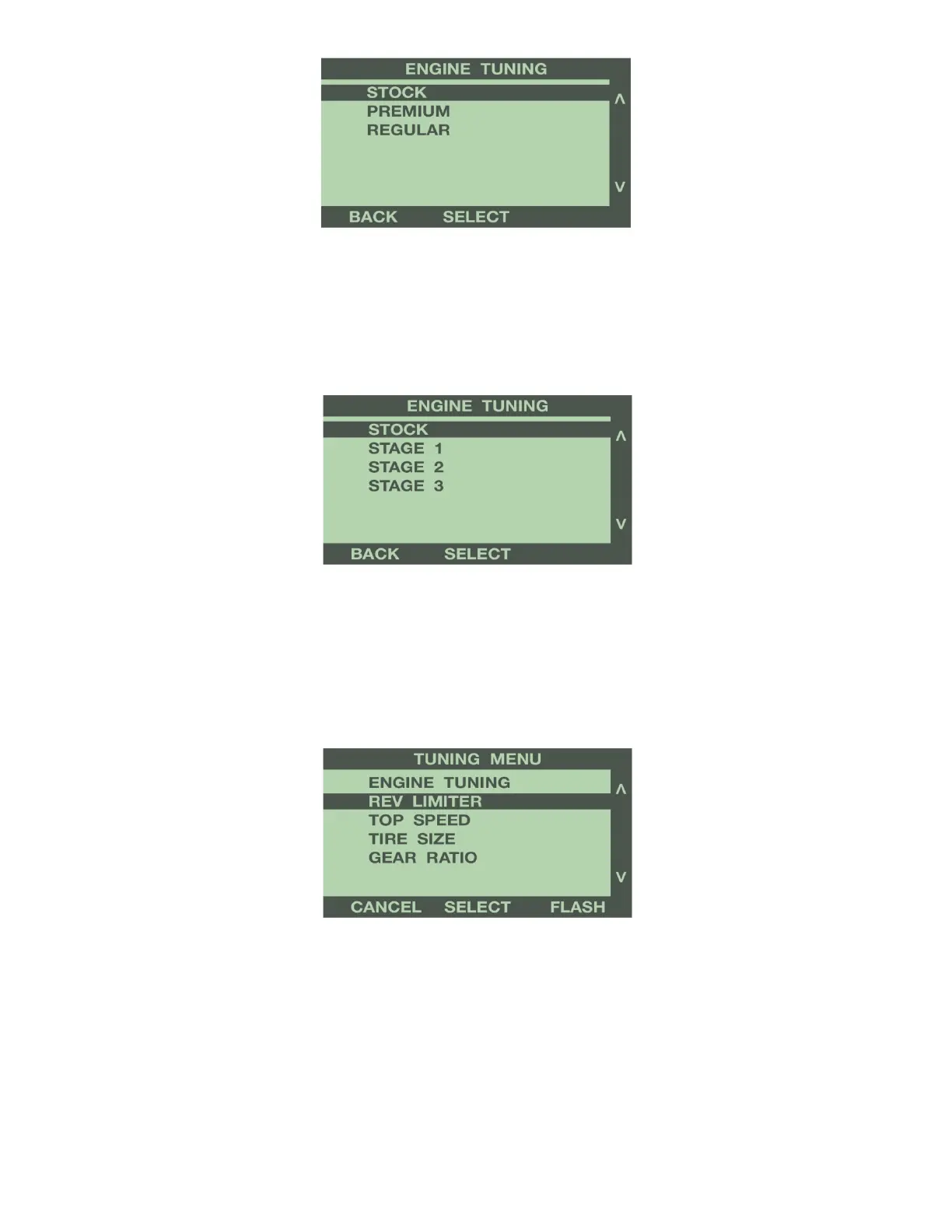
Press ‘Select’ to save the chosen tune. By selecting ‘Stock’, the programmer will install any additional
features selected, but keep the stock engine tuning. For more information on Gas Engine Tuning options,
see Programmer Features explanation in Section 4.
Diesel Vehicles:
Use the buttons to the right of the screen to highlight your choice of tunes; Stage 1, Stage 2, or Stage 3.
Press ‘Select’ to save the chosen tune.
By selecting ‘Stock’, the programmer will install any additional features selected, but keep the stock
engine tuning. For more information on Diesel Engine Tuning options, see Programmer Features
explanation in Section 4.
REV LIMITER (Gas Engines Only)
Use the buttons to the right of the screen to highlight Rev Limiter. Press the ‘Select’ button to adjust the
engine rev limiter, in 100 RPM increments.
Use the buttons to the right of the screen to scroll up or down, and highlight the value to increase or
decrease the engine rev limiter. Press ‘Select’ to save the chosen value.


 To Next Page