•
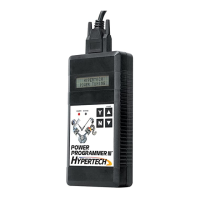
Plug the programmer cable (or adapter) into the DLC. Make sure
the cable is plugged in completely to ensure a good connection.
• Set the parking brake and turn the ignition key to the RUN
position but do not start the engine.
IMPORTANT
:
-DO NOT leave the vehicle while programming is in process.
-Make sure the vehicle battery is fully charged before programming.
-The key must remain in the RUN position, without the engine
running, during the entire programming process..
-DO NOT operate electrical accessories
(radio, windows, wipers, etc.) while programming.
- DO NOT attempt programming while the
vehicle is connected to a battery charger.
• Press the s arrow on the programmer. The following displays
should appear immediately on the LCD screen (where X.X.X.X
is the version number):
• If these screens do not appear, for 1994-1997 LT1/LT4 vehicles
make sure that both ends of the cable are securely attached
and press the s arrow again. For 1994-1995 LT1 vehicles,
check and/or replace the battery as described in #6 of the
Troubleshooting Guide.
• Next, the programmer will show applications and copyright
information. Then, a screen similar to this should appear with
a description of your vehicle:
• If this screen does not appear, make sure that the key is in the
RUN position with the engine NOT running.
7
YOUR VEHICLE IS:
1996 CHEVROLET CAMARO 5.7L LT1
VERSION
X.X.X.X
HYPERTECH
POWER PROGRAMMER
SYSTEM TEST
WAIT
FOR XXXX-XXXX
LT1/LT4 VEHICLES


 To Next Page