EasyManua.ls Logo

HYTROL 190-E24EZ - User Manual

HYTROL 190-E24EZ
20 pages
Print Icon
To Next Page IconTo Next Page
Loading...
Effective February 2015
(Supercedes May 2014)
Bulletin #669
Installation
and
Maintenance
Manual
with Safety Information
and Parts List
RECOMMENDED SPARE PARTS HIGHLIGHTED IN GRAY
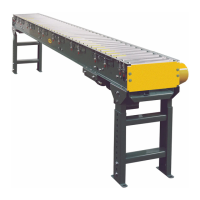
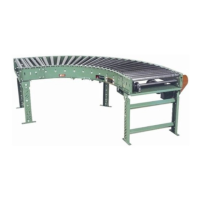
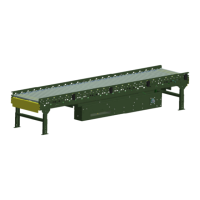
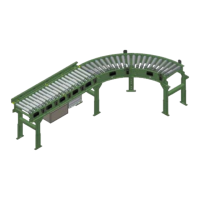
Model 190-E24EZ, 190-E24EZC
Model 190-E24, 190-E24C
Manual
de Instalación
y
Mantenimiento
con Información sobre Seguridad
y Lista de Refacciones
LAS REFACCIONES RECOMENDADAS SE RESALTAN EN GRIS
IMPORTANT!
DO NOT DESTROY
© COPYRIGHT PENDING–HYTROL CONVEYOR CO., INC.
¡IMPORTANTE!
NO DESTRUIR
Hytrol Conveyor Co., Inc.
Jonesboro, Arkansas
PRESS OPTIMIZED FOR THE ENVIRONMENT
(IMPRESIÓN OPTIMIZADA PARA PROTEGER EL MEDIO AMBIENTE)
E24 / E24CE24EZ / E24EZC

Questions and Answers

  • S
    Samuel GilesAug 5, 2025
    What to do if no motors on HYTROL Accessories conveyor will run?
    • H
      hoffmanmindyAug 5, 2025
      If no motors on the HYTROL Accessories conveyor will run, there could be several reasons: * There might be no AC power to the power supply unit, in which case you should check the AC power. * The main power disconnect on the power supply unit might be off; set it to “on”. * The main fuses might be blown; replace them. * There might be no lights on the motor/control board; check the output power of the power supply. * The board might not be receiving a run signal; check the connections and ensure the run signal is active.
  • S
    Sydney OchoaAug 10, 2025
    What to do if no zones on HYTROL Accessories conveyor will run?
    • K
      Katrina MartinAug 10, 2025
      If no zones on the HYTROL Accessories conveyor will run, it might be due to: * Lack of AC power to the power supply unit. You should check the AC power. * The main power disconnect on the power supply unit being in the “off” position. Set the disconnect to “on.” * Blown main fuses. Replace the fuses. * No lights on the Motor/Control Board. Check the output power of the power supply. * No power to the EZLogic® Zone Controller. Check the EZLogic® connections and IOP.
  • J
    James OwensAug 14, 2025
    What to do if individual zone will not run on HYTROL Accessories?
    • G
      gthomasAug 14, 2025
      If an individual zone on the HYTROL Accessories will not run, it could be due to: * Motor/Control Board power pins not connected to wiring harness. Connect the wiring harness and pin connector to power pins on Motor/Control Board. * Motor power connector not connected to Control Board (E24™ motor only). Connect motor power connector to Motor Control Board. * Blown fuse indicator “ON” (E24i™). Replace motor. * Defective control board. Replace control board. * Defective motor. Replace motor.
  • W
    William TurnerAug 19, 2025
    What to do if zone will not restart after accumulation on HYTROL Accessories?
    • B
      bsandersAug 19, 2025
      If a zone on the HYTROL Accessories will not restart after accumulation, it could be due to: * A dirty zone controller lens. Clean the lens. * Stretched or worn O-ring band(s). Replace the o-ring(s).
  • J
    Joshua ParrishAug 26, 2025
    Why zone will not sleep on HYTROL Accessories?
    • M
      Michael MolinaAug 26, 2025
      If a zone on the HYTROL Accessories will not sleep, it could be due to: * The sleep feature being disabled. Enable the sleep feature. * The upstream zone being blocked. Unblock the upstream zone.
  • T
    Theresa GoodmanAug 30, 2025
    Why product will not accumulate on HYTROL Accessories?
    • R
      Rebecca HessAug 30, 2025
      If the product will not accumulate on HYTROL Accessories, it may be due to no zone stop signal to discharge zone. Check the input cable and signal source.

Summary

SAFETY INFORMATION

Guards and Guarding

Describes safety guards, guarding exceptions, and guarding by location or position.

Headroom Requirements

Details minimum clearance for overhead conveyors above aisles and walkways.

Safe Operation Practices

Outlines safety procedures for operating conveyors, including trained personnel and clear areas.

Maintenance Safety

Emphasizes qualified personnel, lockout/tagout procedures, and maintaining guards.

INSTALLATION PROCEDURES

Support Installation Guide

Step-by-step guide for installing conveyor supports, including alignment and elevation.

Ceiling Hanger Installation

Instructions for mounting ceiling hangers for overhead conveyor applications.

Conveyor Section Setup

Positions and connects conveyor sections, ensuring squareness and leveling.

Electrical Equipment & Controls

Covers electrical code compliance, control stations, and emergency stop devices.

CONVEYOR OPERATION

Conveyor Start-Up Checks

Pre-startup checks for foreign objects and verification of moving parts operation.

Lubrication Requirements

Specifies standard bearings are pre-lubricated and require no additional lubrication.

Accumulation Sequence of Operation

Explains singulation and slug modes for accumulation, covering loading and unloading.

SYSTEM SPECIFICATIONS

E24 i Motor Specifications

Details power requirements, PNP inputs, analog speed input, and PNP output for the E24i motor.

E24 EZ Electrical Connections

Illustrates zone length and controller connections for the E24EZ model.

EZLogic Accumulation System

Introduces the EZLogic® Accumulation System and its zone controller connections.

E24 Motor Electrical Connections

Shows wiring diagrams for E24 model connections, including Unidrive motor.

EZLOGIC CONTROL INTERFACE

EZLogic Controller Connector

Describes the connector for drive/no drive signals from an EZLogic® zone controller.

Control Terminals Overview

Details terminals for motor run, direction, analog speed input, and motor running output.

IOP POWER SUPPLY UNIT

Motor Power Supply Unit

Discusses the 24V DC power supply unit for the drive card and motor.

5 AMP Power Supply Wiring

20 AMP Power Supply Wiring

40 AMP Power Supply Wiring

E24 SERIES SPECIFICATIONS

E24 Motor Card Requirements

Details power requirements, NPN/PNP inputs, analog speed input, and PNP output for E24 motor card.

E24 EZ Model Connections

Shows the zone length and controller connections diagram for the E24EZ model.

E24 Model Wiring Diagrams

Illustrates wiring diagrams for E24 model connections, including Unidrive motor.

MOTOR CONTROL BOARD FUNCTIONS

EZLogic Controller Interface

Describes the connector for drive/no drive signals from an EZLogic® zone controller.

Motor Control Terminals

Details terminals for motor run, direction, analog speed input, and motor running output.

TROUBLESHOOTING E24 CONVEYORS

Conveyor Motors Not Running

Lists causes and solutions for conveyor motors failing to run.

Individual Zone Operation Issues

Details problems and fixes for individual conveyor zones not operating.

Zone Restart Failures

Identifies issues and solutions when a zone fails to restart post-accumulation.

TROUBLESHOOTING E24 EZ CONVEYORS

All Zones Failure to Run

Lists causes and solutions for all conveyor zones failing to run.

Individual E24 EZ Zone Issues

Details problems and fixes for individual E24EZ conveyor zones not operating.

E24 EZ Zone Restart Problems

Identifies issues and solutions for E24EZ zones failing to restart post-accumulation.

Zone Sleep Mode Failures

Addresses issues related to the conveyor zone not entering a sleep state.

Accumulation Process Failures

Lists causes and solutions for product accumulation failures.

MODEL 190-E24 EZ FINAL ASSEMBLY

MODEL 190-E24 EZ SECTION ASSEMBLY

MODEL 190-E24 EZ REFLECTOR KIT

MODEL 190-E24 EZ ACCUMULATION KIT

MODEL 190-E24 EZC PARTS DRAWING

MODEL 190-E24 EZC PARTS LIST

MODEL 190-E24 PARTS DRAWING

HYTROL 190-E24EZ Specifications

General IconGeneral
BrandHYTROL
Model190-E24EZ
CategoryAccessories
LanguageEnglish

Related product manuals