Ellipsis | 10www.iboxstyle.com
Alternative Setup
H
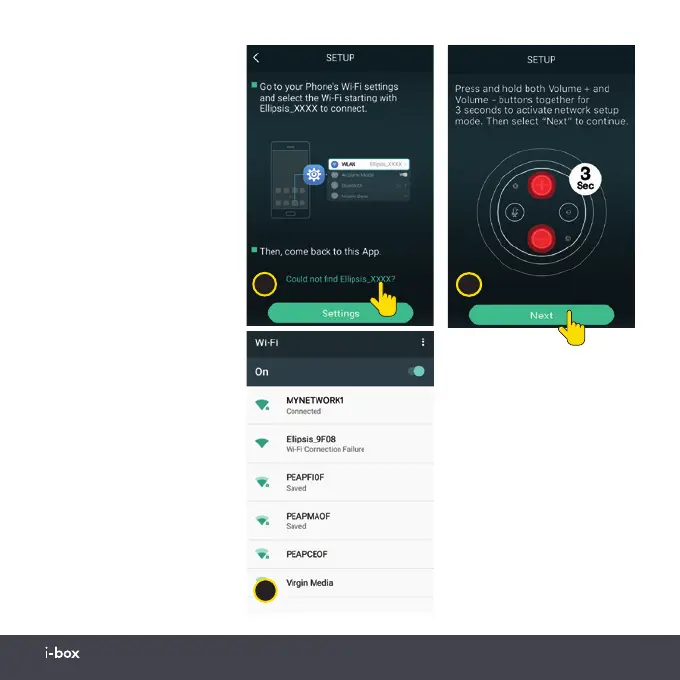
If in step 5 your i-box player
app is unable to connect
to your Ellipsis speaker or
find it, then return to the
i-box player app, screen
(H) and tap on “Could not
find Ellipsis_XXXX”. Screen
(L) will open, follow the
instructions (Press and
hold both Volume + and
Volume - buttons together
for 3 seconds to activate
network setup mode. Then
select “Next” to continue).
This will open your phone
Wi-Fi settings menu (F)
connect to the Ellipsis
speaker and you will hear
a “Connected to speaker”
voice prompt then return
to the i-box player app,
screen (H) and follow step
6. on the previous page to
connect the speaker to your
Wi-Fi network.
L
F
Naming your speaker
After Wi-Fi connection the
NAME DEVICE screen (M)
allows you to name your
speaker, enter a name or
choose from the room list.
Speaker default name is
Ellipsis_XXXX. Tap next
to enter screen (N) tap on
“Sign in with Amazon”


 To Next Page