External USB CD-RW
User’s Guide
- 10 -
Product Description
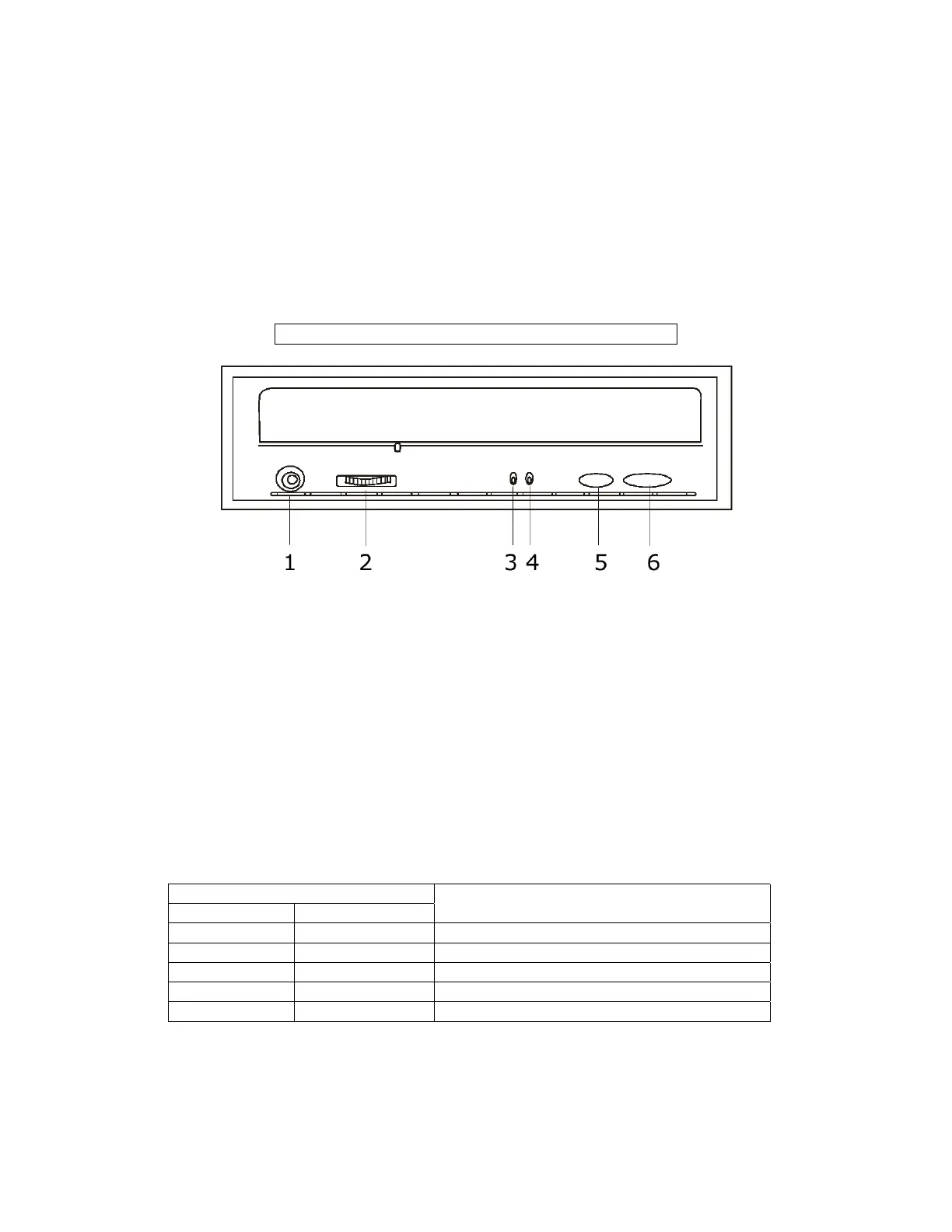
Front View
Note: Product may vary slightly from picture
1. Headphones Jack: Attach headphones or self-amplified speakers.
2. Volume Controller: Adjusts headphone volume level.
3. Writing Indicator: Lights up while data is being written to or erased
from the disc. Please refer to the chart below for detailed status
description.
4. Disc In indicator: Lights up while data is being read from the disc;
flashes during seek operation. Please refer to the chart below for detailed
status description.
5. Play/Skip Button: Play audio CD and skips one track forward if press
again.
6. Open/Close Button: Open and close for disc loading and removal.
Indicator Status
Indicators
Writing Disc In
Status Description
Off Off Drive Ready, No Disc Loaded
Off Blinking Green Power on or Reading.
Off Steady Green Disc Loaded And Ready To Be Accessed
Blinking Red Blinking Green Test Before Writing
Steady Red Blinking Green Writing



 To Next Page