32
Issue 1.11
9 Configuration in ibaPDA
Important note
If the firmware version of the
ibaFOB-D card is older than V2.00 (build 172), f
irst update
the firmware and then
install the new version of the ibaPDA software. Please contact
.
9.1 Configuration in the I/O Manager
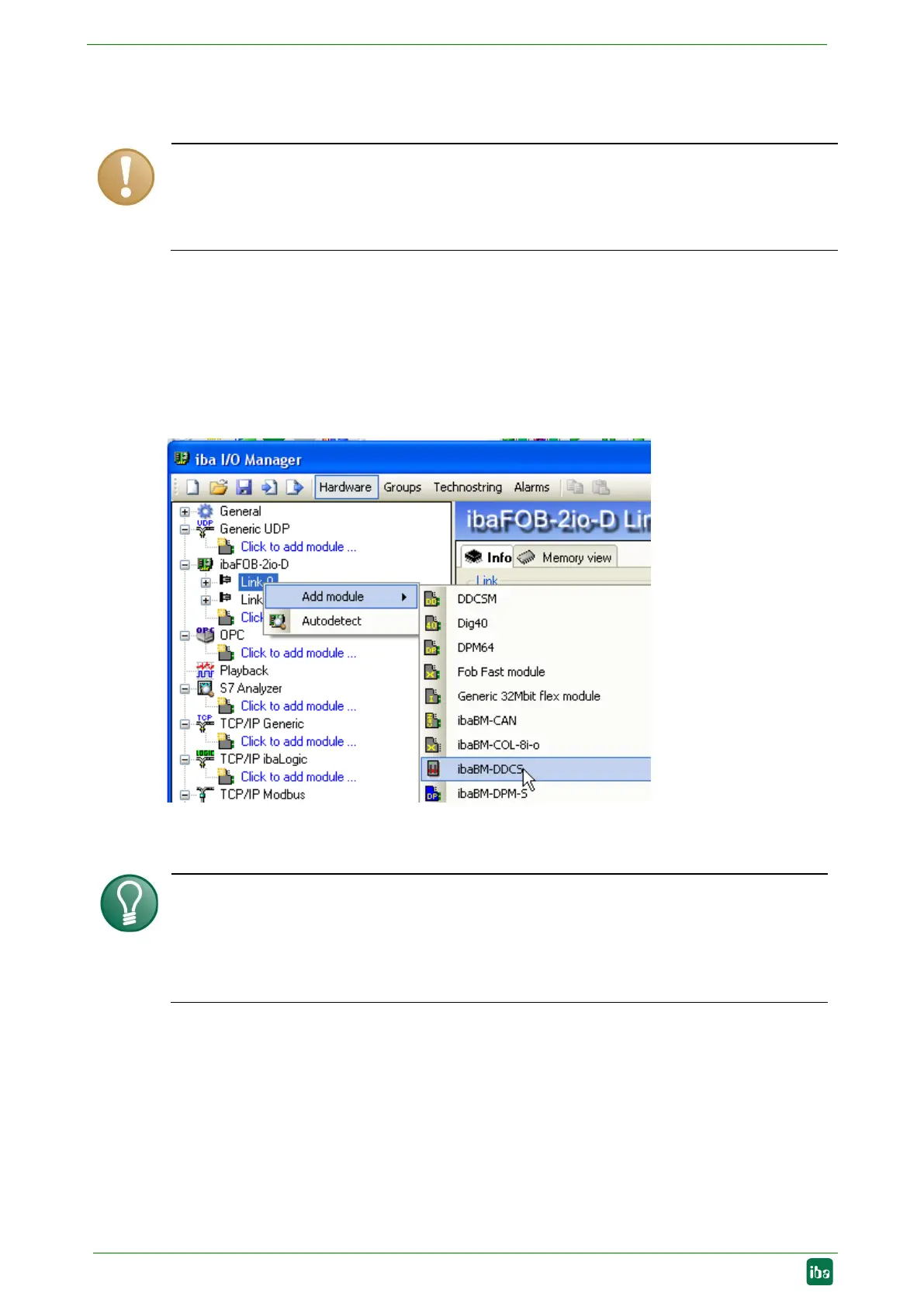
Find the appropriate link of the FOB-D card to which the ibaBM-DDCS is connected in
the I/O Manager. Click on the link with the right mouse button, which opens a submenu.
Select “Add module”. Another submenu with all available devices will be displayed.
Select “ibaBM-DDCS” from this list. “ibaBM-DDCS” will now be shown below the link of
your ibaFOB-D card.
Figure 13: Adding the ibaBM-DDCS module
already been connected, select “Auto detect” in th
e context menu
or click on the <
New configuration> icon. Then, the connected devices
will be
automatically detected, the configured data will be read and the corresponding modules
will be entered in the I/O Manager.


 To Next Page