IBERITAL
INSTALLATION AND OPERATION MANUAL Page 79
ENGLISH
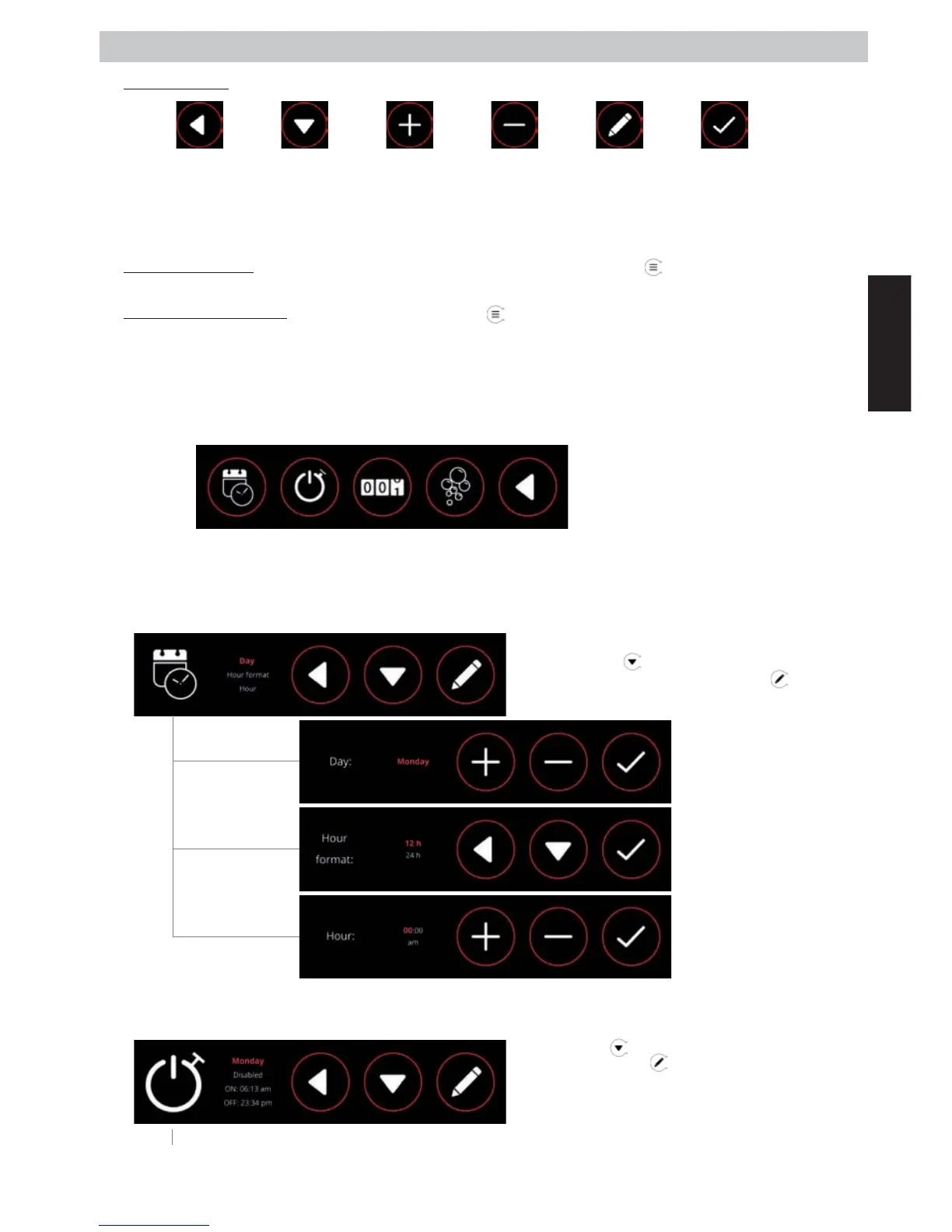
GENERIC ICONS:
Note: When we press the “+” or “-” icons, we increase or reduce the set value respectively. This will occur in single
steps, depending on the minimum resolution value for each value we are going to change. If the button is pressed
for 1.5 seconds, the steps will advance more rapidly, until the button is released.
User MENU display: With the machine in either the ON or OFF position, press the
icon, and we go into the user
menu.
Technical MENU display: In the OFF position, press the
icon for 5 seconds, and we go into the technical level
settings.
IMPORTANT: The options available will be dierent, depending on the MENU we access.
2.9.3.2.1. User menu display
Once we are in the user menu, we can select any of the options shown on the screen. by pressing any of the icons.
DATE-TIME: Through this menu we can change the settings for the time and date, and the way
this information is displayed.
-
- AUTO ON/OFF: Through this menu we can set the settings for switching the machine on and
o automatically.
-
CANCEL
or
GO BACK
CHANGE SELECTION
NEXT VALUE
INCREASE
VALUE
ACCEPT
VALUE
DECREASE
VALUE
EDIT
OPTION
NOTE: If the machine is in the OFF position,
the auto-wash option will not appear on the
display. In that position the machine will not
be suciently hot to perform that function.
HOUR
DATA
CANCEL or
G O BA CK
AUTO
WASH
COUNTERS
AUTO
ON/OFF
By pressing the icon, we can move through the
various menu options. By pressing the
icon, we
can enter the various sub-menus.
Set the day of the week.
Set the time formatas either
12 or 24 hour, according to
our preferences.
Set the time.
By pressing the icon we can change the day of the
week. By pressing the
icon, we access the settings
for the selected day. The first option is “every day”. By
setting this option we erase any individual setting, and
the machine will behave in the same way every day of
the week.



 To Next Page