IBERITAL
INSTALLATION AND OPERATION MANUAL Page 83
ENGLISH
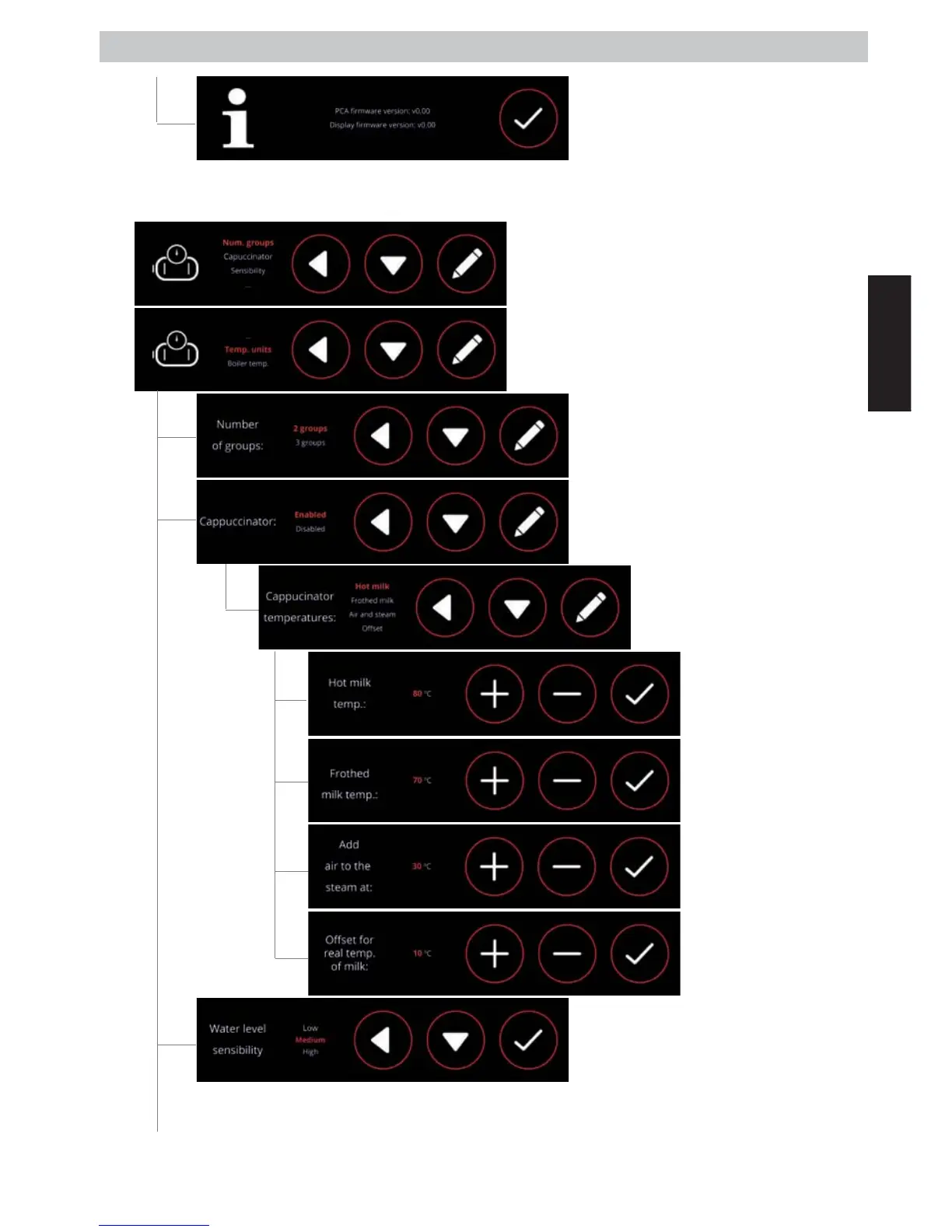
- COFFEE BOILER CONFIG: Through this menu we can edit the settings and visualisation for all
data related to the temperature, and sensitivity of the level sensor.
-
The screen shows the firmware version for
our control unit and display.
Select and modify the number of groups
available for our machine.
Through this screen we can go into
the various functions of the frother
to change the temperatures.
Through this screen we can enable or
disable the frother function, if our machine
has an automatic frother.
The display will highlight the selected
sensitivity so that the level sensor in the
steam boiler correctly detects the water it
contains. For purer (soft) waters we need to
increase the sensitivity.
Select the maximum
temperature the milk will
acquire when heated.
Select the maximum
temperature the milk will
acquire when frothed.
Select the temperature
from which air, mixed
with steam, is to be
injected, to froth the milk.
Selection of the
dierence between wand
temperature and real
temperature of the milk.



 To Next Page