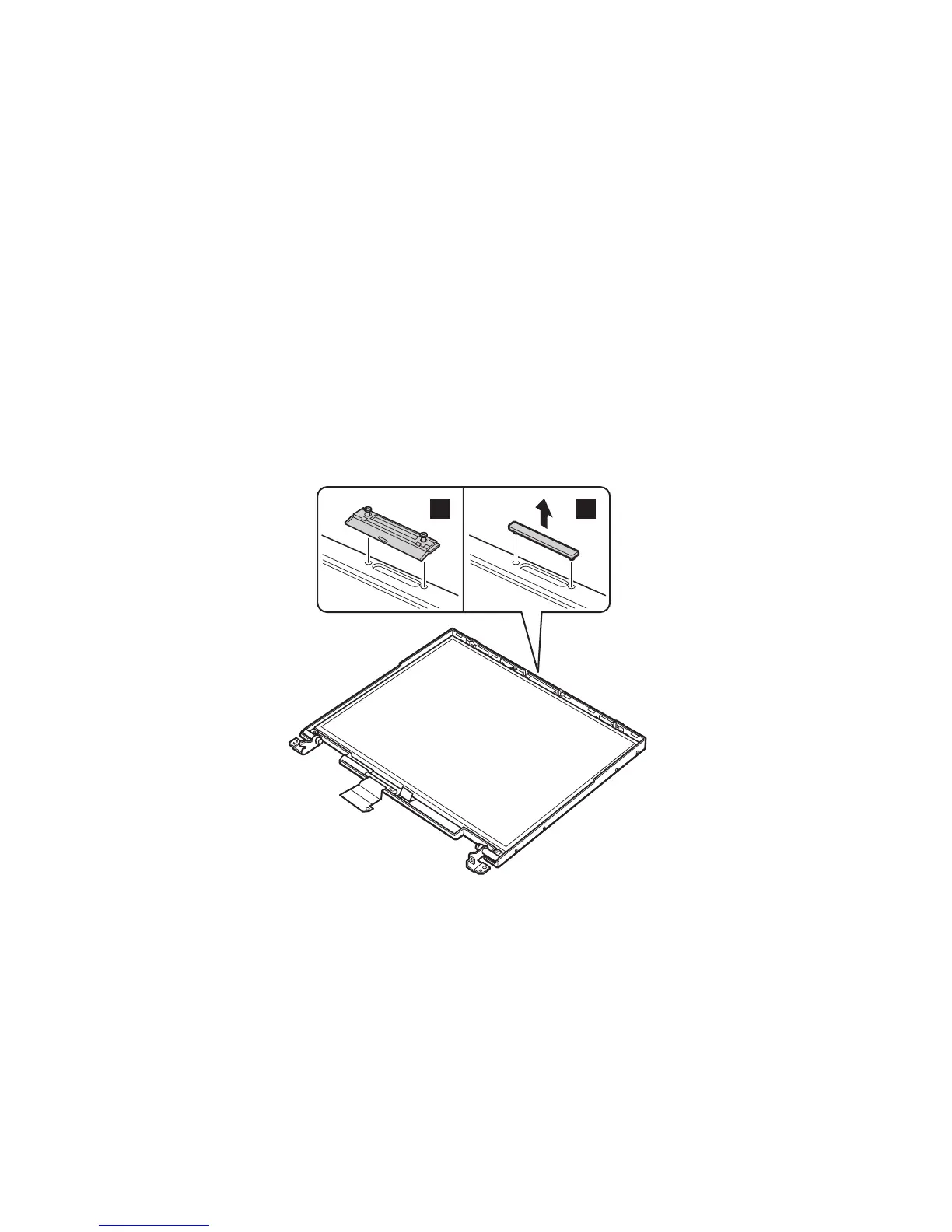
2040 LCD panel
For access, remove these FRUs, in order:
v “1010 Battery pack” on page 60
v “1020 Backup battery” on page 61
v “1030 Hard-disk drive” on page 63
v “1070 Ultrabay 2000 device” on page 73
v “1080 Keyboard” on page 74
v “1090 Keyboard CRU insulator” on page 82
v “1100 Hinge cover” on page 83
v “1110 Keyboard bezel” on page 88
v “1120 Fan assembly” on page 94
v “2010 LCD assembly” on page 119
v “2020 Front bezel” on page 122
v “2030 Inverter card” on page 123
Remove the UltraPort adapter if it has been screwed onto
the LCD. To do this, remove the screw from both side of
the adapter as shown in the figure 1a. Remove the
connector cover for the others as shown in the figure 1b.
1a
1b
(continued)
Removing and replacing a FRU
124 ThinkPad T20, T21, T22, T23 (MT 2647/2648)



 To Next Page