www.ichibot.id USER GUIDE Page 6
A PARTS OF ICHIBOT ULTIMATE 4S
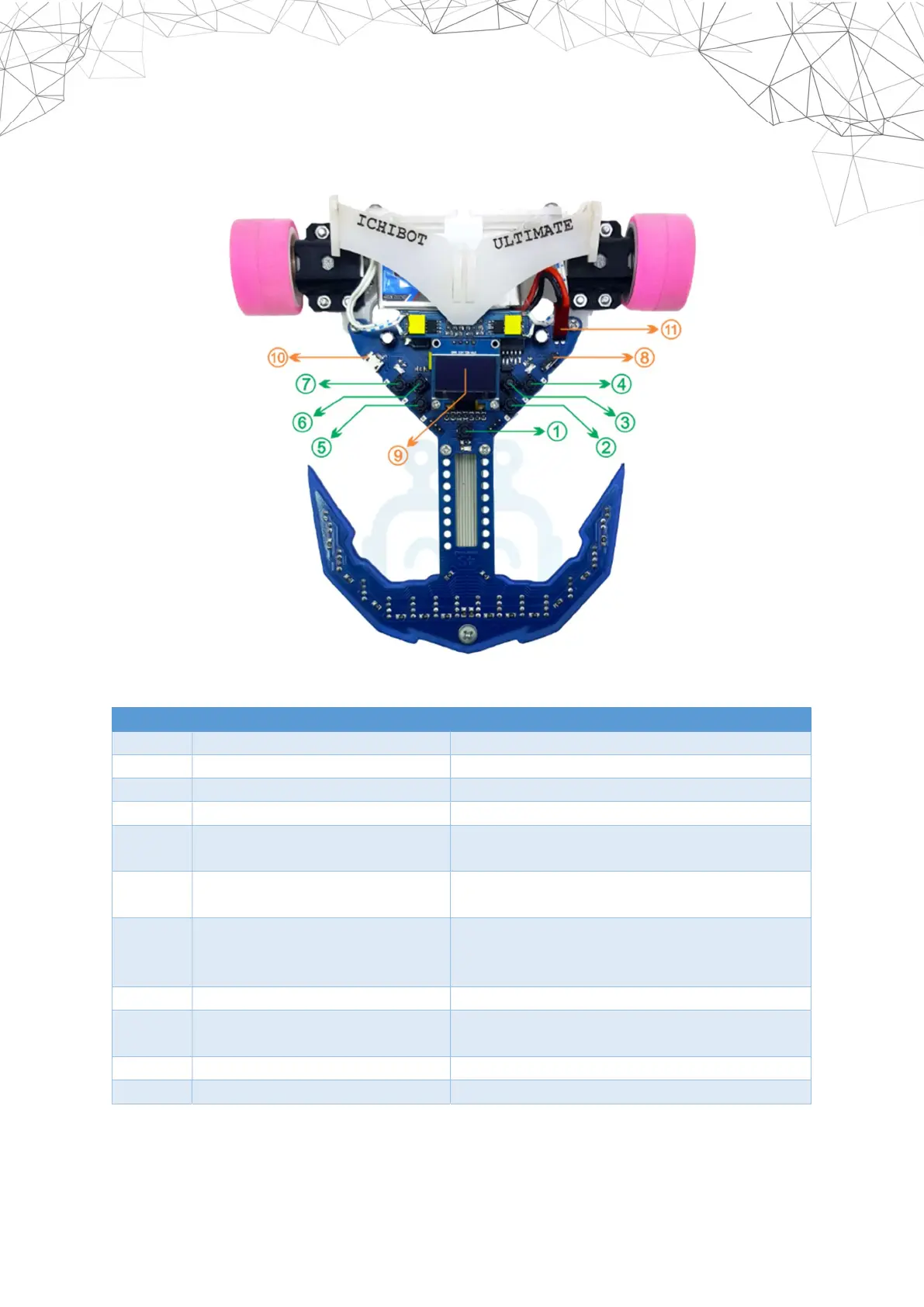
Here are the parts of ichibot ultimate 4s and their functions:
Number
Name Function
1 Restart Button Restarting the robot.
2 UP Left Button Moving the Menu Cursor.
3 DOWN Left Button Moving the Menu Cursor.
4 OK Left/Enter/OK Button Enter the submenu and the OK button.
5 UP Right Button Increasing number parameters or other
parameters.
6 DOWN Right Button Decreasing number parameters or other
parameters.
7 OK Right/Back/Start Button Return or Cancel. At the position of the
Homescreen this button is used to run the
robot (start).
8 ON/OFF Switch Turn off or turn on the robot.
9 LCD Display The viewer of the chios operating system
interface
10 Micro USB Socket Connectors to computers / laptops.
11 Battery Socket Lithium-polymer battery socket.


 To Next Page