www.ichibot.id USER GUIDE Page 12
PLAN SETTINGS
Hover over the home screen in the plan position then press the menu button, it will go to the
plan menu.
The PLAN is likened to a strategy folder that stores all the logic of the action of the robot to
be executed in the order of the index number. In ichibot ultimate 4s there are a maximum of
8 plans that can be used. Plan is symbolized by the letter P followed by its sequence number.
For example P1 is used for the allowance path, P2 is used for the big 32 trajectory, P3 for the
big 16 trajectory and P4 is used for the final trajectory or for trajectories that have different
starting positions e.g. P1 for start A and P2 for start B.
Note :
Each plan can store different indexes.
A plan can be copied and pasted to another plan with the copy plan feature.
The plan can be cleaned or returned to its default settings with the reset plan
feature.
T (trigger) and A (action) at index 0 cannot be changed.
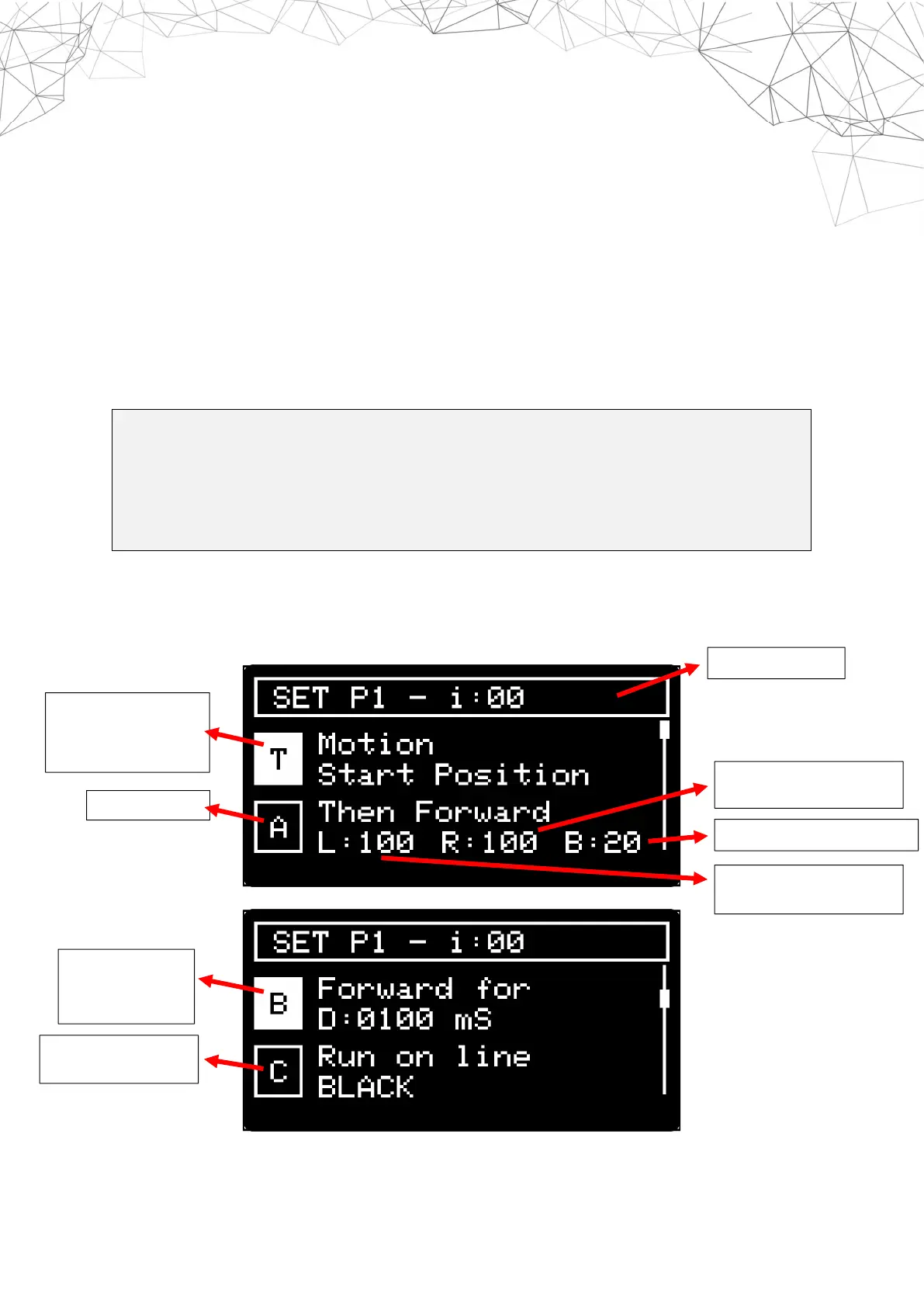
Here is the display in a plan on CHIOS. The example used is P1 :
INDEX NUMBER
TRIGGER or
REQUIREMENTS FOR
ACTION
BRAKE BEFORE THE ACTION
SPEED OF RIGHT MOTORS
SPEED OF LEFT MOTORS
DURATION
(DELAY) ROBOT
DOING ACTION
LINE COLOR THAT


 To Next Page