EasyManua.ls Logo

Icom IC-A200 - Frequency Setting Example

Icom IC-A200
16 pages
Print Icon
To Next Page IconTo Next Page
To Previous Page IconTo Previous Page
Loading...
al
2
FREQUENCY
SELECTION
i
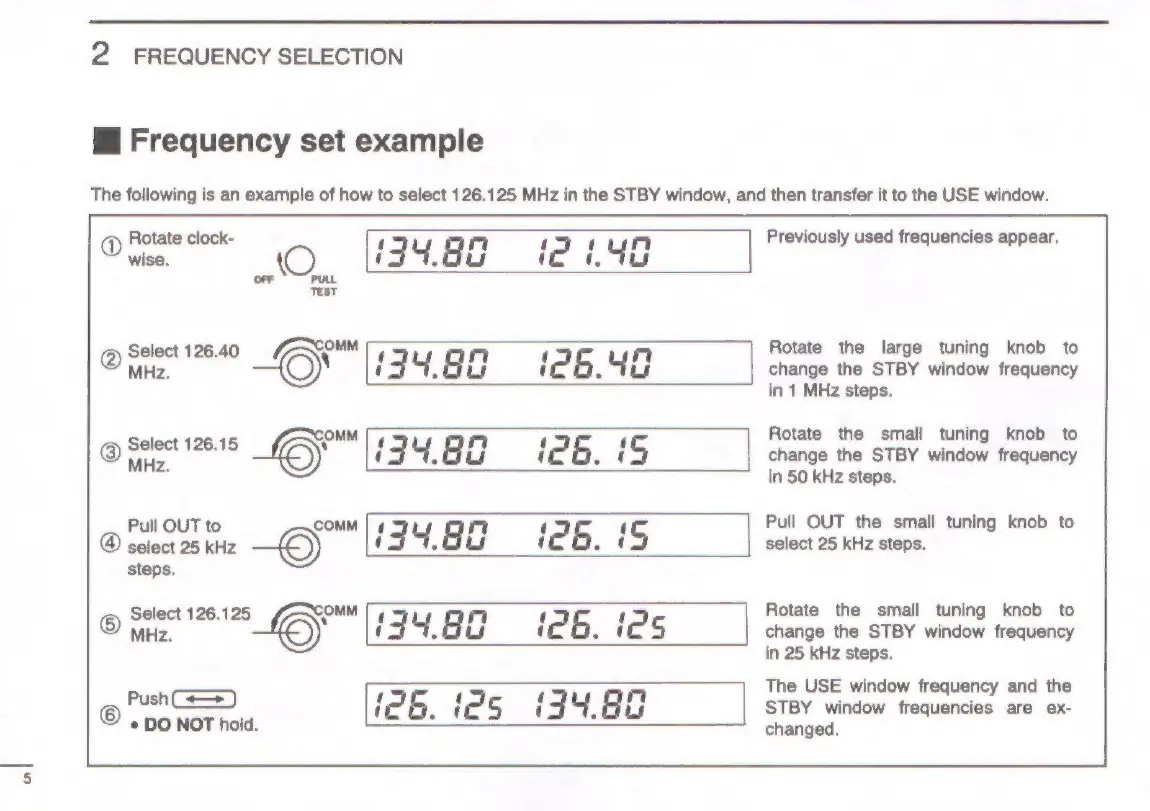
Frequency
set
example
The
following
is
an
example
of
how
to
select
126.125
MHz
in
the
STBY
window,
and
then
transfer
it
to
the
USE
window.
Rotate
clock-
I
rm
1 1
mr
Previously
used
frequencies
appear.
Dies.
(O
(34.8¢
i2
4G
on
Test
O)
Select
126.40
(/7->COMM
1
nm
1
nm
Rotate
the
large
tuning
knob
to
MHz.
Jj
uy
|
uw
iZ
6.
be
change
the
STBY
window
frequency
in
1
MHz
steps.
OMM
Rotate
the
small
tuning
knob
to
©)
on
NeeI6
6}
i
|
uf
HH
i
e
6.
i
5
change
the
STBY
window
frequency
in
50
kHz
steps.
Pull
OUT
to
COMM
|
¢
nm
Pull
OUT
the
small
tuning
knob
to
@
select
25
kHz
—6)
UJ
34.
aa
i26.
5
select
25
kHz
steps.
steps.
Select
126.125
OMIM
Tg
nm
t
Rotate
the
small
tuning
knob
to
©
MHz.
6;
U
|
4.4
aw
iZ
6.
ie
S
change
the
STBY
window
frequency
in
25
kHz
steps.
The
USE
window
frequency
and
the
@
Pun)
iZ
B.
id
5
i
=]
oY,
8a
STBY
window
frequencies
are
ex-
*
DO
NOT
hold.
changed.

Other manuals for Icom IC-A200

Related product manuals