17
4
BIIS OPERATION
DD
Group call
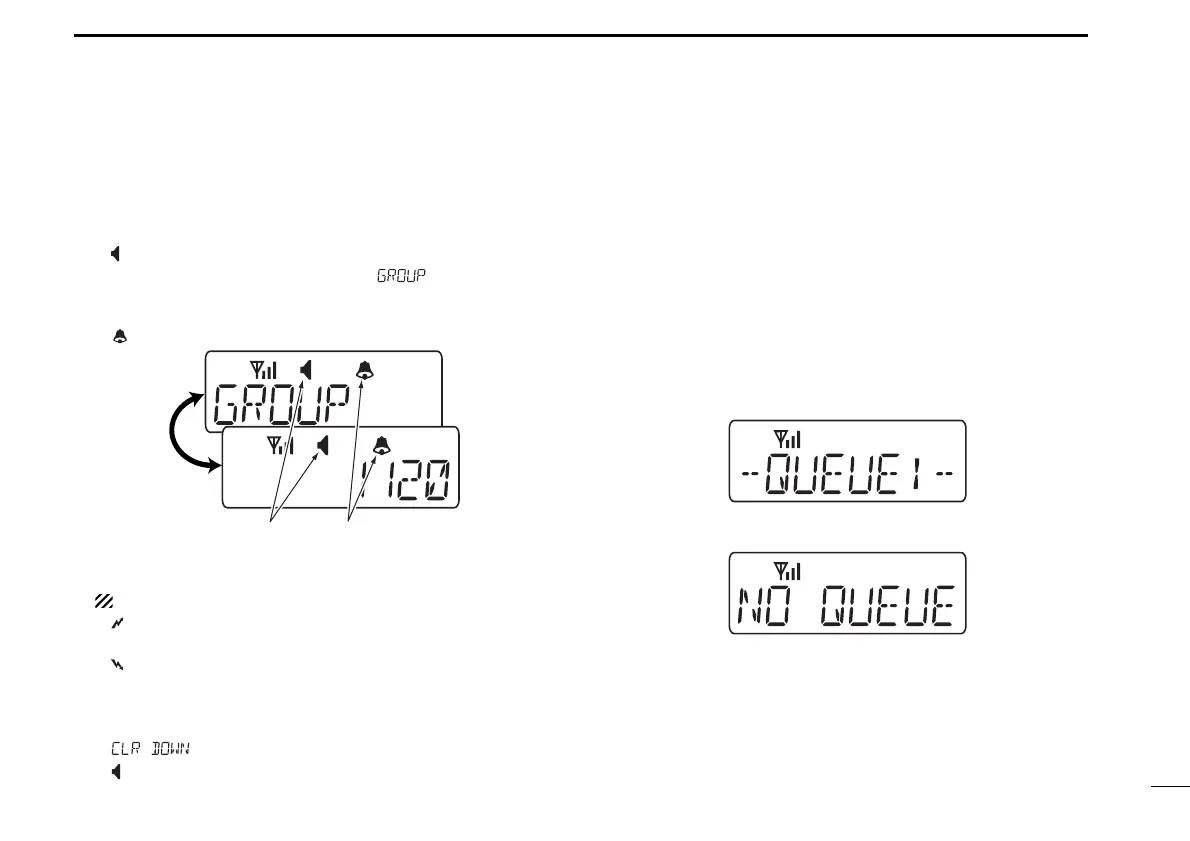
q When a group call is received;
• Beeps sound.
•“ ” appears and the mute is released.
•The programmed text message (e.g.“”) and the calling
station ID (or text) is displayed alternately, depending on the set-
ting.
•“ ” appears or blinks depending on the setting.
w Push and hold [PTT], then speak into the microphone at a
normal voice level.
NOTE: Only one station is permitted to speak.
•“ ” appears.
e Release [PTT] to return to receive.
•“ ” appears while receiving a signal.
r To finish the conversation, push [MONITOR] (Moni(Audi))
to send the ‘Clear down’ signal.
• Either station can send a ‘Clear down’ signal.
•“ ” is displayed for 2 sec. (approx.)
•“ ” disappears and the transceiver returns to the standby condi-
tion.
DD
Displaying the received call record
— Queue indication
The transceiver memorizes the calling station IDs for record.
Up to 3 calls can be memorized, and the oldest call record is
erased when a 4th call is received. However, once the trans-
ceiver is powered OFF, the all records are cleared.
q Push [P1] (Digital) for 1 sec.
• Displays following indication.
When a record is available
When no record is available
w Push [UP] or [DOWN] to select the desired call.
e Push [P1] (Digital) for 1 sec. again to return to the standby
condition.
•When no operation is performed for 30 sec., the transceiver
returns to the standby condition automatically.
IC-F34_44GT_GS-1.qxd 04.9.24 10:26 AM Page 17 (1,1)



 To Next Page
 Loading...