20
4
BIIS OPERATION
■ Receiving a message
DD
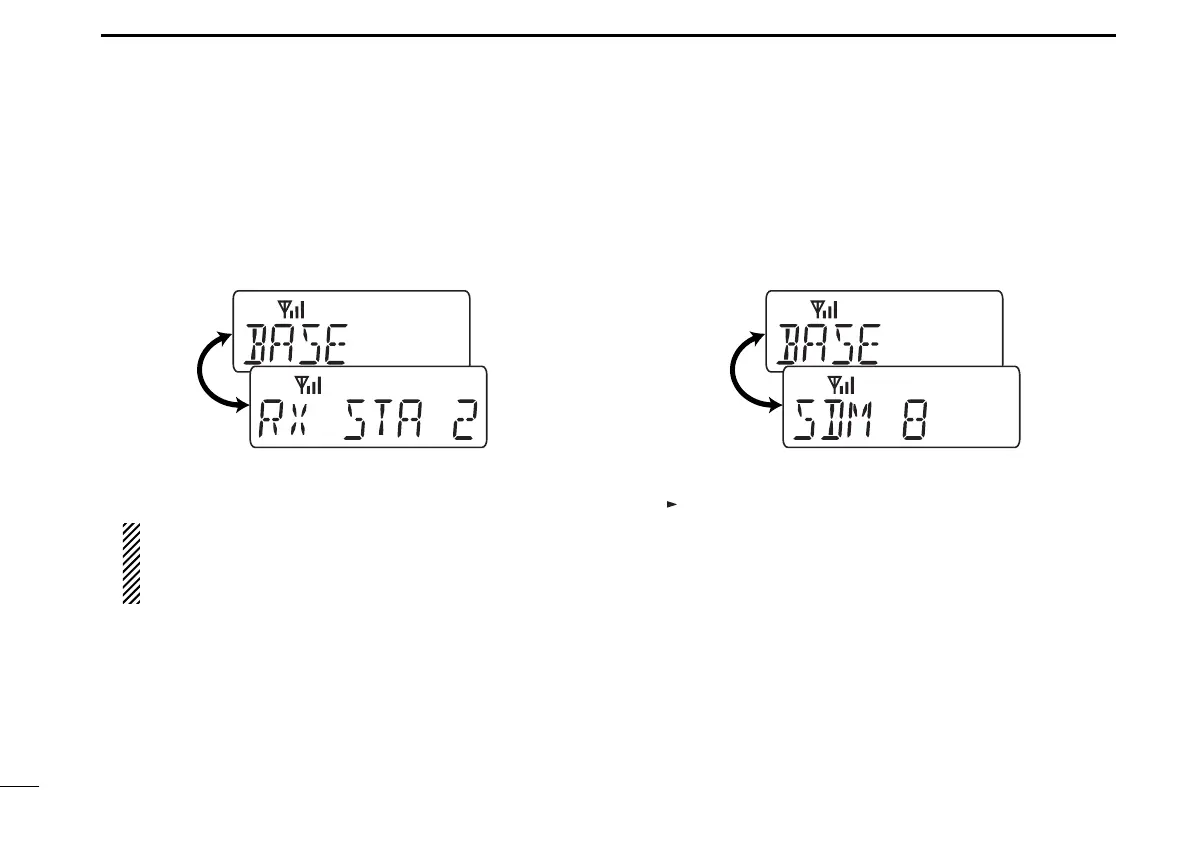
Receiving a status message
q When a status message is received;
• Beeps sound.
• The calling station ID (or text) and the status message is dis-
played alternately, depending on the setting.
w Push [MONITOR] (Moni(Audi)) to return to the standby
condition.
NOTE: Only the calling station ID (or text) is displayed (no
message is displayed alternately) when the scroll timer is
set to ‘OFF.’ In this case, push [Status Up]/[Status Down]
to display the status message manually.
DD
Receiving an SDM
q When an SDM is received;
• Beeps sound.
• The calling station ID (or text) and the SDM is displayed alter-
nately, depending on the setting.
w When the received SDM includes more than 8 characters,
“” appears and the message scrolls automatically, when
the automatic scroll function is activated.
• Push [Status Up]/[Status Down] to scroll the message manually.
e Push [MONITOR] (Moni(Audi)) to return to the standby
condition.
IC-F34_44GT_GS-1.qxd 04.9.24 10:26 AM Page 20 (1,1)



 To Next Page
 Loading...