EasyManua.ls Logo

Icom IC-T81E - Pll Adjustment

Icom IC-T81E
53 pages
Print Icon
To Next Page IconTo Next Page
To Previous Page IconTo Previous Page
Loading...
5 - 2
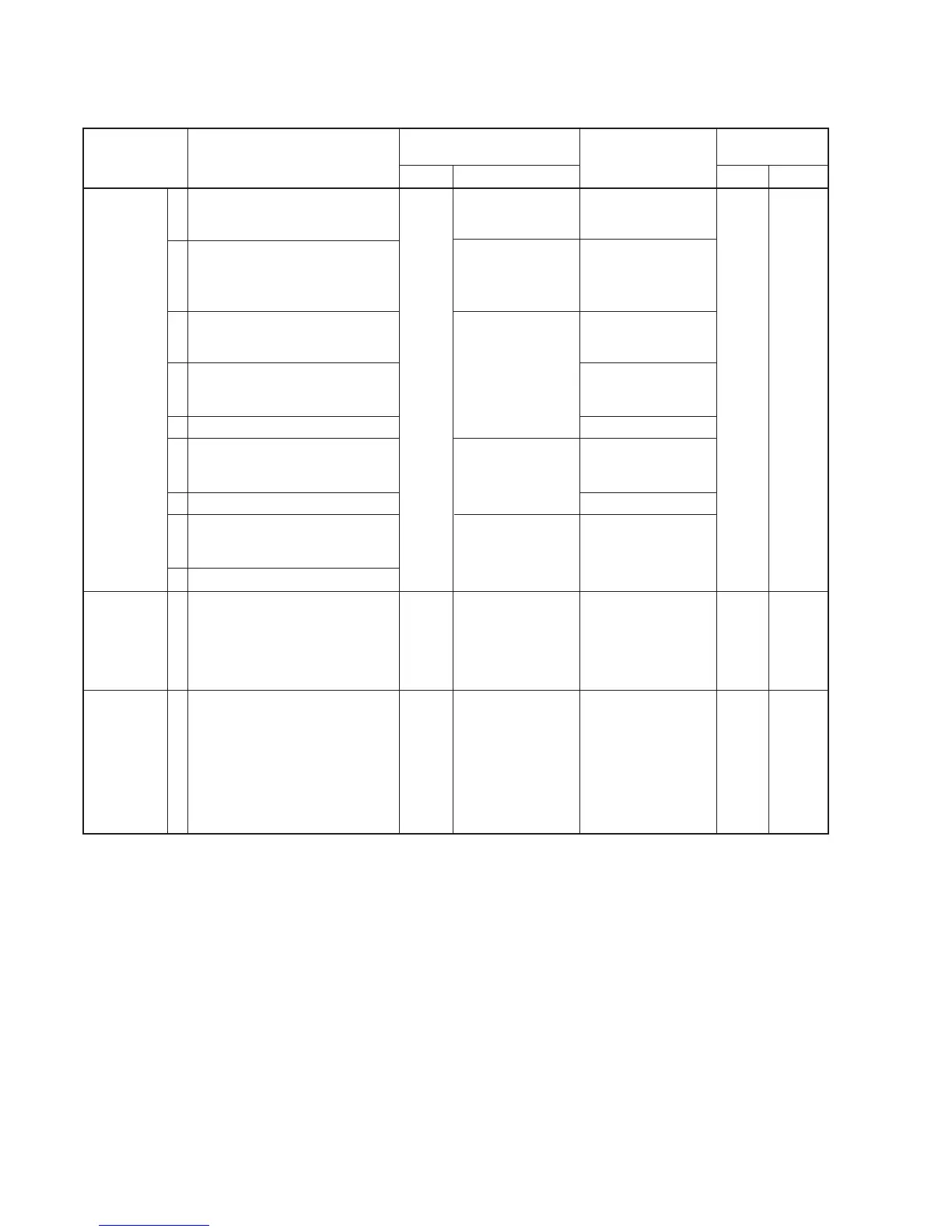
5-2 PLL ADJUSTMENT
The following adjustment must be performed at “ADJUSTMENT MODE”.
PLL LOCK
VOLTAGE
REFERENCE
FREQUENCY
DETECTER
OUTPUT
VOLTAGE
ADJUSTMENT
ADJUSTMENT ADJUSTMENT CONDITION
MEASUREMENT
VALUE
POINT
UNIT LOCATION UNIT ADJUST
1
2
3
4
5
6
7
8
1
1
• Displayed frequency :
51.000 MHz
• Receiving
• Transmitting
• Displayed frequency :
88.000 MHz
• Receiving
• Displayed frequency :
145.000 MHz
• Receiving
• Transmitting
• Displayed frequency :
440.000 MHz
• Receiving
• Transmitting
• Displayed frequency :
1270.000 MHz
• Receiving
• Transmitting
• Displayed frequency :
1270.000 MHz
• Transmitting
• Displayed frequency :
445.000 MHz [USA-1] only
435.000 MHz [ohter]
• Connect an SSG to the antenna
connector and set as:
Level : 1 mV
*
(–47dBm)
Modulation : OFF
• Receiving
RF
Top
Pannel
LOGIC
Connect the DC
voltmeter or an
oscilloscope to VLV.
Connect the DC
voltmeter or an
oscilloscope to
6MLV.
Connect the DC
voltmeter or an
oscilloscope to VLV.
Connect the DC
voltmeter or an
oscilloscope to ULV.
Connect the DC
voltmeter or an
oscilloscope to
12LV.
Loosely couple the
frequency counter
to the antenna con-
nector.
Connect a digital-
voltmeter to the
check point Q.
0.8 V – 1.8 V
1.8 V – 2.8 V
1.4 V – 2.4 V
1.5 V – 2.5 V
1.5 V – 2.5 V
2.0 V – 2.5 V
2.0 V – 2.5 V
1.9 V – 2.9 V
1270.0000 MHz
1.0 V
Top
panel
LOGIC
Verify
Push and
hold the
[SQL] key,
then turn
the [DIAL]
L702
*This output level of the standard signal generator (SSG) is indicated as SSG’s open circuit.

Related product manuals