EasyManua.ls Logo

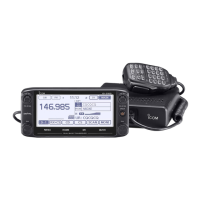
Icom ID-5100A - User Manual

Icom ID-5100A
2 pages
Print Icon
To Next Page IconTo Next Page
Loading...
MENU ITEMS (Shows only the groups and the next level items)
DUP/TONE... group
Offset Freq
Repeater Tone
TSQL Freq
Tone Burst
DTCS Code
DTCS Polarity
Digital Code
Manage Memory group
Memory CH
Call CH
Scan group
Pause Timer
Resume Timer
Temporary Skip Timer
Program Skip
Bank Link
Program Scan Edge
Program Link
Voice Memo group
QSO Recorder
DV Auto Reply
Voice TX group
Record
TX Set
<<TX>>
GPS group
GPS Set
GPS TX Mode
GPS Information
GPS Position
GPS Memory
GPS Alarm
GPS Logger
GPS Auto TX
Call Sign group
RX History group
DV Memory group
Your Call Sign
Repeater List
My Station group
My Call Sign
TX Message
QUICK MENU ITEMS
ID-5100A/ID-5100E
Operating Guide
VFO mode MR mode
CALL-CH mode
DR function
Band Select Bank Select GPS Information Group Select
GPS Information GPS Information GPS Position Repeater Detail
GPS Position GPS Position
Weather Infomation
GPS Information
Weather Infomation
Weather Infomation
Temporary Skip
GPS Position
Temporary Skip
Temporary Skip
PRIO Watch
Weather Infomation
PRIO Watch PRIO Watch Weather CH* Temporary Skip
Weather CH* Weather CH* Weather Alert* PRIO Watch
Weather Alert* Weather Alert* Display Type Weather CH*
Home CH Set Home CH Set Voltage Weather Alert*
Voltage Display Type <<REC Start>> Home CH Set
<<REC Start>> Voltage <<Lock>> Display Type
<<Lock>> <<REC Start>> Voltage
<<Lock>> <<REC Start>>
<<Lock>>
Appears when the D-PRS TX format is set to “Weather.
Appears while scanning.
*Appears for only the USA version transceivers
In the Quick Menu, the selectable items differ, depending on the operating
mode or function. The items shown below are examples.
A-7115H-1EX-q
Printed in Japan
©
2014 Icom Inc.
Touch to display the Quick Menu.
DV Set group
Tone Control
Auto Reply
DV Data TX
Digital Monitor
Digital Repeater Set
DV Auto Detect
RX Record (RPT)
BK
EMR
EMR AF Level
SPEECH group
RX Call Sign SPEECH
RX>CS SPEECH
DIAL SPEECH
MODE SPEECH
SPEECH Language
Alphabet
SPEECH Speed
SPEECH Level
DTMF group
DTMF Memory
DTMF Speed
QSO/RX Log group
QSO Log
RX History Log
CSV Format
Function group
Squelch/ATT Select
Squelch Delay
Fan Control
Dial Speed-UP
Auto Repeater*
Remote MIC Key
Up/Down MIC Key
One-Touch PTT (Remote MIC)
PTT Lock
Busy Lockout
Time-Out Timer
Active Band
MIC Gain
Touch Operation (Sub)
Keyboard Type
Data Speed
CI-V
Heterodyne
Power OFF (With No Controller)
Display group
Backlight
Auto Dimmer
Auto Dimmer Timer
Touch Operation (Dimmed)
LCD Contrast
RX Call Sign
RX Position Indicator
RX Position Display
RX Position Display Timer
Reply Position Display
TX Call Sign
Scroll Speed
Opening Message
Voltage (Power ON)
Display Unit
System Language
Sounds group
Beep Level
Key-Touch Beep
Home CH Beep
Band Edge Beep
Scan Stop Beep
Standby Beep
Sub Band Mute
Scope AF Output
Time Set group
Date/Time
GPS Time Correct
UTC Offset
Auto Power OFF
SD Card group
Load Setting
Save Setting
Import/Export
SD Card Info
Format
Unmount
Bluetooth Set group
Bluetooth
Auto Connect
Pairing/Connect
<<Paring Reception>>
Headset set
Data Device set
Bluetooth Device Information
Initialize Bluetooth Device
Others group
Information
Clone
Repeater Mode*
Touch Screen Calibration
Reset
*Appears depending on the transceiver’s version.

Other manuals for Icom ID-5100A

Questions and Answers

  • C
    carrillojamesSep 9, 2025
    What to do if Icom Transceiver replies ‘UR?’ and its call sign?
    • S
      stephaniemaldonadoSep 9, 2025
      If your Icom Transceiver replies with 'UR?' and its call sign after your call, it means the call was successfully sent, but no station immediately replied. Wait for a while, and try again.
  • V
    Victoria DanielSep 8, 2025
    What to do if Icom ID-5100A replies ‘RPT?’ and its call sign?
    • A
      April PerrySep 8, 2025
      If your Icom Transceiver replies with 'RPT?' and its call sign after your call, the destination repeater call sign is likely incorrect. Correctly set the destination repeater call sign.
  • J
    Jamie KellerSep 7, 2025
    What to do if Icom ID-5100A Transceiver does not return a status reply after my call?
    • J
      Joshua HebertSep 7, 2025
      If your Icom Transceiver does not return a status reply after your call, several factors could be at play. The repeater setting might be incorrect; if so, select the correct repeater. Your transmission may not be reaching the repeater; in that case, correct the repeater frequency, frequency offset, or duplex setting. You can also try waiting until you are closer to the repeater, or try to access another repeater.
  • B
    Beth WalkerAug 22, 2025
    What to do if Icom ID-5100A doesn't return a signal from the repeater?
    • M
      Michelle ColeAug 22, 2025
      If, after transmitting, you receive no signal from the repeater, several factors could be at play. First, verify that the repeater setting is correct by selecting the appropriate repeater. If that's not the issue, your transmission might not be reaching the repeater; in this case, correct the repeater frequency, frequency offset, or duplex setting. If problems persist, try again when you are closer to the repeater or attempt to access another repeater.
  • M
    Mark CoxSep 4, 2025
    Why does 'L' appear on my Icom ID-5100A Transceiver and the audio is interrupted?
    • A
      Amanda MurphySep 4, 2025
      If the Icom Transceiver displays 'L' on the LCD and the received audio is interrupted, it's likely due to packet loss from a network error during internet reception. The suggested solution is to wait a while and try again.
  • T
    Thomas MorganSep 3, 2025
    How to fix the digital code squelch (CSQL) that is impossible on Icom ID-5100A Transceiver?
    • C
      cardenasangelaSep 3, 2025
      If the digital code squelch (CSQL) is impossible on your Icom Transceiver, the wrong digital code is set. Set the correct digital code.
  • S
    Stacey CarrSep 2, 2025
    How to solve the issue when the received call sign does not set to the destination call sign to make a call back on Icom ID-5100A?
    • S
      Steve ContrerasSep 2, 2025
      If, even when holding down [RX>CS], the received call sign does not set to the destination call sign to make a call back on your Icom Transceiver, the transceiver did not correctly receive the call sign data. Try it again after the transceiver has correctly received the call sign.
  • K
    katelyn78Sep 1, 2025
    What does 'L' appearing on the LCD of Icom Transceiver mean?
    • D
      Danielle HendricksSep 1, 2025
      If “L” appears on the LCD of your Icom Transceiver, while receiving data through the Internet, some packets may be lost due to a network error. Wait a while, and try it again. When the transceiver receives corrupted data, and misidentifies it is as packet loss, “L” appears, even if it is a Local area call.
  • J
    Jeremy MurphyAug 31, 2025
    How to fix a Local area call that can be made, but the Gateway call or destination station call cannot be made on Icom ID-5100A Transceiver?
    • D
      David BurnsAug 31, 2025
      If a Local area call can be made, but the Gateway call or destination station call cannot be made on your Icom Transceiver, your call sign (MY) has not been registered on a D-STAR repeater. Register your call sign (MY) on a D-STAR repeater, or confirm the registration of the call sign.
  • F
    Frank BanksAug 29, 2025
    Why doesn't the DR screen appear even when holding down [DR] on Icom ID-5100A Transceiver?
    • L
      Lisa HolmesAug 30, 2025
      If the DR screen does not appear even when holding down the [DR] button on your Icom Transceiver, it could be due to a missing repeater list. Reload the repeater list using the SD card or enter the Repeater list data directly into the transceiver.

Summary

Radio Menu Items Overview

Manage Memory Group

Manages memory channels and call channels for radio operations.

Scan Group

Configures scan settings for searching frequencies and memory channels.

GPS Group

Manages GPS settings, position, and logging functions.

Function Group

Controls various operational functions like squelch and PTT settings.

Quick Menu Items by Mode

VFO Mode Quick Menu

Quick menu items selectable in VFO mode for frequency tuning.

MR Mode Quick Menu

Quick menu items selectable in Memory Recall (MR) mode.

CALL-CH Mode Quick Menu

Quick menu items selectable in Call Channel mode.

DR Function Quick Menu

Quick menu items selectable for the Digital Repeater (DR) function.

Touch Screen Operations

Touch Area Description

Explains the touch-sensitive areas on the display for various operations.

Touch Operation Types

Details short touch and long touch operations and their feedback.

Display Selection

Covers selection between single or dual band display modes.

Frequency Tuning Controls

Explains "MHz" tuning, tuning step selection, and band selection.

Icom ID-5100A Specifications

General IconGeneral
BrandIcom
ModelID-5100A
CategoryTransceiver
LanguageEnglish

Related product manuals