DGX-IP1000C/IP100H -V1.0
6
STEP 4: IP100H SETTINGS (A CS-IP100H is necessary to set up the IP100H)
BEFORE you use a CS-IP100H, the following procedures are required. See the CS-IP100H and OPC-
478UC instruction manuals for setting and installation details.
• Install the CS-IP100H (Cloning software)
• Install the OPC-478UC (Cloning cable)’s USB driver
• Connect the OPC-478UC and the IP100H
• Run the CS-IP100H
The setting steps are as follows:
STEP 4-1 TR 1 settings
STEP 4-2 TR 2 settings
STEP 4-1 TR 1 settings
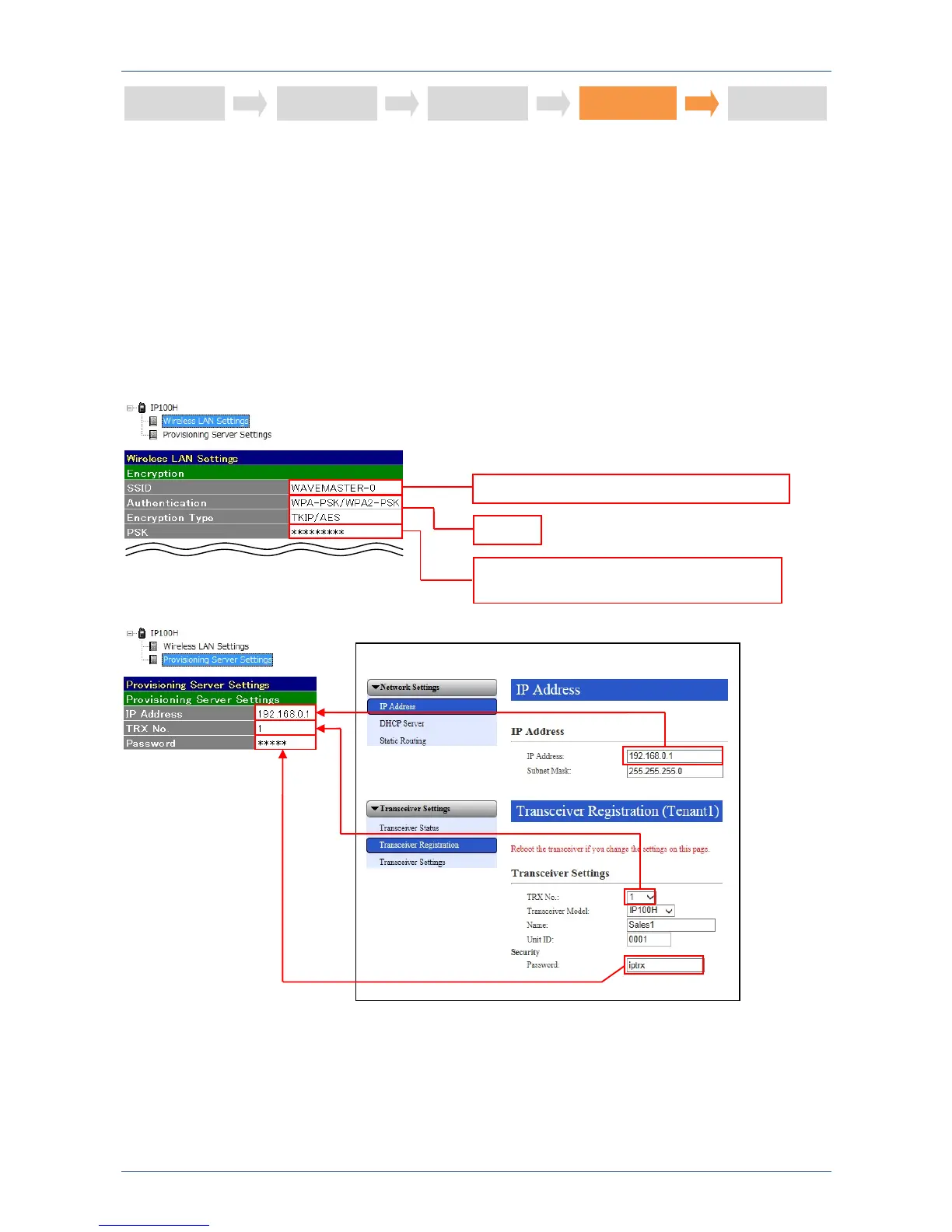
IP1000C’s setting screen
Enter the same SSID as the access point
Enter the same PSK as the access point
(Enter “5cf97dgh6” here)
Select
STEP 1
STEP 2
STEP 3
STEP 5
STEP 4



 To Next Page