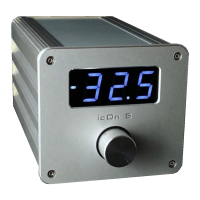
Volume: turn the Volume up with the button on top (1) and turn down with
the button on bottom (2).
Changing the Inputs: Inputs can be changed with the left and right
buttons (3) if Balance adjustment is not active. If Balance adjustment is
active to go back to normal listening mode push the Menu button again.
Changing the Outputs: Press the PLAY/PAUSE (4) button on the remote
to mute the music. In the muted state pressing the volume up button the
active output is changing and the number of the actual active output is
displayed on the right of the display. On the left you can see the active
input number. The output numbers show the engraved numbers above the
output sockets. The output 3 indicates when both outputs (1+2) are active.
You can go back to music listening with the chosen output(s) with pressing
again PLAY/PAUSE (4) button.
Changing the Balance: Select the Balance function with pushing the
Menu button (6) . On the display a “b”, the number of 0.5 dB balance steps
and a dash will appear, showing the state of the balance. When both sides
have equal volume the number is 0 and the dash will appear in the middle.
The dash in the top position will indicate higher volume on the right side.
Adjust the Balance (in range +/- 9 steps) with the left and right (3) buttons.
When you push the left button the level of the left channel is increasing
and the right channel’s volume decreasing (and vice versa). To go back to
the normal listening mode you should press the Menu button again, where
you can change the Inputs with the right and left (3) buttons. The balance
adjustment is disabled near the extreme ends to preserve the integrity of
the channels.
Central Button: The button 5 (in the centre of the black circle) has two
different functions. Pushing the central button the number of activated
input and the state of buffered (buF) or passive (PAS) mode are displayed
for 2 seconds to check the status of icOn anytime without any change. If
icOn 5 is muted then this button will take icOn into sleep mode. In sleep
mode the display is dark with a dim point in the middle. Every preamp
function is disabled, the outputs are inactive. Double touch the sensor on
the faceplate or push the PLAY/PAUSE button on the remote to wake up
icOn from sleep.
7


 To Next Page
 Loading...