Input buffer activation / deactivation: Press the Volume down button
after pressing the Play / Pause button. The new buffer state (PAS / buF)
will be displayed. Press again the Play / Pause button again.
MUTE: Press the PLAY/(4) button on the remote to mute or unmute the
music. Pressing the 1,2 or 3 buttons in Mute initiates an Unmute too. The
Mute/Unmute changes are not abrupt but quick, pleasant up or down
sweeps. In Mute state -99 is shown on the display.
LED Display Night Mode: First activate Mute and after that you can
activate/deactivate the Night Mode pushing the Menu button (6). Go back
to the normal Listening Mode with the PLAY/PAUSE button. In Night Mode
the volume numbers are not displayed, only a dimmed dash but it goes
back to full display for a short time when you initiate any change.
USING THE KNOB AND THE HIDDEN TOUCH
SENSOR
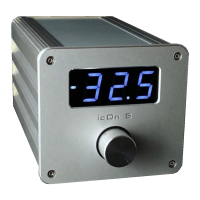
Turn the knob right: Volume Up
Turn the knob left: Volume Down
Touch sensor: invisible, it’s behind the upper left corner of the
display window. In order to reach certain functions you will need to
combine short (•) and long (–) touches.
Here you can nd the combinations:
• next input (after last input comes input 1 again)
– mute / un-mute
• – night mode activation/deactivation. After activation a dim dash will be
displayed in night mode. Deactivate the night mode with one short and
one long touch again on the sensor
• • sleep mode / wake up from sleep state
Personalisation possibilities:
• • • You choose between two display brightness. They alternate with every
3 clicks the brighter and dimmer state
8


 To Next Page