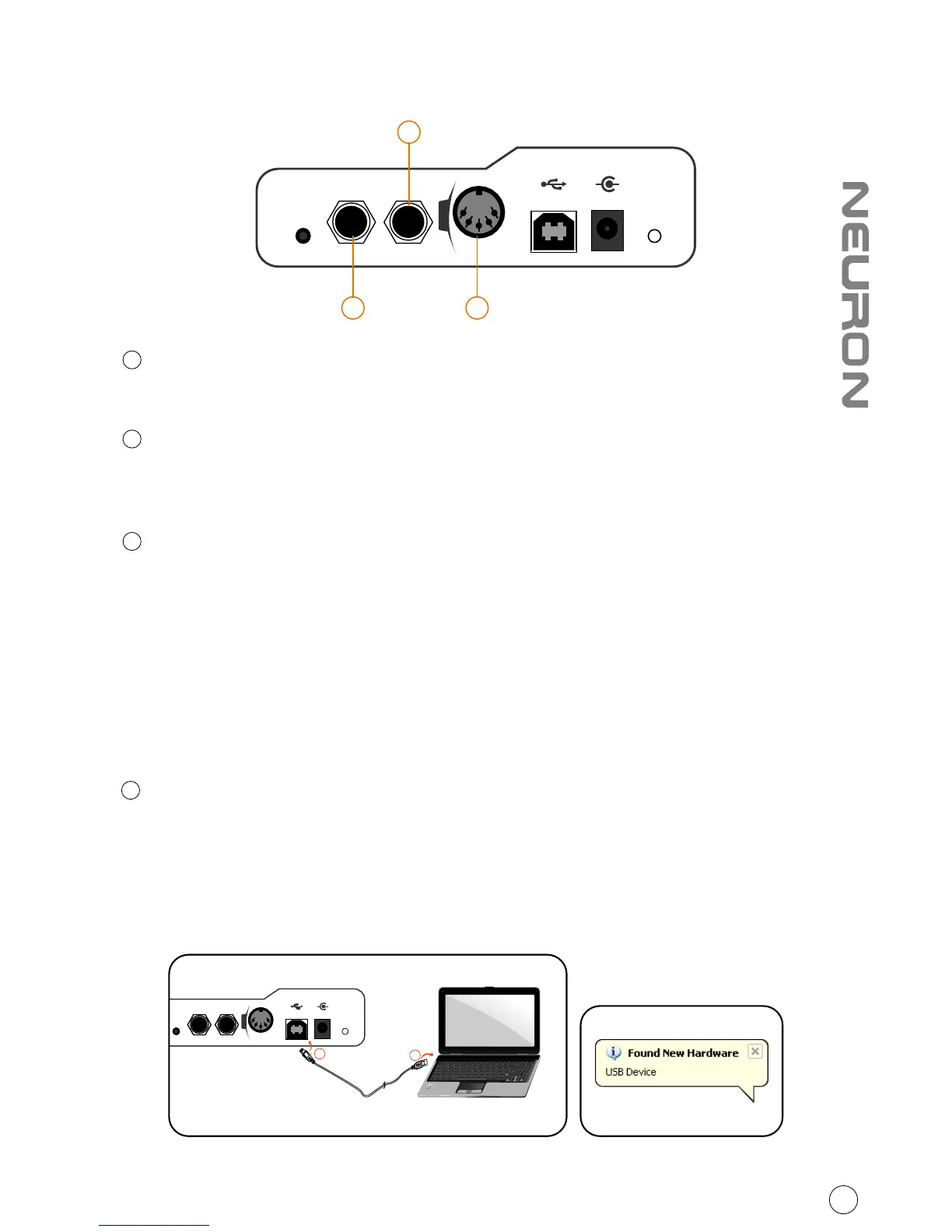
Rear panel layout
Expression Pedal Input
A standard expression pedal can be connected via this 1/4” input.
Sustain Pedal Input
This 1/4” jack can be used to connect a momentary footswitch, like a piano's
sustain pedal. (ICON SPD-01)
Midi Out Port
Use the MIDI Out terminal to connect an external synthesizer or sound module.
1
2
3
Getting Started
Connecting your Neuron G2 controller system
1
Connect the Neuron G2 to your Mac/PC via the USB port.
Choose a USB port on your Mac/PC and insert the wide (flat) end of the USB
cable. Connect the cable's small jack end to the Neuron G2. Your Mac/PC
should automatically “see” the new hardware and notify you that it is ready
to use.
Diagram 1 Diagram 2
b



 To Next Page