34
iMap
TM
Software for Mac OS X
Please follow the procedures below step-by-step to launch your iMap
TM
software to
Mac OS X.
1. Insert the Utility CD in your CD-
Rom and double click “Platform M+
iMap” icon.
Tip: By "drag and drop" the Platform-M+" icon
into the "Applications" folder, you could create
a"iMap" shortcut on your Mac's desktop.
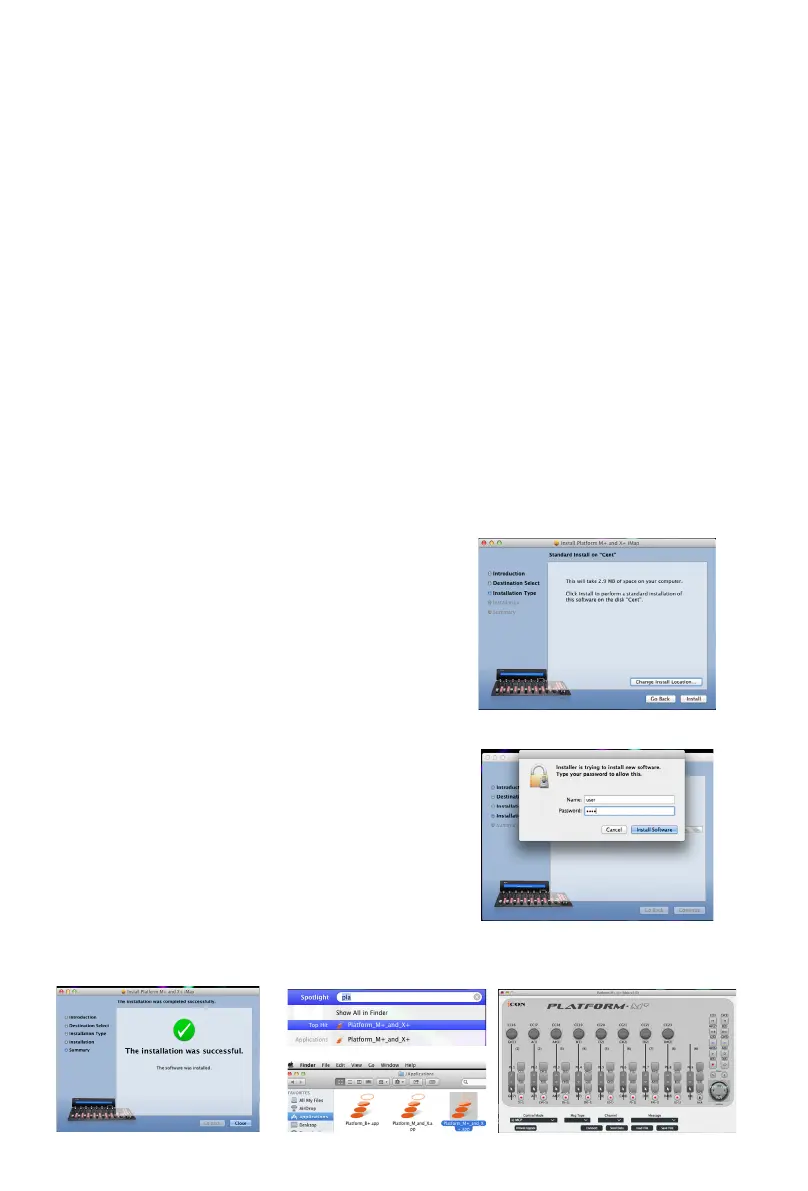
2. Click Continue".
3. Click "Install".
4. Input your password to allow the
installation to start .
5. When the installation is complete,
click "Close".
6. You could nd the Platform_M + _and_
X + application inside the "Spotlight"
and click to run it.
Or you coudle open the "Applications" folder
in Finder and run the iMap.
7. User-interface of the iMap.
Tip: By "drag and drop" the Platform-M+" icon
into the "Applications" folder, you could create
a"iMap" shortcut on your Mac's desktop.



 To Next Page