11
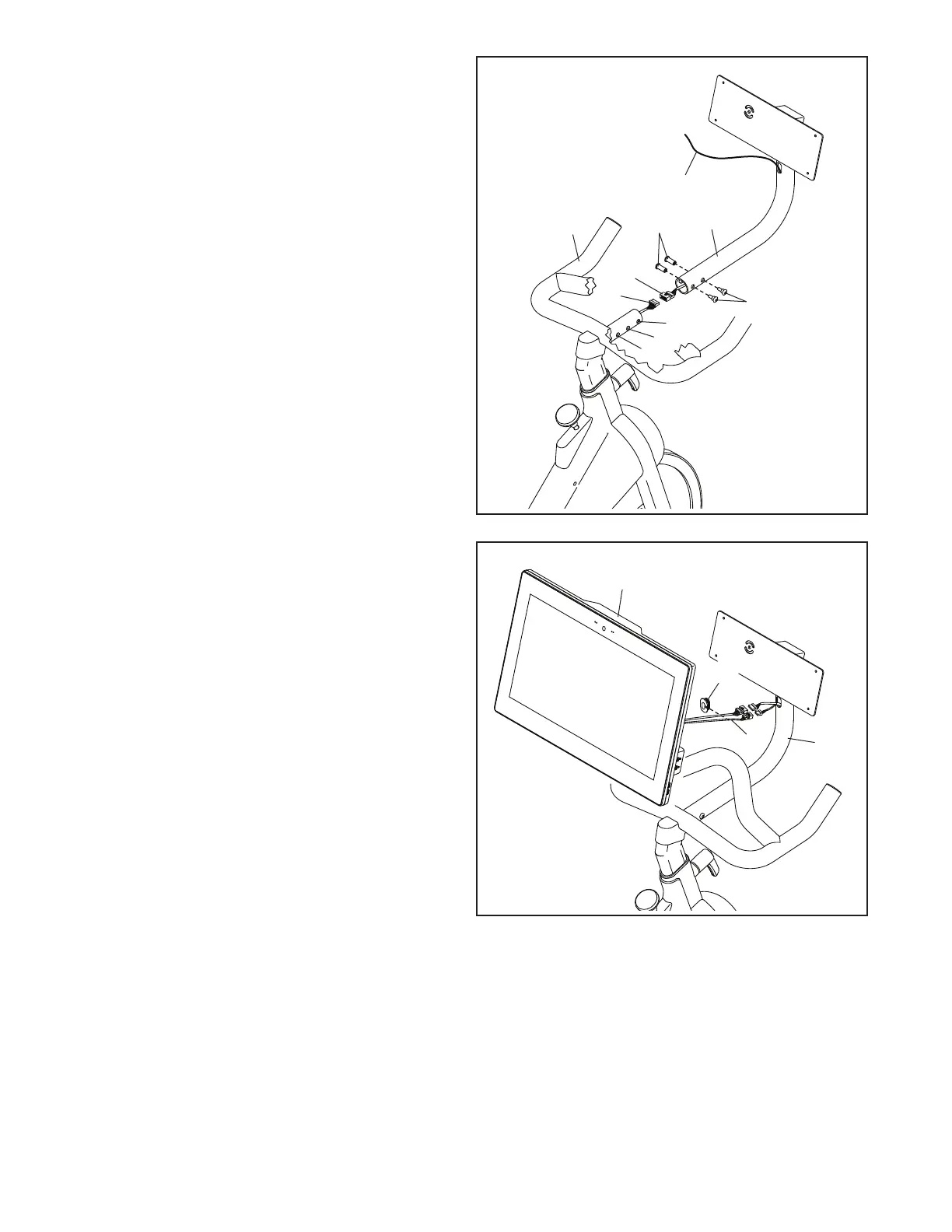
10. While a second person holds the Console
Mount (5) near the Handlebar (4), connect the
Mount Wire (91) in the Console Mount to the
Handlebar Wire (90) in the Handlebar.
Tip: Avoid pinching the wires. Gently pull on
the wire tie (E) as you slide the Console Mount
(5) onto the Handlebar (4). Make sure that the
wires inside the Handlebar are out of the way
of the bolt holes.
You can attach the Console Mount (5) in either
the standard position or the extended position.
For the standard position, align the Console
Mount with the inner holes (F, G). For the
extended position, align the Console Mount with
the outer holes (G, H).
Tip: Avoid pinching the wires. Attach the
Console Mount (5) with two M6 Bolt Sets (70).
11
11. While a second person holds the Console (6)
near the Console Mount (5), press the Wire
Protector (98) around the Console Wires (I) in
the location shown.
5
6
I
10
70
5
F
G
H
E
4
Avoid pinching
the wires
70
91
90
98




 To Next Page