
 Need help?
Do you have a question about the ICON PRO-FORM SMART STRIDER 495 CSE and is the answer not in the manual?
Instructions for connecting the power adapter to the elliptical and power outlet.
Steps to adjust the leveling feet to stabilize the elliptical.
Guidance on securely placing and adjusting a tablet in the holder.
How to mount, pedal, and dismount the elliptical safely.
Steps for folding and storing the elliptical safely, noting weight requirements.
Visual layout of the elliptical's console buttons and displays.
Description of the console's advanced features for enhanced workouts.
Instructions for playing audio through the console speakers.
Details about the optional chest heart rate monitor and its benefits.
Steps for connecting a tablet to the console via Bluetooth.
Steps to pair a Bluetooth heart rate monitor with the console.
How to change measurement units and view console usage information.
General advice on regular maintenance, cleaning, and part inspection.
Solutions for console display issues, such as heart rate monitoring problems.
Steps to adjust the reed switch for accurate console feedback.
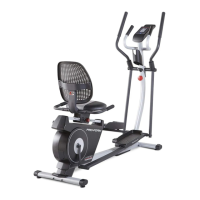
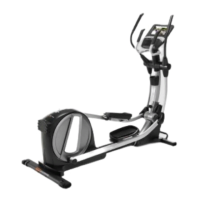
The PRO-FORM SMART STRIDER 495 CSE elliptical is a fitness machine designed for home use, offering a range of features to enhance workouts. Its primary function is to provide a low-impact cardiovascular exercise, simulating walking or running without the high impact on joints. The elliptical allows users to engage both upper and lower body muscles simultaneously, contributing to a more effective and enjoyable workout experience.
The elliptical operates by allowing users to pedal on foot platforms while simultaneously moving upper body arms. This synchronized motion creates a full-body workout. The resistance of the pedals can be adjusted, enabling users to customize the intensity of their exercise. The console, located at the front of the machine, serves as the central control and feedback unit. It displays various workout metrics such as time, distance, calories burned, speed, RPM (revolutions per minute), pace, and power output in watts.
The console offers a manual mode where users can freely adjust resistance levels. Additionally, it features onboard workouts that automatically change resistance and prompt users to maintain a target power output, guiding them through structured exercise routines. For those interested in interval training, the console allows users to create and save custom high- and low-intensity intervals, which can be alternated during a workout.
A unique feature is the power ring display, which provides a visual representation of the user's power output in watts per kilogram of body weight. Users can set a power output target, and the elliptical's resistance will automatically adjust to help them stay within that target. This feature is primarily for motivation, encouraging users to maintain a comfortable pedaling speed and resistance level.
The elliptical is also equipped with a heart rate monitor. Users can measure their heart rate using handgrip sensors on the handlebars or by connecting a compatible BLUETOOTH® Smart heart rate monitor. This allows for continuous heart rate monitoring, which is crucial for achieving specific fitness goals like fat burning or cardiovascular strengthening. The console prioritizes readings from a BLUETOOTH® Smart heart rate monitor if both are used simultaneously.
For entertainment during workouts, the console includes a sound system. Users can connect their personal audio players via a 3.5 mm audio cable to listen to music or audio books through the elliptical's speakers. Volume can be adjusted directly from the console.
The machine also integrates with the iFit® Bluetooth Tablet app. Users can download and install the app on their iOS® or Android™ tablet, then connect the tablet to the console. This connectivity allows for recording and tracking workout information, further enhancing the user's fitness journey. The tablet holder on the console securely holds most full-size tablets, providing a convenient viewing experience.
To begin using the elliptical, users simply step onto the pedals, holding the handlebars or upper body arms for stability. The pedals can move in either direction, though a recommended direction is indicated for optimal use. The elliptical does not have a freewheel, meaning the pedals will continue to move until the flywheel stops, so users should reduce pedaling speed in a controlled manner before dismounting.
The console turns on by pressing any button or by simply starting to pedal. Users are prompted to enter their weight, which helps in calculating accurate power output and calorie burn. If no weight is entered, a default value is used.
The manual mode is automatically selected upon startup, allowing immediate control over resistance. Resistance levels can be adjusted using numbered quick resistance buttons or the increase/decrease buttons. The display provides continuous feedback on various metrics, and a "Scan mode" cycles through all available workout information.
For storage, the elliptical can be folded into an upright position. This process requires two persons due to the machine's size and weight. Users must loosen an upright knob, pull the upright backward until a latch locks, and then release the knob. To fully lower the upright for folded storage, the latch needs to be lifted while pulling the upright forward. When moving the elliptical, a handle on the front stabilizer allows it to roll on wheels, making relocation easier.
The elliptical features leveling feet beneath the rear stabilizer to ensure stability on uneven floors. These can be adjusted to eliminate any rocking motion during use.
Regular maintenance is crucial for the elliptical's optimal performance and longevity. Users should inspect and properly tighten all parts each time the elliptical is used, replacing any worn components immediately.
Cleaning the elliptical involves using a damp cloth and a small amount of mild soap. It is important to keep liquids away from the console and to avoid direct sunlight to prevent damage.
Troubleshooting for the console includes checking heart rate monitor connections and ensuring proper hand placement on the handgrip sensors for accurate readings. If a replacement power adapter is needed, users are advised to contact customer care and use only a manufacturer-supplied regulated power adapter to prevent damage.
The reed switch, which provides feedback to the console, may require adjustment if the console displays incorrect information. This involves unplugging the power adapter, accessing the reed switch and magnet, and carefully sliding the switch until correct feedback is restored.
The drive belt may also need adjustment if the pedals slip, even at the highest resistance setting. This is a more involved process requiring the removal of several covers and parts to access and tighten the idler adjustment screw, which controls the belt tension. After any maintenance, all removed parts must be reattached, and the power adapter plugged back in.
The manual emphasizes that the heart rate monitor is an exercise aid and not a medical device, and various factors can affect the accuracy of its readings. It also advises against over-exercising and recommends consulting a physician before starting any exercise program, especially for individuals over 35 or those with pre-existing health problems.
 General
| Type | Elliptical |
|---|---|
| Resistance Levels | 18 |
| Stride Length | 18 inches |
| iFit Compatibility | Yes |
| Product Type | Elliptical |
| Drive System | Front Drive |
| Maximum User Weight | 275 lbs |
| Display Type | Backlit LCD |
| Heart Rate Monitoring | Yes |
| Display | 5" Backlit Display |
| Warranty | 1 year labor |
| Weight Capacity | 275 lbs |


 To Next Page