
 Need help?
Do you have a question about the ICON WEIDER POWER TOWER and is the answer not in the manual?
Shows the location of warning decals and instructions for replacement if missing or illegible.
Key safety warnings and guidelines for using the exercise rack, including user responsibility and environment.
General warning to read the manual and keep it for future reference before using the equipment.
Instructions for registering the product and activating the warranty online at my.weiderfitness.com.
Contact details and operating hours for customer service and support for the exercise rack.
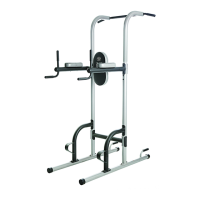
Overview of the Power Tower's benefits, dimensions, and a guide to familiarize with labeled parts.
Visual guide to identify small parts needed for assembly, referencing key numbers from the part list.
Step-by-step guide for assembling the Power Tower, including required tools and precautions.
Detailed list of all parts included in the Power Tower, with key numbers, quantities, and descriptions.
Diagram illustrating the Power Tower with all parts numbered for reference during assembly and repair.
Guidance on warming up, working out, and cooling down for effective exercise routines.
Instructions on proper technique for performing exercises smoothly and safely through the full range of motion.
Tips for maintaining motivation through workout logging and consistent exercise for achieving fitness goals.
Template pages to schedule and record strength and aerobic workouts for regular exercise tracking.
Information on how to order replacement parts, including required product and part details.
Details of the product warranty, coverage, limitations, and conditions for claims.
The Weider Power Tower is a versatile exercise rack designed to help users develop major muscle groups in the upper body. Whether the goal is a shapely figure, dramatic muscle size and strength, or a healthier cardiovascular system, this equipment aims to help achieve specific fitness results. It is intended for home use and offers a range of exercises to target different areas of the body.
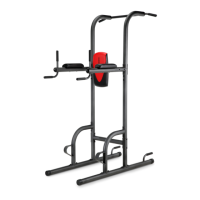
The Power Tower provides multiple stations for various bodyweight exercises, making it a comprehensive tool for upper body and core strength training. Key components include a pull-up bar, dip arm handles, dip arms, a backrest, arm pads, and push-up handles, along with footrests for stability and assistance.
The Pull-up Bar allows for a variety of pull-up and chin-up variations, targeting the back, biceps, and shoulders. Users can perform wide-grip pull-ups for broader back development, close-grip chin-ups for bicep emphasis, and neutral-grip pull-ups for a balanced approach. The height and sturdy construction of the bar ensure a secure platform for these exercises.
The Dip Arm Handles and Dip Arms are central to performing dips, an effective exercise for the triceps, chest, and shoulders. The design allows for a full range of motion, and the arm pads provide comfort and support during the exercise. Users can adjust their body position to target different muscle groups, such as leaning forward to emphasize the chest or keeping the body upright to focus on the triceps.
The Backrest and Arm Pads are specifically designed to support the user during leg raises and knee raises. These exercises are excellent for strengthening the abdominal muscles and hip flexors. The backrest provides stability for the spine, while the arm pads allow users to comfortably support their body weight on their forearms, enabling them to focus on engaging their core.
Push-up Handles are integrated into the base of the Power Tower, offering an elevated grip for push-ups. This feature can increase the range of motion compared to traditional floor push-ups, leading to greater muscle activation in the chest, shoulders, and triceps. The handles also reduce wrist strain, making push-ups more comfortable for some users.
Footrests are strategically placed to assist users in getting into position for exercises like dips and leg raises. They provide a stable step-up point, enhancing safety and ease of use, especially for individuals who may need a boost to reach the handles or pads.
The Weider Power Tower emphasizes user safety and effective workout practices. Before beginning any exercise program, users are strongly advised to consult their physician, especially if they are over 35 or have pre-existing health problems. The equipment is designed to support a maximum user weight of 300 lbs. (136 kg).
Workout Guidelines encourage users to familiarize themselves with the equipment and learn proper form for each exercise. It recommends determining appropriate workout lengths, repetitions, and sets based on individual pace and body signals. Each strength workout should be followed by at least one day of rest.
Warming Up is crucial, with 5 to 10 minutes of light exercise recommended to increase body temperature, heart rate, and circulation. Working Out should include 5 to 10 different exercises, targeting every major muscle group and emphasizing areas for development. Varying exercises provides balance and variety. Cooling Down involves 5 to 10 minutes of stretching to increase muscle flexibility and prevent post-exercise problems.
Cross Training is suggested, combining strength training and aerobic exercise. A typical schedule might include strength workouts on Monday, Wednesday, and Friday, with 20 to 30 minutes of aerobic exercise on Tuesday and Thursday, and one full day of rest each week for muscle regeneration.
Exercise Form emphasizes moving through the full range of motion for each exercise, engaging only the appropriate body parts. Repetitions should be performed smoothly and without pausing. The exertion stage should last about half as long as the return stage, with exhalation during exertion and inhalation during the return stroke. Holding one's breath is discouraged.
Rest periods after each set vary depending on the fitness goal: three minutes for muscle building, one minute for toning, and 30 seconds for weight loss.
Staying Motivated is supported by keeping an exercise log, recording the date, exercises performed, resistance used, and the number of sets and repetitions. Monthly recording of weight and key body measurements is also recommended to track progress and maintain motivation.
To ensure the longevity and safe operation of the Weider Power Tower, several maintenance precautions are outlined.
Warning Decal Placement is critical. Users are instructed to check the location of warning decals and request free replacements if any are missing or illegible. These decals provide important safety information, such as warnings about low overhead clearance and proper body positioning to prevent head injury. They also specify maximum user and weight capacities for different parts of the equipment, and caution against misuse, allowing children on or around the machine, and keeping body, clothing, and hair clear of moving parts.
General Precautions include ensuring that all users are adequately informed of precautions. The exercise rack should be used only as described in the manual and is intended for home use only, not commercial, rental, or institutional settings. It should be kept indoors, away from moisture and dust, and not placed in a garage, covered patio, or near water.
Regular Inspection is vital. Users must ensure that all parts are properly tightened each time the exercise rack is used. Any worn parts should be replaced immediately to prevent safety hazards. The manual also advises against allowing children under age 13 and pets near the equipment at all times.
For Ordering Replacement Parts, users are directed to the front cover of the manual and asked to provide the model number, serial number, product name, and the key number and description of the needed part. This ensures accurate and efficient service.
The product comes with a Limited Warranty covering defects in workmanship and material under normal use and service conditions for ninety days from the date of purchase. This warranty is for the original purchaser and is not transferrable. All warranty claims must be preauthorized by ICON Health & Fitness, Inc. (ICON). While replacement parts may be shipped under warranty, a minimal handling charge may apply. For in-home service, a minimal trip charge may also apply. The warranty is voided if the product is used as a store display, purchased or transported outside the USA, if instructions and warnings are not followed, if the product is abused or abnormally used, or if it is used for commercial or rental purposes.
To activate the warranty and register the product, users can visit my.weiderfitness.com. This process documents ownership, activates the warranty, and ensures priority customer support if assistance is needed. For those without internet access, customer care can be contacted by phone. For service at any time, users can visit weiderservice.com or call the provided customer care number during specified hours. It is emphasized that users should not contact the store for service inquiries.
 General
| Material | Steel |
|---|---|
| Weight Capacity | 300 lbs |
| Color | Black |
| Maximum User Weight | 300 lb |
| Exercises | Pull-ups, Chin-ups, Dips, Push-ups |
| Features | Padded backrest and armrests |


 To Next Page