EasyManua.ls Logo

ICON WEIDER XR 6.1 - User Manual

ICON WEIDER XR 6.1
20 pages
Print Icon
To Next Page IconTo Next Page
Loading...
Serial Number Decal (under seat)
USER’S MANUAL
CAUTION
Read all precautions and
instructions in this manual before
using this equipment. Keep this
manual for future reference.
Model No. WEBE60610.1
Serial No.
Write the serial number in the space
above for reference.
weiderfitness.com
To register your product and
activate your warranty today,
go to my.weiderfitness.com.
REGISTER YOUR
PRODUCT
CUSTOMER CARE
For service at any time, go to
support.weiderfitness.com.
Or call 1-877-992-5999
Mon.–Fri. 6 a.m.–6 p.m. MT
Sat. 8 a.m.–12 p.m. MT
Please do not contact the store.
Question and Answer IconNeed help?

Do you have a question about the ICON WEIDER XR 6.1 and is the answer not in the manual?

Summary

Important Precautions

Protect Your Fitness Equipment with an Extended Service Plan

Preventive Maintenance Service Plans

Details service plans for preventive maintenance.

Standard Service Plans

Details standard service plans for equipment protection.

Before You Begin

Part Identification Chart

Assembly

Adjustment

Adjusting the Backrest

How to adjust the backrest to different positions.

Attaching Weights to the Leg Lever

Instructions for using the leg lever with weights.

Adjusting the Weight Rests

Exercise Guidelines

Four Types of Strength Workouts

Explains different approaches to strength training.

Workout Guidelines

Provides advice on performing exercises and recovery.

Exercise Form

Guides on proper technique and breathing during exercises.

Staying Motivated

Tips for maintaining motivation in fitness routines.

Exercise Log

Notes

Part List

Exploded Drawing

Ordering Replacement Parts

Limited Warranty

Summary

Important Precautions

Protect Your Fitness Equipment with an Extended Service Plan

Preventive Maintenance Service Plans

Details service plans for preventive maintenance.

Standard Service Plans

Details standard service plans for equipment protection.

Before You Begin

Part Identification Chart

Assembly

Adjustment

Adjusting the Backrest

How to adjust the backrest to different positions.

Attaching Weights to the Leg Lever

Instructions for using the leg lever with weights.

Adjusting the Weight Rests

Exercise Guidelines

Four Types of Strength Workouts

Explains different approaches to strength training.

Workout Guidelines

Provides advice on performing exercises and recovery.

Exercise Form

Guides on proper technique and breathing during exercises.

Staying Motivated

Tips for maintaining motivation in fitness routines.

Exercise Log

Notes

Part List

Exploded Drawing

Ordering Replacement Parts

Limited Warranty

Overview

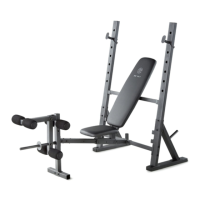
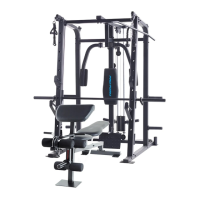
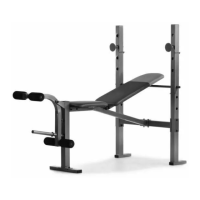
The Weider XR 6.1 is a versatile weight bench designed for home use, offering a selection of exercises to develop major muscle groups. It supports various fitness goals, from toning and building muscle size and strength to improving cardiovascular health. The bench is designed to be used with the user's own weight set, which is not included.

Function Description:

The Weider XR 6.1 weight bench facilitates a range of strength training exercises. Its primary function is to provide a stable and adjustable platform for lifting weights and performing bodyweight exercises. Key components include:

  • Adjustable Backrest: The backrest can be positioned in a declined, level, or two inclined positions, allowing for a variety of chest, shoulder, and abdominal exercises. This adjustability is crucial for targeting different muscle fibers and accommodating various exercise forms.
  • Weight Rests (Barbell Crutches): These supports hold a barbell, enabling exercises such as bench presses. The height of the weight rests is adjustable, catering to different user heights and exercise requirements.
  • Leg Lever: This attachment allows for leg exercises like leg extensions and leg curls, targeting the quadriceps and hamstrings. It is designed to accommodate standard weight plates.
  • Sturdy Frame: The overall structure provides stability and safety during workouts, ensuring that the user can focus on proper form and muscle engagement.

The bench is intended for individual use in a home environment and is not suitable for commercial, rental, or institutional settings.

Important Technical Specifications:

  • Model Number: WEBE60610.1
  • Dimensions:
    • Length: 5 ft. 2 in. (157 cm)
    • Width: 2 ft. 6 in. (76 cm)
  • Weight Capacities:
    • Maximum User Weight: 300 lbs. (136 kg)
    • Maximum Total Weight (User + Weights): 410 lbs. (186 kg)
    • Weight Crutch (Weight Rest): Max 110 lbs. (50 kg) (including a barbell and weights)
    • Leg Developer: Max 50 lbs. (23 kg)
    • Weight Carriage: Max 110 lbs. (This specification appears in the warning decal but is not explicitly labeled on the diagram; it likely refers to the total weight capacity of the bench structure itself when supporting weights on the crutches or other parts.)
    • Chest Fly Per Arm: Max 30 lbs. (This specification appears in the warning decal but is not explicitly labeled on the diagram; it suggests the potential for future attachments or a feature not fully detailed in the current manual.)
  • Barbell Compatibility: Do not use a barbell longer than 6 ft. (1.8 m) with this weight bench. (Note: Barbell and weights are not included.)

Usage Features:

  • Adjustable Backrest: The backrest (8) can be set to declined, level, or two inclined positions by adjusting the Backrest Support (14) in the Uprights (1). When using the backrest in the level or inclined position, the Backrest Support must be fully inserted through both uprights and turned to the locked position to ensure safety.
  • Adjustable Weight Rests: The Weight Rests (15) can be removed and inserted into different sets of holes in the Uprights (1) to change their height. It is crucial to always rotate the Weight Rests so that their locking pins (C) are wrapped around the Uprights and to set both Weight Rests at the same height for stability and safety.
  • Leg Lever Operation: To use the Leg Lever (6), desired weight plates (A) (not included) are slid onto the weight tube (B). A critical safety precaution is to place a barbell with the same amount of weight on the Weight Rests (not shown in the leg lever diagram) to balance the weight bench when the leg lever is in use. The Leg Lever must pivot easily, indicating that the M10 Locknut (31) used in its assembly should not be overtightened.
  • Exercise Guidelines: The manual provides comprehensive exercise guidelines covering four types of strength workouts: Muscle Building, Toning, Weight Loss, and Cross Training. It also includes sections on Warming Up, Working Out, Cooling Down, Exercise Form, and Staying Motivated, emphasizing proper technique, repetition ranges, rest periods, and the importance of consistency.
  • Safety Precautions: Numerous warnings are provided, including the importance of consulting a physician before starting an exercise program, reading the manual and all warnings, keeping children and pets away, inspecting and tightening parts regularly, wearing athletic shoes, and exercising with a partner for bench press exercises. It also warns against over-exercising and to stop immediately if feeling faint or experiencing pain.
  • Product Registration: Users are encouraged to register their product and activate their warranty online at my.weiderfitness.com.

Maintenance Features:

  • Regular Inspection: Users are instructed to inspect and properly tighten all parts each time the weight bench is used. This helps ensure the equipment remains safe and functional.
  • Part Replacement: Any worn parts should be replaced immediately to prevent injury or further damage to the equipment.
  • Cleaning: The weight bench can be cleaned with a damp cloth and a mild, non-abrasive detergent. Solvents should not be used for cleaning.
  • Storage: The weight bench should be kept indoors, away from moisture and dust, and not in a garage, covered patio, or near water.
  • Hardware Kit: The manual includes a part identification chart to help users identify small parts during assembly and for future reference when ordering replacement parts. Extra hardware may be included in the kit.
  • Customer Care: For service or to order replacement parts, users are directed to support.weiderfitness.com or to call a toll-free number (1-877-992-5999) during specified hours. They are advised not to contact the store where the product was purchased.
  • Extended Service Plans: The manual highlights the availability of optional Preventive Maintenance Service Plans and Standard Service Plans through UTS (Universal Technical Services) to protect the fitness equipment with extended coverage for parts, labor, and in-home repairs. These plans offer various durations and features depending on the equipment price.

ICON WEIDER XR 6.1 Specifications

General IconGeneral
BrandICON
ModelWEIDER XR 6.1
CategoryFitness Equipment
LanguageEnglish

Related product manuals