Driver Installation (Continues)
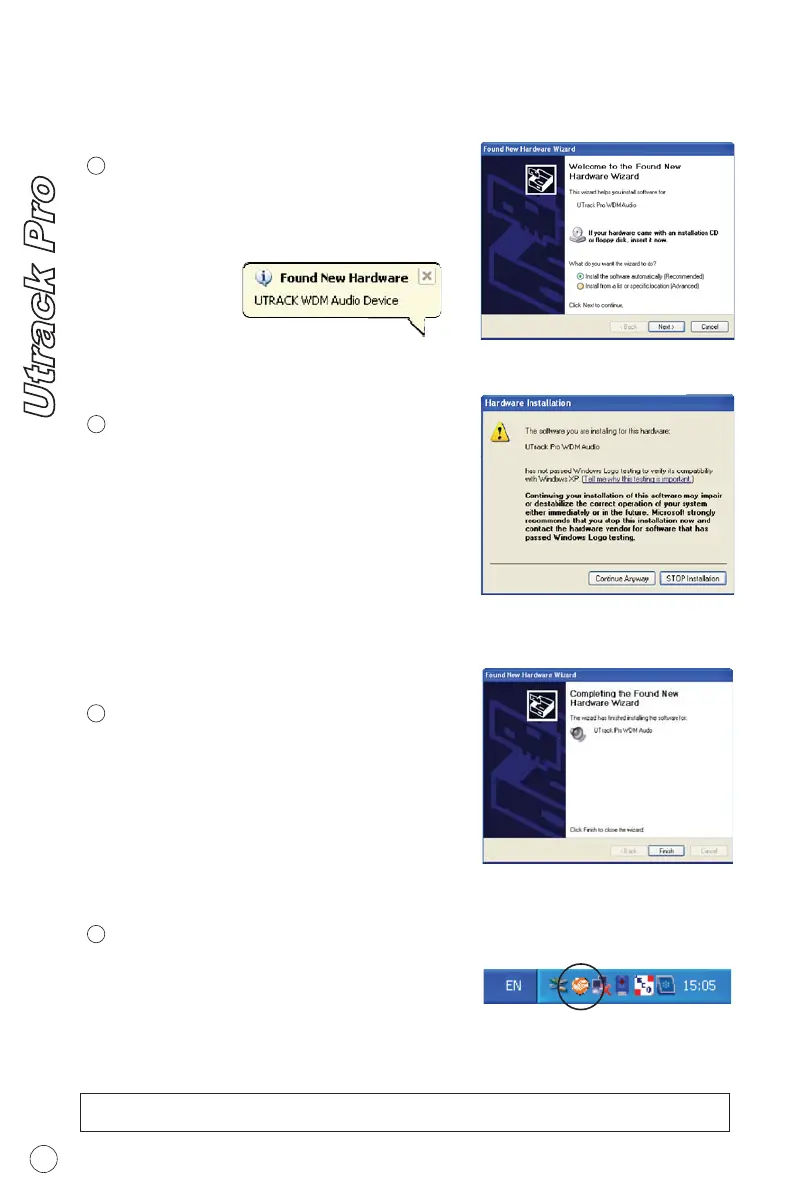
Note: Although this message appear.
Utrack Pro's driver is fully tested and
supporting Window XP and Vista
WDM driver installation window
appear, click "Next"
Utrack Pro WDM Audio Driver
Utrack Pro's WDM driver installation
has completed. Click "Finish"
Driver Installation completed
Diagram 9
10
Note: For the latest driver updates please check www.icon-global.com
10
11
A window as illustrated as Diagram 4
would appear. Choose " Continue
Anyway"
Software Installation Window
Diagram 10
You may click the Utrack logo on the
system tray to luanch the Utrack Pro
Contrl Panel (Page 8).
Launch the Utrack Pro Control Panel
10
Diagram 11
Diagram 12
7


 To Next Page