Driver Installation (Continues)
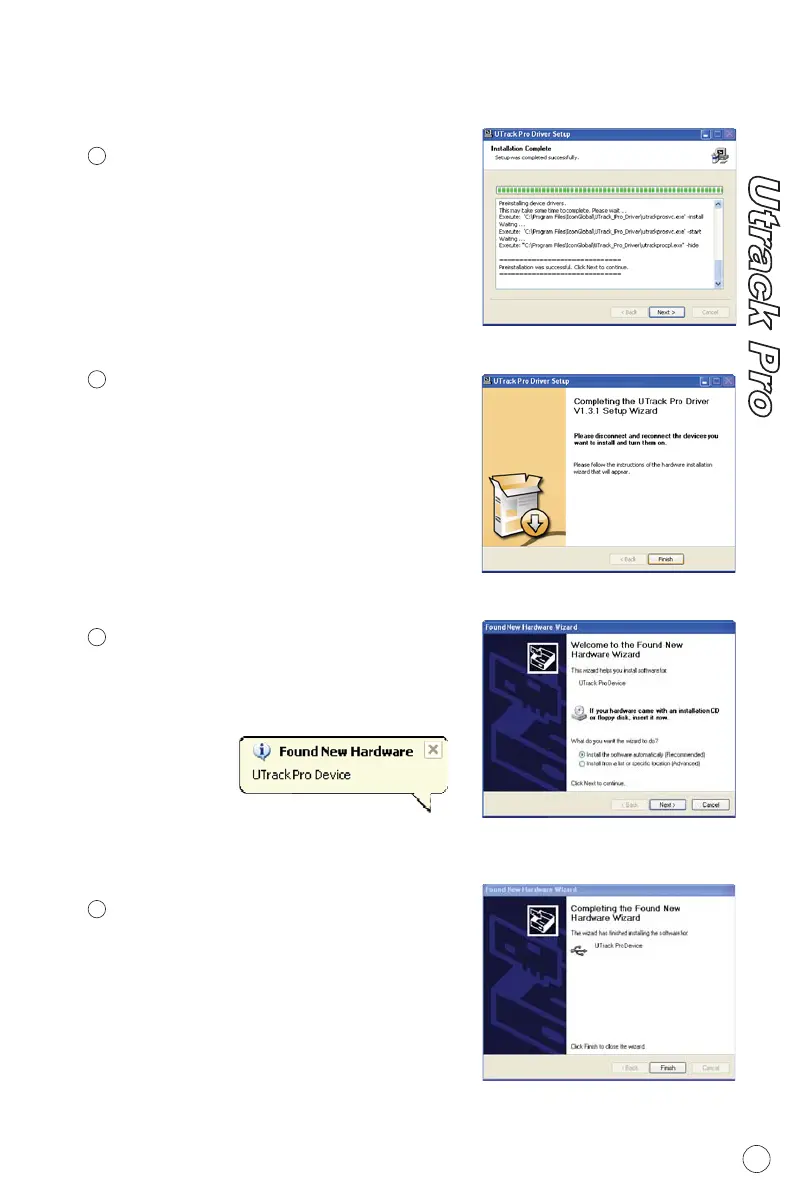
Driver (ASIO2.0) will automatically
install and this may take some time,
please be patient and wait for the
installation set up completed as
shown on Diagram5. Then click
"Next".
Installation Start
6
7
8
Diagram 5
Diagram 6
New hardware (Utrack Pro) should
be found and
click "Next"
Found New Hardware Wizard
6
Notes: Utrack Pro only support
USB 2.0. Your computer must have
an USB2.0 port.
Now, connect the Utrack Pro to your
computer's USB port and turn on
its power switch and click "Finish".
Connect your Utrack Pro
Diagram 7
Diagram 8
9
Utrack Pro Device is found and
appear in the window. Click "Finish"
Found New Hardware Completed


 To Next Page