File Manager
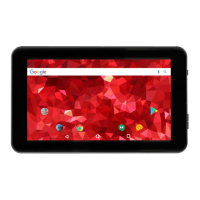
Touch the Explorer application icon to view the files on all storage devices (Local
Disk, SD-ext, USB uhost and Music, Photo, Movies, Ebook and APK), and to quickly & easily
install Android application on your Tablet.
A: Touch the “File Manager” icon on the apps page, will be shown in above picture.
B: Touch the “ or ”, will be shown in above picture. (SD-ext and uhost)


 To Next Page