User Guide
3
USER
1.1 INTRODUCTION
The Logic System
2
S is a system boiler, featuring full sequence
automatic spark ignition and fan assisted combustion.
Due to the high eciency of the boiler, condensate is produced
from the ue gases and this is drained to a suitable disposal
point through a plastic waste pipe at the base of the boiler.
A condensate ‘plume’ will also be visible at the ue terminal.
Safety
CURRENT GAS SAFETY (INSTALLATION & USE)
REGULATIONS OR RULES IN FORCE.
It is the law that this appliance installation and any work carried
out on the appliance is carried out by a Gas Safe Registered
engineer in accordance with the above Regulations.
It is essential that the instructions in this booklet are strictly
followed, for safe and economical operation of the boiler.
ELECTRICITY SUPPLY
This appliance must be earthed.
Supply: 230 V ~ 50 Hz. The fusing should be 3A.
IMPORTANT NOTES
• This appliance must not be operated without the casing
correctly tted and forming an adequate seal.
• If the boiler is installed in a compartment then the
compartment MUST NOT be used for storage purposes.
• If it is known or suspected that a fault exists on the boiler
then it MUST NOT BE USED until the fault has been
corrected by a Gas Safe Registered Engineer.
• Under NO circumstances should any of the sealed
components on this appliance be used incorrectly or
tampered with.
• This appliance can be used by children 8
years and above. Also persons with reduced
physical, sensory or mental capabilities, or lack
of experience and knowledge, provided they
have been given supervision or instruction
concerning use of the appliance in a safe way
and understand the hazards involved. Children
shall not play with the appliance. Cleaning and
user maintenance shall not be made by children
without supervision.
1.2 BOILER OPERATION
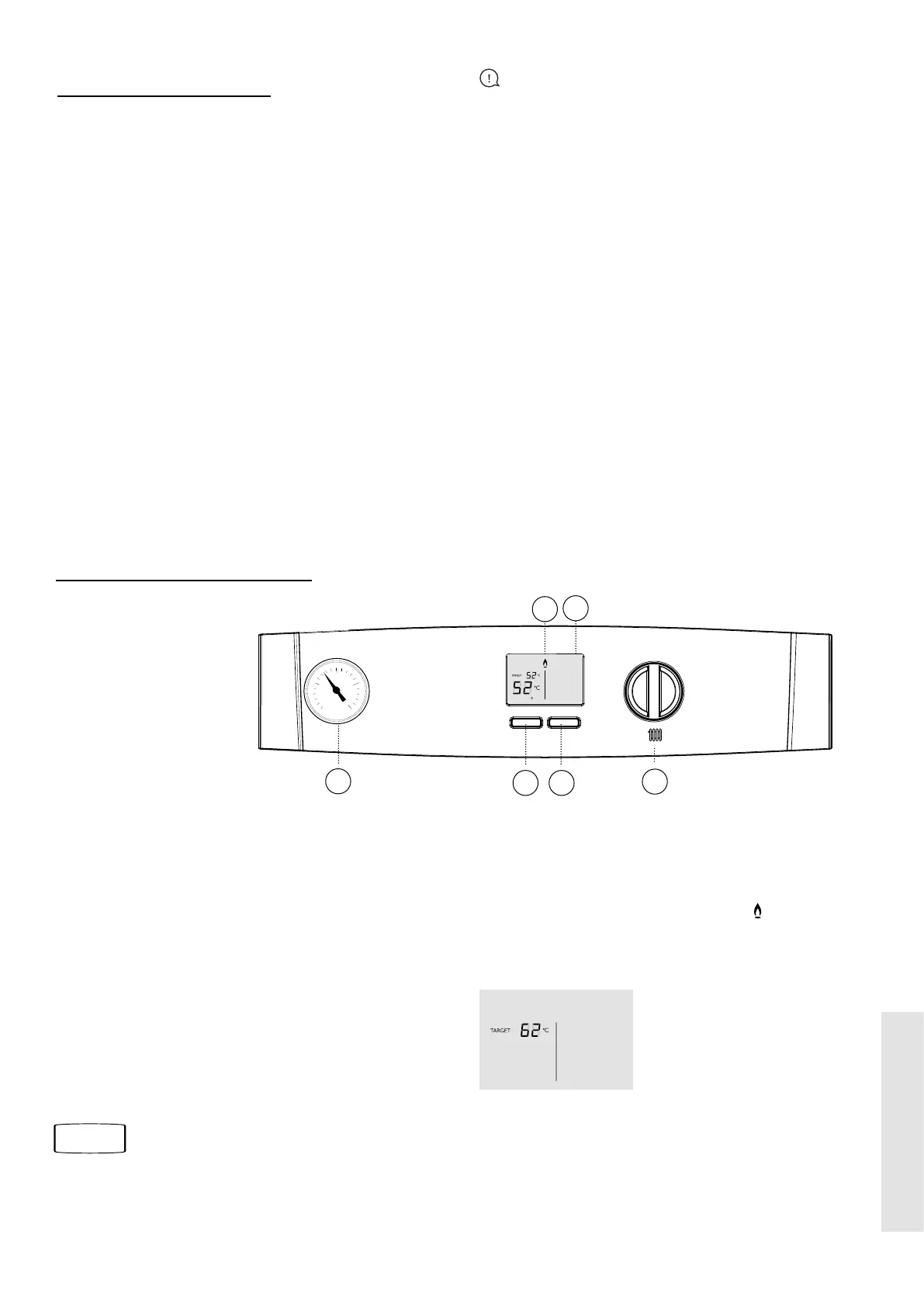
To START the boiler
1 Switch on electricity to the boiler and check that all external
controls e.g. programmer, room thermostat and cylinder
thermostat are all on.
2. If OFF is shown at the bottom of the screen press the Mode
button (B) so that ON appears.
3. Turn the Temperature control knob (A) until 80°C is shown.
Once the boiler has lit see the following page about where the
Temperature control knob should be set.
Note. In normal operation the boiler status display (C) will
display messages.
Refer to Section
1.7
Boiler frost protection – boiler will re if temperature is below
5°C.
During normal operation the burner symbol ‘
’ will remain
illuminated when the burner is lit.
If the boiler fails to light after ve attempts the following fault
messages will be displayed:
L 02
To restart the boiler, press Restart (E). The boiler will repeat
the ignition sequence. If the boiler still fails to light consult a
Registered Gas Installer.
If an L code is shown on the display then the boiler can be restarted by pressing the Restart button (E).
Legend
A. Temperature Knob
B. Mode Button
C. Boiler Status Display
D. Burner On indicator
E. Restart Button
G. System Pressure Gauge
1
0
2
3
4
bar
C
A
B
D
N
E
G





 To Next Page