12
4. Description of the Program
4-1 Device allocations of the program screen
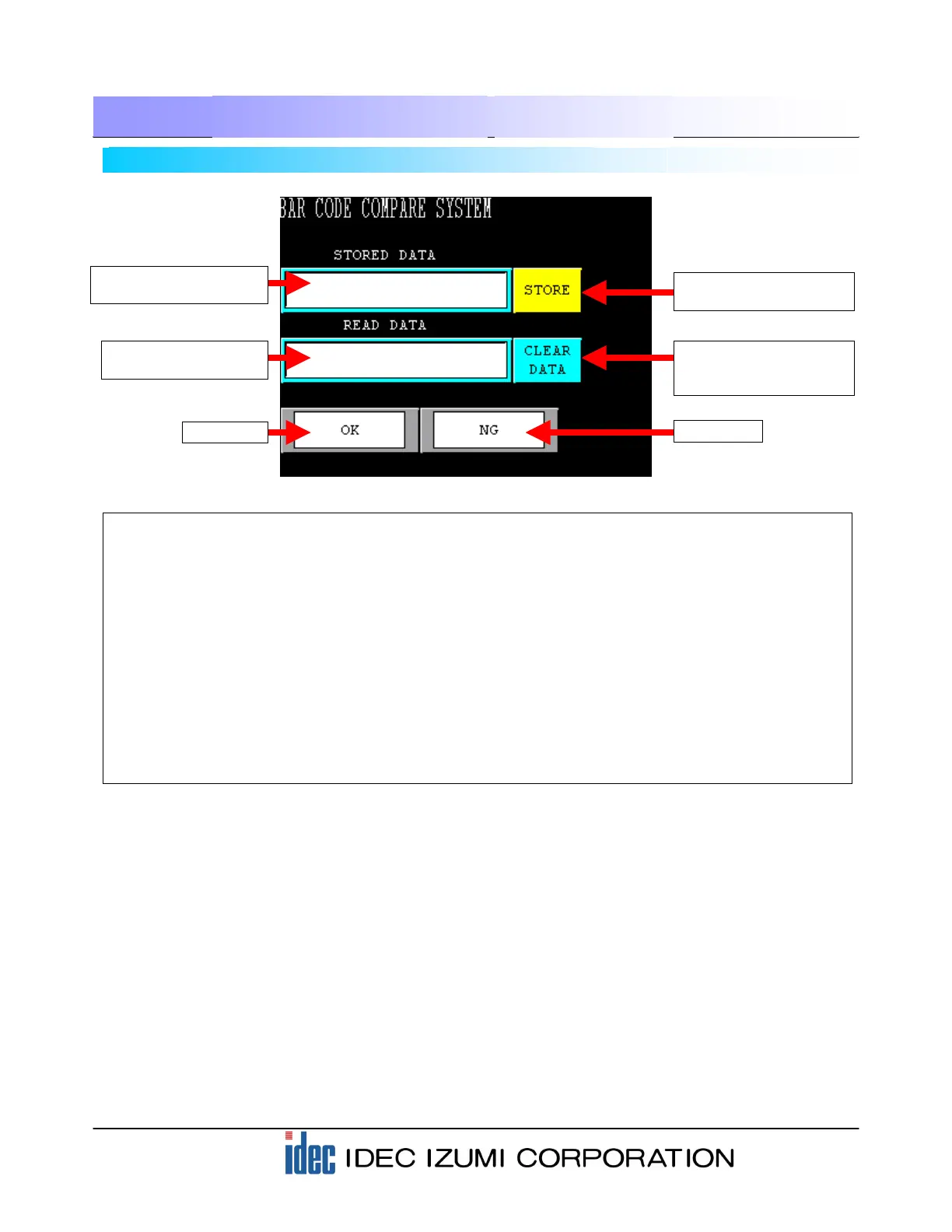
(1) Display area of registered barcode data Message Display: Displays (LKR100 to LKR109).
(2) Display area of scanned barcode data Message Display: Displays (LDR8010 to
LDR8019).
(3) STORE button used for registering barcode data Word Button: Transfers the data (LDR8010 to
LDR8019) to (LKR100 to LKR109).
(4) Word Button: Transfers the data “0” to each of
(LKR100 to LKR109).
(5) OK lamp Pilot Lamp: Illuminates when (LDR100= 127) is
true.
(6) NG lamp Pilot Lamp: Illuminates when (LDR100= 127) is
NOT true.
.....................
……………….
…..
……..
…………………………………………………
…………………………………………………
CLEAR DATA button for clearing the barcode
registration
(1) Display area of
registered barcode data
(2) Display area of
scanned barcode data
(3) STORE button used for
registering barcode data
(4) CLEAR DATA button for
clearing the barcode
registration
(6) NG lamp
(5) OK lamp


 To Next Page