18
4. Description of the Program
4-7 Judging the barcode data matching
When the READ DATA matches the STORED DATA completely, LDR100-0 to LDR100-6 are turned on
and the value of LDR100 becomes “127”. Configure the setting so that the [OK] lamp is turned on under
this condition.
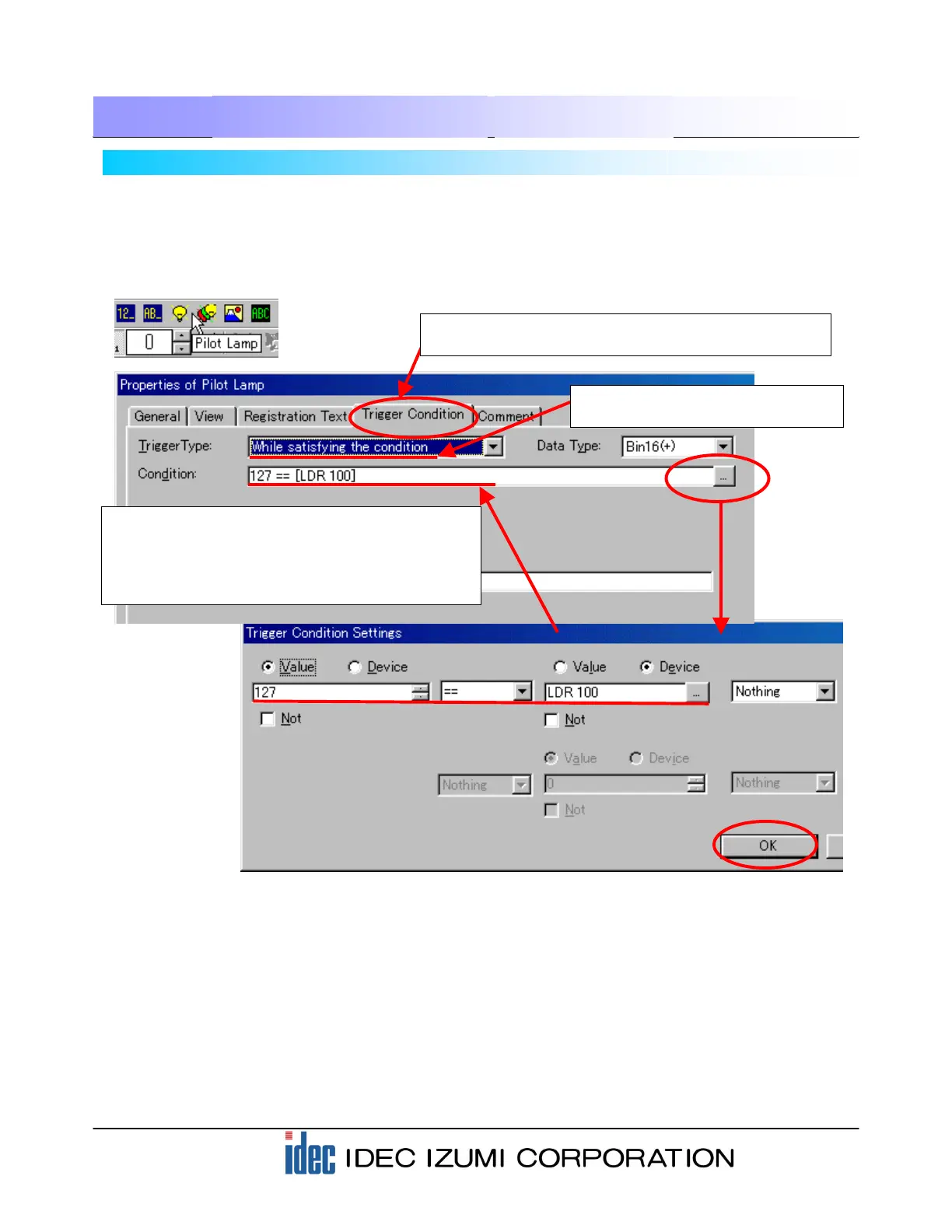
(1) Click the “Pilot Lamp” icon from the toolbar to open the dialog box.
(4) Designate “127==LDR100” to the Condition field.
As described on the previous page, click the […]
button on the right of the Condition field to open
the “Trigger Condition Settings” dialog box and
configure the settings as shown below.
(5) Set up the [NG] lamp using a similar procedure. Make sure that the Condition in the Trigger Condition
of the [NG] lamp is “127!=LDR 100”. (!= indicates “mismatch”.)
* The descriptions for the “View” and “Format” settings are omitted in this text. For these descriptions,
refer to the section “Parts” in Chapter 5 “Draw and Parts Objects” in the Instruction Manual.
(2) When the “Properties of Pilot Lamp” dialog box is
displayed, configure the Trigger Condition settings first.
(3) Select “While satisfying the
condition” in the Trigger Type field.


 To Next Page