16
4. Description of the Program
4-5 Judging the match or mismatch of barcode data
The comparison between the READ DATA and STORED DATA is performed using the following
procedures.
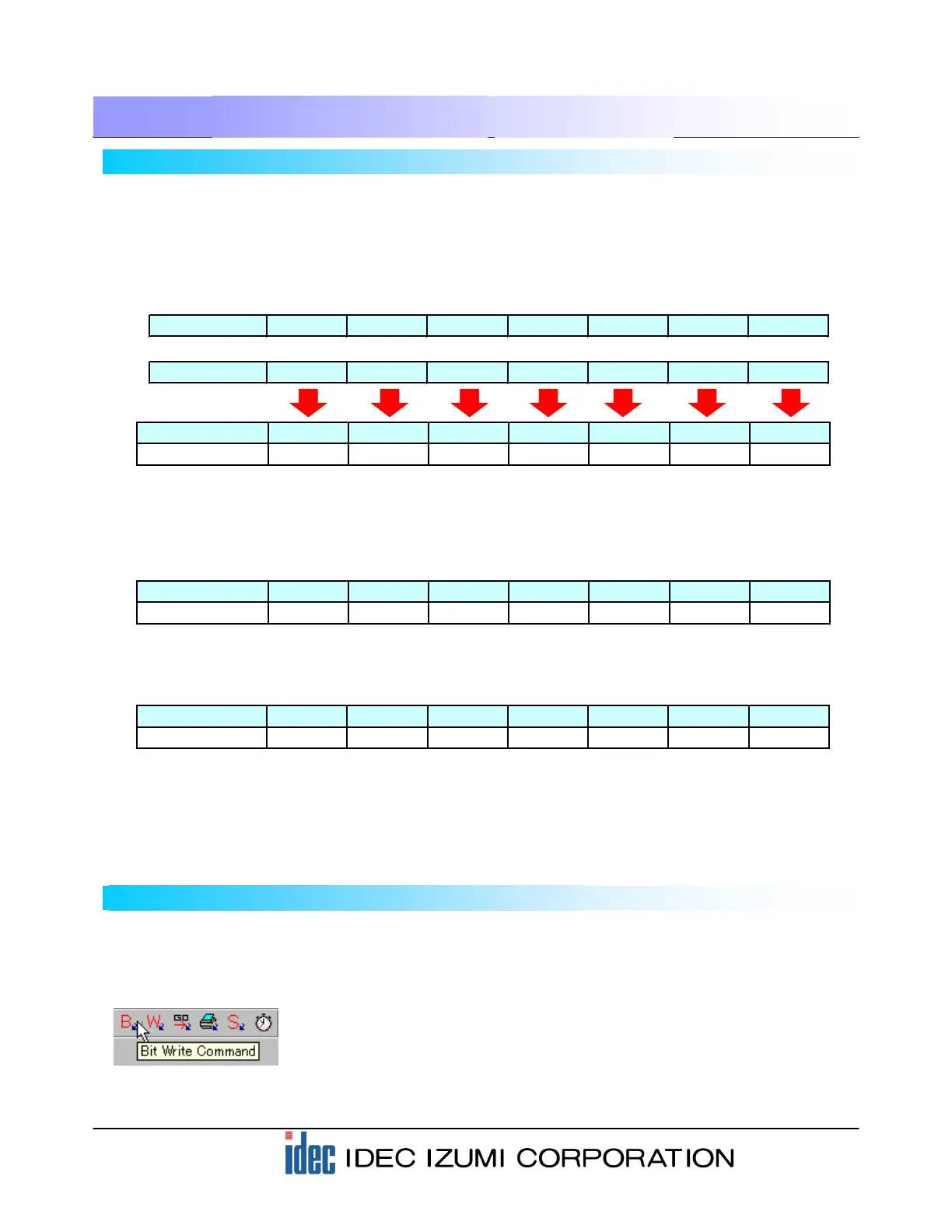
Storage location LKR 100 LKR 101 LKR 102 LKR 103 LKR 104 LKR 105 LKR 106
Storage location LDR8010 LDR8011 LDR8012 LDR8013 LDR8014 LDR8015 LDR8016
Compare Compare Compare Compare Compare Compare Compare
When data matches
(1) The READ DATA (LDR8010 to 8016) is compared to the STORED DATA (LDR100 to 106)
successively word by word. When the data matches, the corresponding LDR100-0 to LDR100-6 is
turned on. (Refer to the tables below.)
Comparison result LDR100-0 LDR100-1 LDR100-2 LDR100-3 LDR100-4 LDR100-5 LDR100-6
Value of LDR1001248163264
(2) When the READ DATA matches the STORED DATA completely, all of the LDR100-0 to LDR100-6 are
turned on, and then the value of LDR100 is added.
Therefore, the system judges the data as being “matched” when the value of LDR100 is “127”, and as
“mismatched” when the value of LDR100 is other than “127”.
4-6 Barcode comparison settings
The READ DATA (LDR8010) is compared to the STORED DATA (LKR100). Using a part “Bit Write
Command” for the comparison.
(1) Click the “Bit Write Command” from the toolbar to open the dialog box.
Comparison result LDR100-0 LDR100-1 LDR100-2 LDR100-3 LDR100-4 LDR100-5 LDR100-6
Value of LDR1001248163264
[OK] case…When all data items match, the LDR always becomes “127”.
LDR100 = 1 + 2 + 4 + 8 + 16 + 32 + 64 = 127
Comparison result LDR100-0 LDR100-1 LDR100-2 LDR100-3 LDR100-4 LDR100-5 LDR100-6
Value of LDR100 1 0 4 8 16 32 64
[NG] case…When the 4th digit does not match, LDR100 will not be “127”.
LDR100 = 1 + 0 + 4 + 8 + 16 + 32 + 64 = 125


 To Next Page