Quick Installation Guide
Jun. 2011 Copyright © IDTECK Co., Ltd.
9. INITIALIZATION
When you lost the Configuration Card or forget the Master PIN number, you may need to re-initialize
the unit for new setup. There is a hard-wired Initialize function on the unit.
※ WARNING: You may lose all setup data after Initialization.
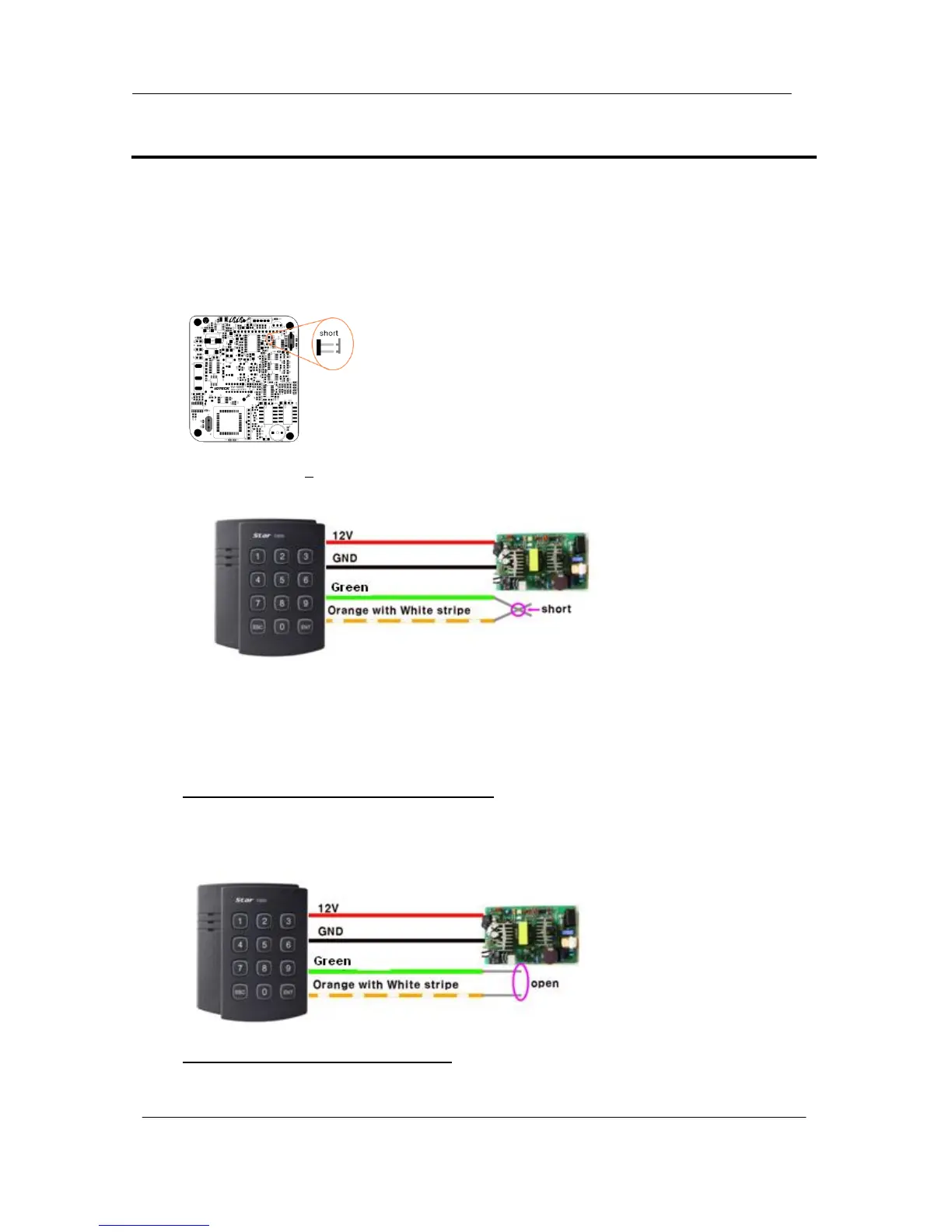
9.1. Hardware Initialization (When the master card or ID is lost)
9.2. Wire Initialization
(When the master card or ID is lost, 100R: Over V5.0.0 / IP100R: Over V2.0.0)
1) Open the top case taking out four bolts on the back.
2) As the left picture, make two jumpers short in state of being
on power
3) 3-color LED blinking with beep sound indicates success of
initialization
1) Main power off.
2) Connect the Green and orange with white stripe wire together and power on.
3) 3 color LED blinking with beep sound indicates the success of initialization.
100R: V5.0.0 ~ V5.0.3 / IP100R: V2.0.0 ~ V2.0.1
4) Main power off again.
5) Disconnect orange wire and orange with white stripe wire as shown above
(normal connection diagram) and power on.
100R: Over V5.0.4 / IP100R: Over V2.0.2
4) Disconnect those two wires and wire them as shown above (normal connection diagram).



 To Next Page