Quick Installation Guide
Jun. 2011 Copyright © IDTECK Co., Ltd.
6.8. Wiegand Input Connection from Another Compatible Wiegand Reader (Separate
purchase required)
- Connect (+) wire of Reader to DC +12V (be sure that the existing power supply has enough
capacity to support this accessory or upgrade to a sufficient one.)
- Connect (-) wire of Reader to Power GND (-) wire.
- Connect Wiegand output DATA0 wire of the additional Reader to DATA0, Pink wire.
- Connect Wiegand output DATA1 wire of the additional Reader to DATA1, Cyan wire.
6.9. RS-232 Communication Port Connection
9-pin connector (COM Port, female) is required to connect serial communication RS-232 between
Main Unit and Personal Computer.
- Connect RS-232-TX, Black with White stripe wire of Main Unit to pin number 2 of 9-pin connector.
- Connect RS-232-RX, Red with White stripe wire of Main Unit to pin number 3 of 9-pin connector.
- Connect RS-232-GND, Black wire of Main Unit to pin number 5 of 9-pin connector.
- Plug in 9-pin connector to COM1 or COM2 Port of Personal Computer.
- Install and run STAR 100R Application Software.
6.10. Chime Bell Connection (Separate purchase required)
- Connect (+) wire of Chime Bell unit to Bell Output, Brown with White stripe wire of Main Unit.
- Connect (-) wire of Chime Bell unit to Power GND (-) wire.
7. INITIAL SETUP
The Flash memory of each shipped STAR 100R contains a minimum set of defaulted values, but it
does not have any other preprogrammed values or user’s data in it, therefore, Initial Setup is required
upon the first time the unit is powered-up in order to operate the unit properly.
7.1. Registration of RF Cards for RF CARD ONLY MODE
(1) Apply 12V DC to the unit.
All 3 LEDs will be flashing along with a powered-up melody (do mi sol me do do mi sol do~).
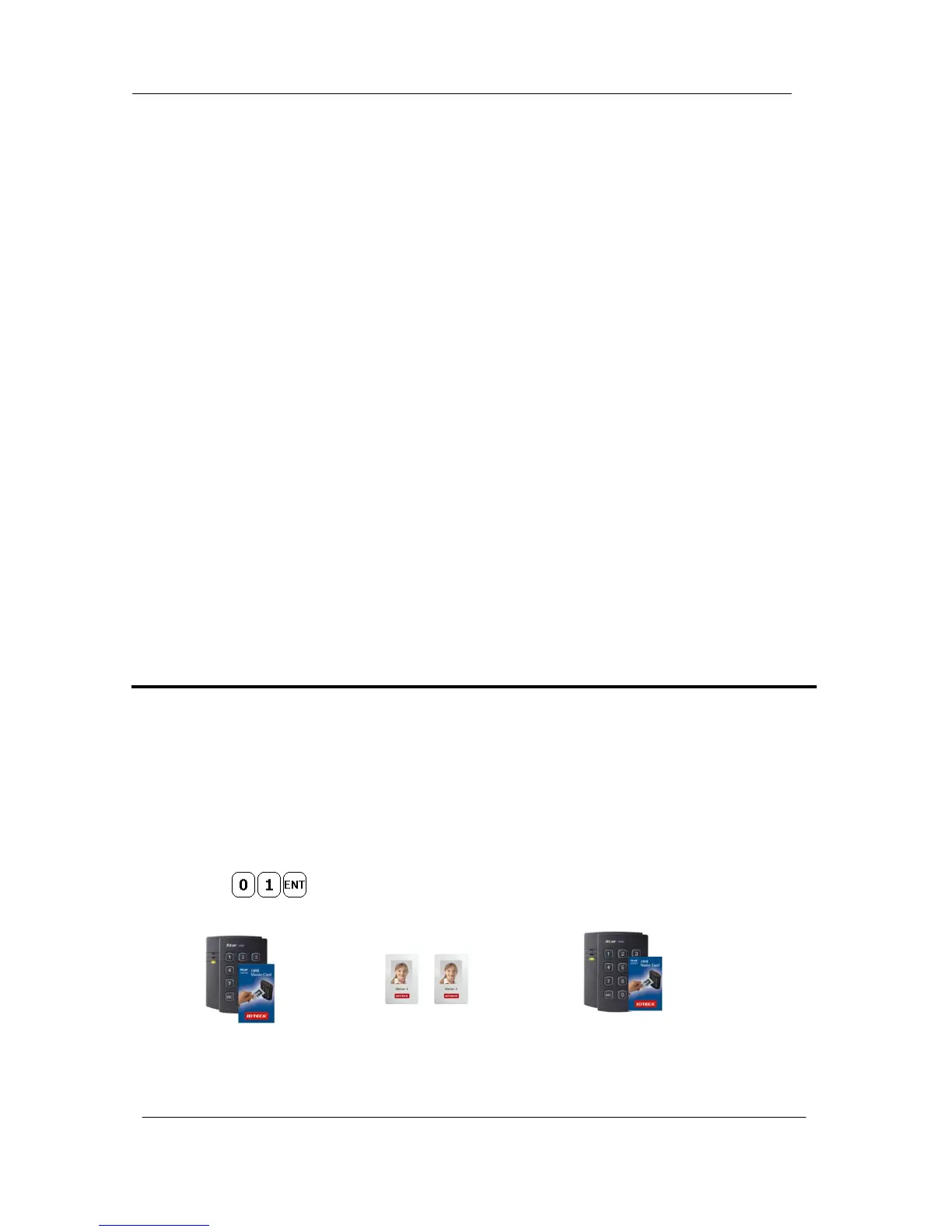
(2) Press from the keypad. (RF CARD ONLY MODE)
(3) Present RF Cards as follow to register Configuration Card and User Access Cards.
........
Configuration Card User Access Cards Configuration Card again to end task
※ NOTE: The user may choose to register the 8 digit card numbers via the keypad instead
of presenting the cards to the unit; this implies that the user must know the 8



 To Next Page