12
The unit is now adapted to your flow conditions� It returns to the operating mode,
the display should now show example 1�
The adjustment affects the switch point: it is increased proportionally (maxi-
mum up to LED 7)�
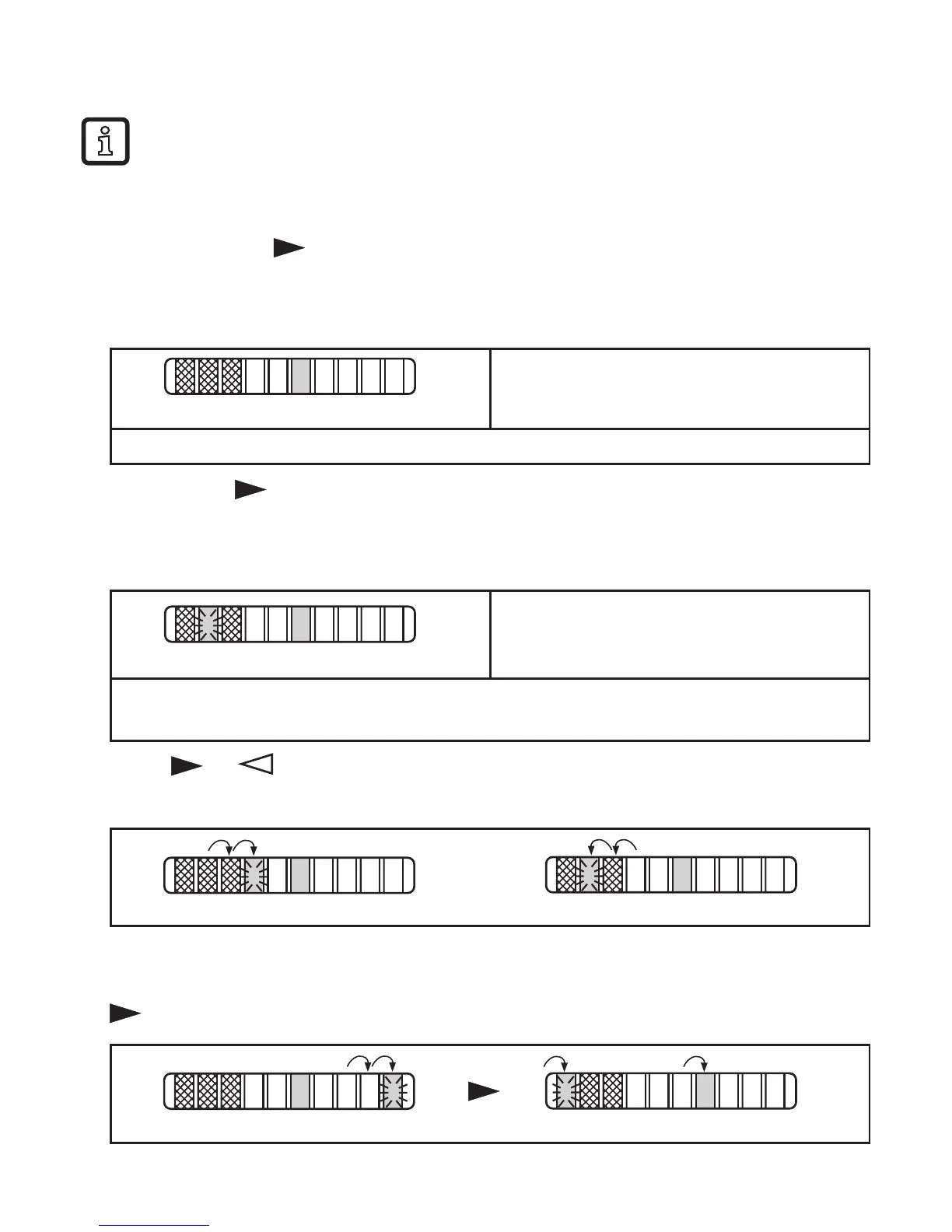
7.5 Set switch point SP2 for temperature
► Press the button briefly�
> The unit indicates the current temperature and the current setting of the switch
point(SP2)instepsof10°Cforapprox.5s(→8.1).
Red LEDs = temperature,
green or orange LED = switch point�
LED green if OUT = OFF; LED orange if OUT = ON�
► Briefly press again within 5 s�
> The current setting of the switch point is indicated in steps of 1 °C and can be
changed�
Lit LED = tens digit (10 times X °C), flash-
ing LED = units digit (X °C)�
Here: 51 °C�
LED green if OUT = OFF; LED orange if OUT = ON�
In addition, the current temperature is indicated in steps of 10 °C by red LEDs�
► Press or as often as required� Each press of the pushbutton shifts the
flashing LED (units digit) by one position in the indicated direction�
After LED 9 has been reached the cycle starts again at LED 0; the continuously
lit LED (tens digit) moves one position to the right (when setting is made with
)�












 To Next Page