11
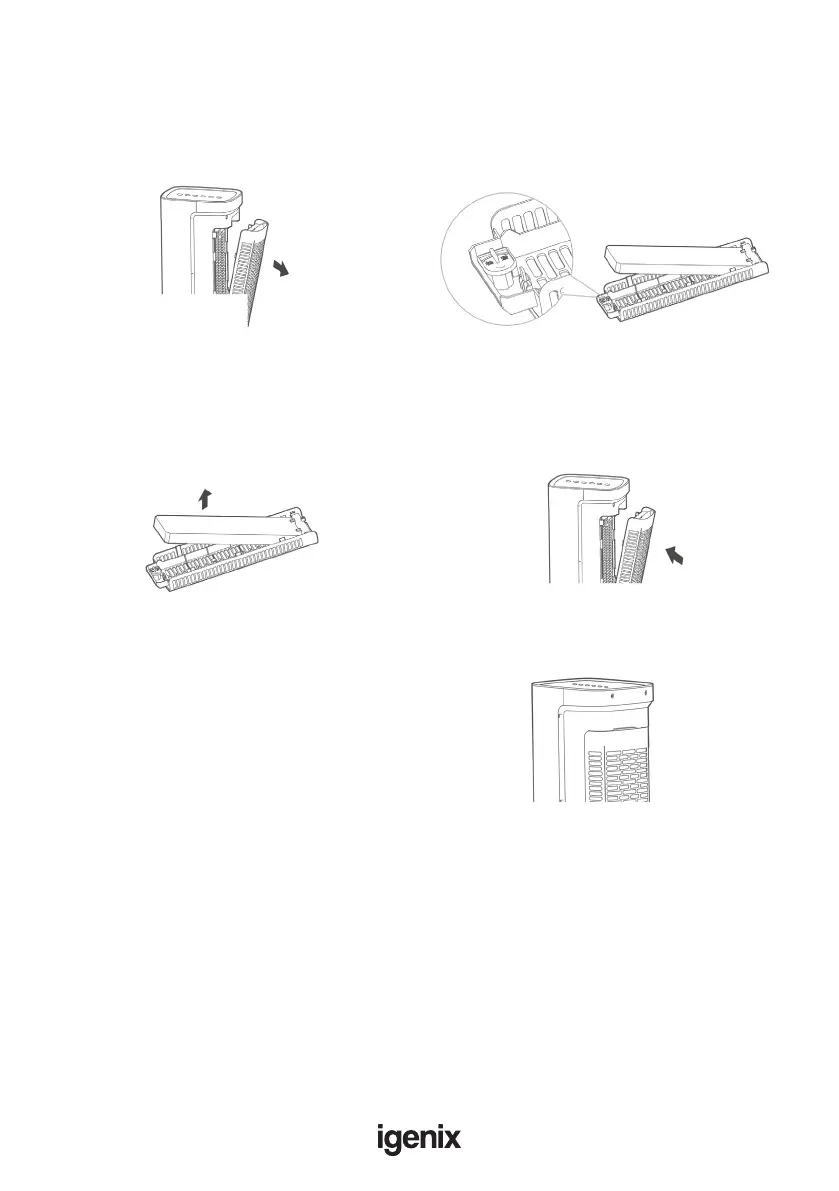
Guidance on the disassembly and installation of honeycomb lter parts
1. Remove the honeycomb lter support. 2. Rotate the bottom locking mechanism 90
degrees anticlockwise, and then remove the
honeycomb lter.
3. Take out the honeycomb lter for cleaning.
With a mild detergent and a soft brush, scrub
the honeycomb lter with clean water and
then leave to dry fully before placing back into
the lter support.
4. Re-install the honeycomb lter support
once all pieces are clean and dry.
Replace water
After the Cool Wind function has stopped for 2 minutes, you
can then remove the water tank to rell it, as the water will have
returned to the water tank after being circulated through the unit.
Stop the Cool
Wind function
for 2 minutes.



 To Next Page