10
CLEANING & MAINTENANCE
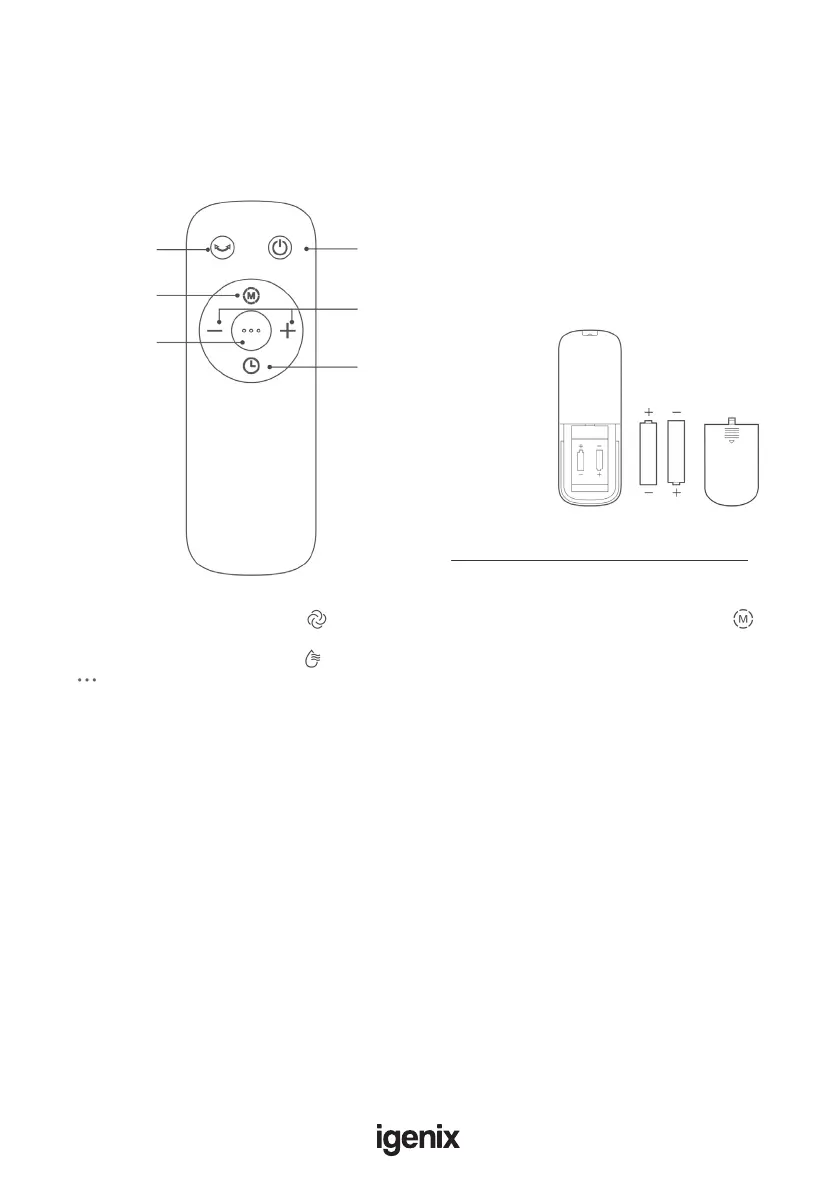
Remote control button description
NOTE:
• The remote control should be normally used within 5 metres of the front of the product and 30
degrees of the deviation angle.
• Battery acid can be harmful, so please always recycle waste batteries safely and separately.
Oscillation
Set Wind Type
Cool Wind
Startup/Standby
“+” increase Wind Speed
“-” decrease Wind Speed
Delay Timer
AAA Battery, 1.5 V
Use manganese or alkaline batteries of type
“AAA”. Do not use rechargeable batteries.
NOTE: On the unit control panel, shows Wind Type selection. On the remote it is shown by
NOTE: On the unit control panel, selects Cool Wind. On the remote, this same function is shown
by .
NOTE:
• Disconnect the power before cleaning the product. Clean after the product is shut down for two
minutes.
• Prevent from using any abrasive tools and solvents that may damage the surface to clean up the
product. Detergent can be used for cleaning, and then wiped clean with a dry cloth afterwards.
Prevent from washing the machine body with water directly, and wash disassemble parts (honeycomb
lter parts) with a soft brush.
• Only replace internal parts once they are fully dry.
• Do not take apart or modify any of the internal pieces. It is recommended that this product should be
checked and cleaned regularly in order to extend its service life.



 To Next Page