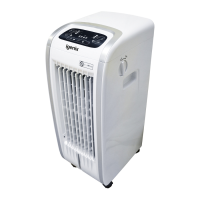
This document is the user manual for the Igenix 3-in-1 Portable Air Conditioner, model IG9909, designed for domestic and light office use. It outlines the appliance's functions, installation, operation, and maintenance procedures.
Function Description:
The Igenix IG9909 is a versatile 3-in-1 portable air conditioner offering Cooling, Fan, and Dehumidifier modes. It is designed to provide comfort in various environmental conditions. In Cool Mode, the unit cools and dehumidifies a room, making it ideal for hot and muggy weather. Users can set a target temperature between 18°C and 32°C (64°F-90°F) and choose between high or low fan speeds. The manual recommends a temperature range of 24°C to 27°C (75°F to 81°F) for optimal comfort during summer. The Fan Mode circulates air without cooling, and the exhaust hose is not required for this operation. Users can select either high or low fan speeds. The Dry Mode is specifically designed to reduce room humidity, suitable for spring, autumn, or damp conditions. In this mode, the appliance automatically selects the fan speed, and the air exhaust hose must be attached to discharge moisture outside.
The unit also features a Sleep Mode, accessible only via the remote control. This mode is intended for nighttime use, gradually reducing operation with reduced brightness and noise levels. It maintains an optimum room temperature without excessive fluctuations in temperature or humidity, with the fan speed always set to Low. In COOL mode, the selected temperature will increase by 1°C (1°F) per hour over a 2-hour period, maintaining this new temperature for the next 6 hours before the appliance turns off. Sleep mode cannot be set in FAN or DRY modes.
A Timer function allows users to delay the appliance's start-up or shut-down, helping to optimize operating periods and avoid electricity waste. The timer can be set for 1 to 24 hours.
Usage Features:
The appliance is designed for ease of use with a control panel on the unit and a remote control. The control panel includes buttons for Timer, Fan Speed, Temperature Increase/Decrease, Mode selection, and ON/OFF. The display screen shows the selected mode, fan speed, and temperature. The remote control offers additional functions, including Sleep mode and a Unit Switch button to change the temperature unit between Celsius and Fahrenheit.
For installation, the unit should stand for 12 hours after transport or tilting to allow coolant gases to settle. The exhaust hose assembly is crucial for Cooling and Dry modes, expelling hot air or moisture outside. The hose extends from 30cm to 150cm, with shorter lengths recommended for better results. The exhaust air must flow freely, avoiding kinks or bends greater than 30 degrees to prevent overheating. A window slider kit is provided for easy installation in most standard vertical and horizontal windows, and it can be fastened with screws. The unit is portable, equipped with castor wheels, and should be kept upright when moved. It must be placed on a dry, stable surface, at least 45cm away from walls, curtains, or heat sources to ensure adequate air circulation.
Water drainage is a key aspect of operation, especially in Cooling and Dry modes. The unit can be drained manually or continuously. Manual draining involves unplugging the unit, placing a container under the lower drain plug, and removing the plug to collect water. Continuous draining connects a drainage hose to the lower drain outlet, allowing water to flow into a floor drain or bucket. In Dry mode, drainage can also occur from a middle drainage outlet. An error code "FE" (FULL TANK) indicates that the internal water tank is full and needs to be emptied.
Maintenance Features:
Regular maintenance is essential for the appliance's efficient operation and longevity.
Cleaning the Cabinet: Before cleaning, the unit must be turned off and unplugged from the mains socket. The outer cabinet should be cleaned with a slightly damp cloth and then dried. Users are warned against washing the appliance with water, using petrol, alcohol, solvents, or spraying antibacterial liquids.
Cleaning the Air Filters: To maintain efficiency, the air filter should be cleaned weekly. The filter is accessed by opening the grid at the back of the appliance. Dust can be removed with a vacuum cleaner, or if very dirty, the filter can be immersed in warm water (not hotter than 40°C/104°F) and rinsed. After washing, the filter must be thoroughly dried before re-attaching the intake grille. Users should avoid contact with metal parts when handling the filter to prevent injury.
Start of Season Operations: Before the first use of the season, ensure the power cable and plug are undamaged and properly earthed, and follow the installation instructions precisely.
End of Season Operations: To prepare the unit for storage, the internal circuit should be completely drained of water by removing the cap and collecting all water in a basin. After draining, replace the cap. The filter should be cleaned and thoroughly dried before storage.
The manual also includes a Troubleshooting Guide to help users diagnose and resolve common issues, such as the unit not switching on, switching off prematurely, not cooling, or leaking water. It provides solutions like checking the power supply, remote control batteries, exhaust hose for obstructions, and cleaning the air filter. Error Codes are explained, with "PF" indicating a probe failure (sensor damaged) requiring service, and "FE" indicating a full internal safety tank that needs emptying.



 To Next Page
 General