15
WATER DRAINAGE
With daily use, it is recommended to empty the unit approximately once a week.
The unit can be drained manually or continuously, as explained below:
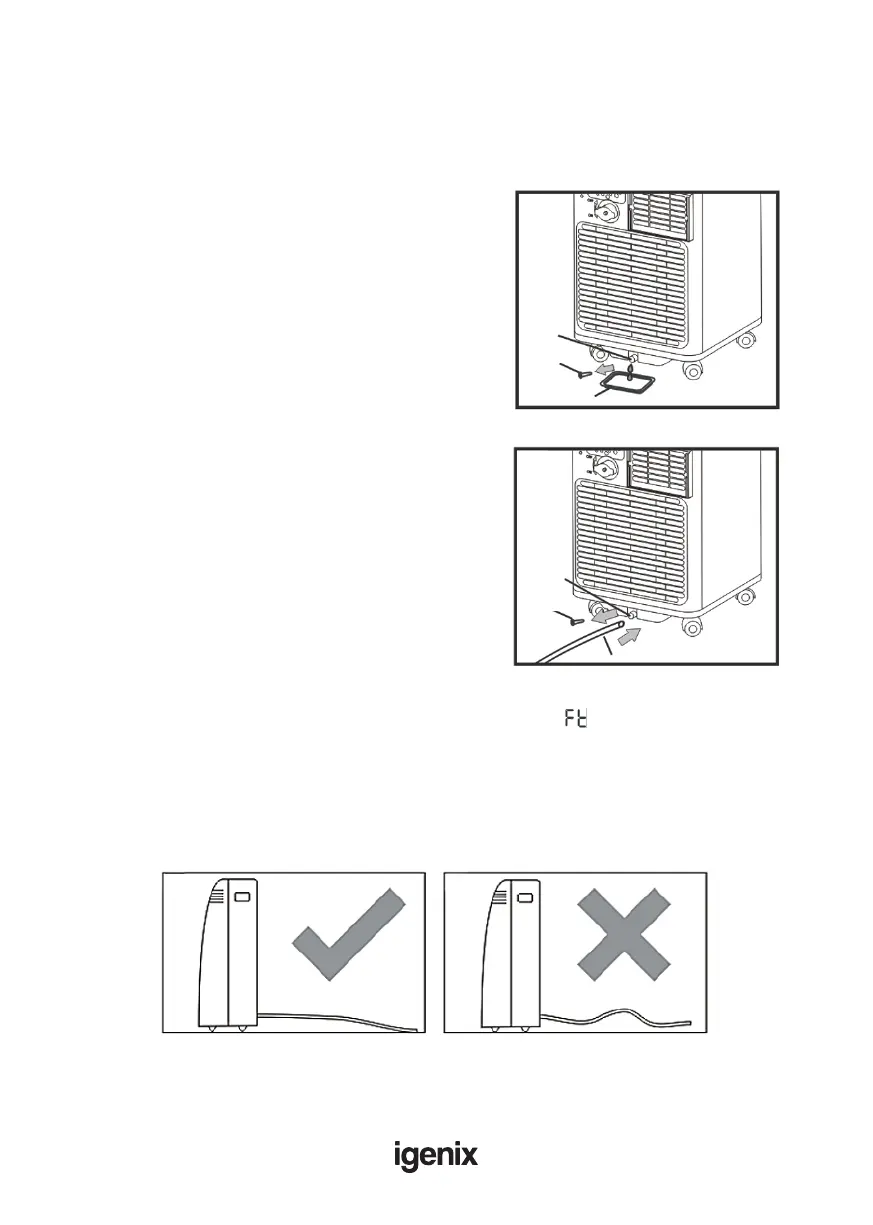
Manual Draining (Fig.12)
• Unplug the unit from power source.
• Place a suitable container (not supplied with unit)
under the lower drain plug. See diagram.
• Remove the lower drain plug.
• Water will drain out and collect in the pan.
• After the water is drained, replace the lower drain
plug rmly.
• Turn on the unit.
Continuous Draining (Fig.13)
• Unplug the unit from the power source.
• Remove the drain plug. While doing this, some
residual water may spill so have a suitable pan or
container ready to collect the water (not supplied
with unit.
• Connect the drain hose. See diagram.
• The water can be continuously drained through the
hose into a oor drain or bucket.
• Turn on the unit.
If the unit has not been emptied frequently enough and there is excess water condensation inside
the unit, the appliance will stop running and shows the error code “ ” (FULL TANK).
This indicates that the water condensation needs to be drained using one of the above procedures.
NOTE
Ensure that the drain hose is not higher than that of the drain outlet, or the water tank may not
drain fully. (Fig.14 & Fig.15)
Fig.12
Drain Drain
outletoutlet
Drain Drain
capcap
PanPan
Fig.13
Drain Drain
outletoutlet
Drain Drain
capcap
Drain hoseDrain hose
Fig.14 Fig.15



 To Next Page