7
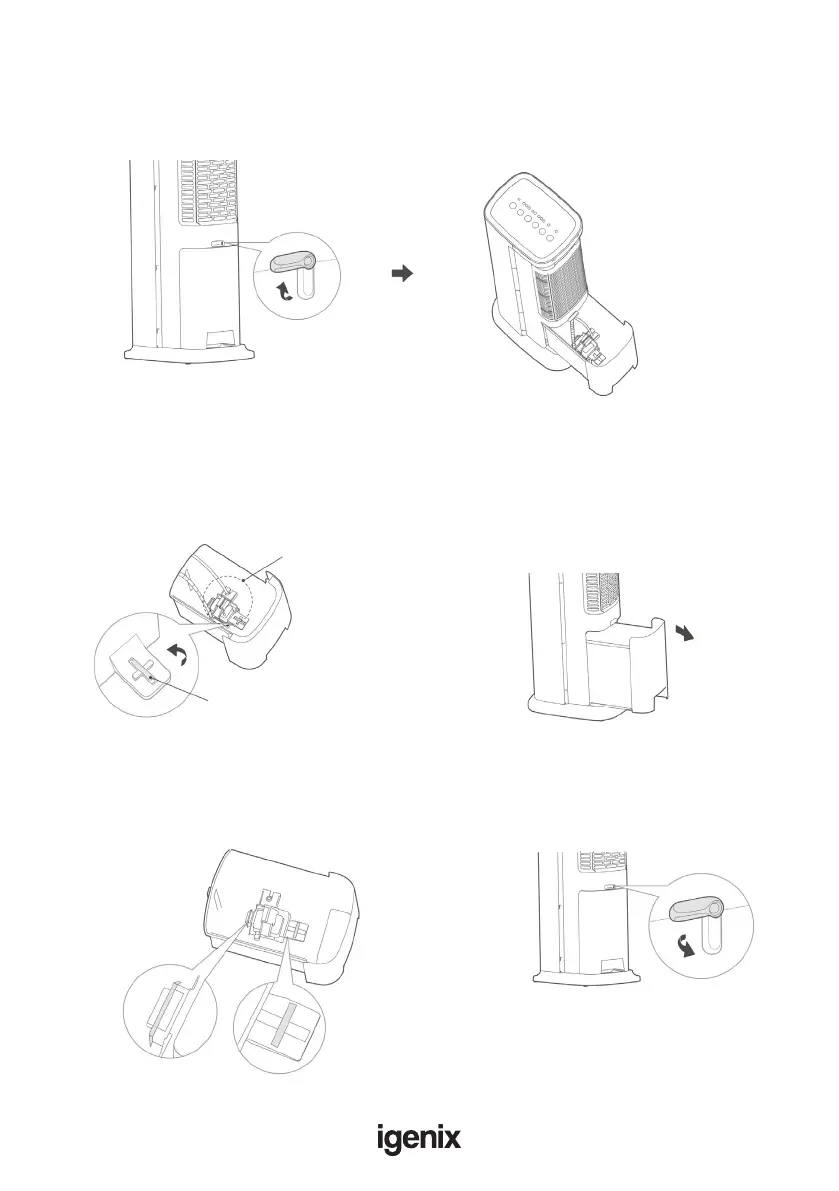
Water pump module
Locking mechanism
Filling the water tank
1. Unlock the water tank by rotating
the locking mechanism 90 degrees.
2. Pull out the water tank and ll with water (making
sure not to go over the maximum ll line), then
once lled push the tank back into position and lock
securely.
Removing and cleaning the water tank
1. Rotate the locking mechanism 90 degrees
anticlockwise to release the water pump module
from the water tank (including the water pipe).
2. Once the water pump module has been
detached, carefully remove the water tank from
the unit so that it can be fully emptied of any
stagnant water and cleaned thoroughly.
3. After cleaning the water tank, reinsert the water
pump module back into the water tank. Insert
front hook into the slot of the water tank, and then
rotate locking mechanism clockwise 90°, and close it
as shown below.
4. Push the water tank inside slowly, and
rotate the locking mechanism to secure
back in place



 To Next Page